

Donor segmentation in Salesforce means grouping your supporters by how they give and engage – recency, frequency, amount, giving type, causes and channels – and turning those groups into appeals that fit each of them. Whether you run the Nonprofit Success Pack (NPSP) or Nonprofit Cloud, Salesforce holds everything you need for it: every gift, every household, every campaign response. The challenge is getting that data into precise, current appeal audiences without exports, spreadsheets and last-minute list fixes.
This guide covers:
- how donor data is modeled in NPSP and in Nonprofit Cloud – and what that means for segmentation
- the dimensions that matter for donor segmentation
- twelve donor segments with criteria and objects, plus the exclusions every appeal needs
- how to run appeals with Salesforce campaigns
- where native tools stop – and how to keep segments current
For segmentation basics beyond fundraising, see our complete guide to Salesforce segmentation.
Why donor segmentation decides retention
Most nonprofits know the feeling: the year-end appeal goes to “everyone”, major donors get the same letter as first-time givers, and people who donated last week receive a request to donate again. Each of these mistakes costs money – in postage and print, in lower response rates and, worst of all, in donors who stop giving because they don’t feel seen.
Segmentation turns one appeal into several conversations:
- New donors get a welcome and learn what their gift achieved – before they’re asked again.
- Regular donors are thanked and invited to increase their commitment.
- Lapsed donors receive a reason to come back, not the standard appeal.
- Major donors are handled personally by gift officers and kept out of mass mailings.
The better your segments reflect where each supporter stands, the more of your fundraising budget reaches people who are likely to respond.
Your data model: NPSP vs. Nonprofit Cloud
Salesforce offers two data models for fundraising. NPSP is a managed package on top of standard objects and is still supported. Nonprofit Cloud (NPC) is Salesforce’s newer, industry-native model and where new implementations are heading. Moving from one to the other is a reimplementation rather than an upgrade.
| Concept | NPSP | Nonprofit Cloud |
|---|---|---|
| Donor (person) | Contact | Person account |
| Household | Household account | Party relationship group |
| Organization donor | Organization account | Business account |
| Donation | Opportunity (with payments) | Gift transaction |
| Recurring gift or pledge | Recurring donation | Gift commitment with schedule |
| Soft credits | Opportunity contact roles, partial and account soft credits | Gift soft credit |
| Fund or cause | General accounting unit allocations | Gift designation |
| Giving summary | Rollup fields on contact and household (e.g. Total Gifts, Total Gifts Last Year, Last Gift Date, Largest Gift) | Donor gift summary |
| Appeal source | Campaign | Campaign and outreach source code |
What this means for segmentation:
- Rollups are your friend – and your limit. Summary fields make simple segments easy (“Total Gifts Last Year greater than 0”). Anything they don’t cover – gifts to a specific fund, gifts in a specific campaign, a change in giving amount – needs the underlying gift records.
- Households and individuals live on different records. Giving is usually summarized per household, but people are contacted individually. Your segments need to bridge both.
- The models aren’t interchangeable. If you plan a move to Nonprofit Cloud, every segment definition has to be rebuilt on the new objects. Document your segments now – it makes the migration far easier. Our guide on moving from NPSP to Nonprofit Cloud shows what changes and how to migrate segments step by step.
The dimensions of donor segmentation
Most donor segments combine a few of these dimensions:
| Dimension | Typical criteria | Where the data lives |
|---|---|---|
| Recency | Last gift date, months since last gift | Rollups / donor gift summary, gifts |
| Frequency | Number of gifts per year, consecutive years of giving | Rollups, gifts |
| Amount | Largest gift, total last 12 months, average gift | Rollups, gifts |
| Giving type | One-time, recurring, pledge, in-kind, tribute | Gifts, recurring donations / commitments |
| Lifecycle | New, active, lapsing, lapsed, reactivated | Derived from gift dates |
| Cause | Fund, project, designation | GAU allocations / gift designations |
| Channel and source | Campaign, appeal, source code, online vs. offline | Campaign members, gifts |
| Relationship | Volunteer, member, event attendee, board | Volunteer, membership and campaign data |
| Region | Country, postal code, distance to an event | Addresses |
| Consent | Do not contact, email opt-out, no mail, deceased | Contact / person account fields |
Recency, frequency and monetary value together form the classic RFM model. You don’t need a scoring formula to use it – three simple thresholds per dimension already separate your best donors from those who need a different approach. For the relationship dimension, see our guide on volunteer and member segmentation.
12 donor segments with criteria and objects
These segments cover the core of most fundraising calendars. Each is described in business language first, then with the data behind it.
| # | Segment | Criteria | Data |
|---|---|---|---|
| 1 | New donors – welcome | First gift in the last 90 days | Gifts, giving summary |
| 2 | LYBUNT | Gave last year, not this year | Giving summary or gifts by year |
| 3 | SYBUNT | Gave in an earlier year, not last year or this year | Gifts by year |
| 4 | Major donors | Total giving in the last 12 months above your major gift threshold | Gifts (sum), household |
| 5 | Mid-level upgrade candidates | Several gifts in the last 24 months, total just below the major gift threshold | Gifts (count, sum) |
| 6 | Recurring donors with failed payments | Active recurring gift with a failed or missed payment | Recurring donation / commitment, payments / schedule |
| 7 | Recurring upgrade | Active recurring gift, amount unchanged for two years | Recurring donation / commitment |
| 8 | One-time to recurring | Three or more one-time gifts in 24 months, no recurring gift | Gifts, recurring donations / commitments |
| 9 | Lapsed recurring donors | Recurring gift ended or lapsed in the last 12 months | Recurring donation / commitment |
| 10 | Event attendees without a gift | Attended an event in the last 12 months, never donated | Campaign members, gifts |
| 11 | Project update by cause | Gave to a specific fund or project in the last 24 months | Gift designations / GAU allocations |
| 12 | Legacy prospects | Ten or more years of giving, regular gifts, no legacy pledge yet | Gifts by year, commitments |
Every segment also needs the same base exclusions:
- deceased and “do not contact” supporters
- everyone who gave in the last 30–60 days (for appeals)
- donors in a gift officer’s portfolio (for mass appeals)
- missing or invalid addresses for the channel you use
- duplicates – and for print, more than one letter per household
Segments 3, 5, 7, 8, 11 and 12 can’t be built from rollup fields alone, because they need conditions on individual gift records, counts or changes over time. That’s where most nonprofits run into the limits of reports – more on that below. For segments 2 and 3 in depth, see LYBUNT & SYBUNT in Salesforce; for segments 4 and 5, see major donor and mid-level segmentation; for segments 6 to 9, see recurring donors in Salesforce.
Running appeals with Salesforce campaigns
In Salesforce, every appeal should land on a campaign. A structure that works well:
| Level | Example | Purpose |
|---|---|---|
| Appeal (parent) | Year-End Appeal 2026 | Total results of the appeal |
| Segment (child) | YE26 – LYBUNT | Response and income per segment |
| Channel or version (grandchild) | YE26 – LYBUNT – Letter / Email / Control | Which channel and version works |
Campaign hierarchies roll up members, responses and income across up to five levels, so you can report on the appeal and on each segment at once.
Four practices make appeal campaigns reliable:
- Use one campaign per segment and channel. It makes results comparable and keeps source codes clean.
- Connect gifts to the campaign. Set the primary campaign source on donations or gift transactions – or use source codes – so income is attributed to the right segment.
- Send one letter per household. Deduplicate by household or address before you hand the list to the mail house. Our guide on one mailing per household shows how.
- Hold back a control group. A small random share of each segment that doesn’t receive the appeal shows how much income the appeal really generated.
For the full appeal workflow – source codes, suppressions, gift attribution and measurement – see fundraising appeals with Salesforce campaigns.
Native tools and their limits in NPSP and Nonprofit Cloud
Salesforce gives nonprofits solid basics:
- Reports on donations, households and campaigns – NPSP includes ready-made fundraising reports, including a LYBUNT report at account level.
- Rollup fields for giving summaries, configurable in NPSP with Customizable Rollups and in Nonprofit Cloud through the donor gift summary.
- List views and “Add to Campaign” to turn a report into an appeal audience.
- NPSP Levels to assign donor levels based on rollup values.
Where they stop:
| Limit | What it means for fundraising |
|---|---|
| Rollups only cover what they summarize | Gifts to one fund, gifts in one campaign or a change in amount need the underlying records |
| Report types join max. four objects, three AND-only cross filters | “Gave to fund X, has an active recurring gift, attended an event, no open major gift” doesn’t fit into one report |
| Household vs. contact level | Reports are either about households or about people – appeals need both |
| “Add to Campaign” stops at 50,000 records | Larger appeals need exports and imports – see how to add more than 50,000 campaign members |
| Snapshots only | A segment built two weeks before the mailing still contains donors who gave in the meantime |
That’s why many fundraising teams end up exporting several reports into Excel, combining them with lookups and importing the result as campaign members – every time, for every appeal. It works, but it’s slow, error-prone and moves sensitive donor data out of Salesforce. We describe these workarounds in Salesforce segmentation challenges and how to solve them.
Keeping donor segments current
Donor data changes daily: gifts arrive, recurring payments fail, addresses change, supporters opt out. A segment is only correct at the moment it is built. For fundraising, three moments matter most:
- Right before the send: refresh the segment and remove everyone who no longer qualifies – above all donors who gave since the selection.
- Before the mail house export: deduplicate by household and address, and remove “do not contact” records added since.
- During ongoing journeys: welcome series, upgrade asks and reactivation tracks need segments that refresh on a schedule, so new donors join and converted donors leave automatically.
Doing this by hand means rebuilding the list several times per appeal. Automating it is the single biggest time saver in most fundraising teams. How segments then reach print, email and phone tools is covered in our guide to the nonprofit marketing stack on Salesforce.
How Campaign Audience Builder helps nonprofits
More than half of the organizations using Campaign Audience Builder are nonprofits. It runs natively in Salesforce – on NPSP and on Nonprofit Cloud – and covers the full appeal process:
- Segment on any fundraising data: gifts and gift transactions, recurring donations and gift commitments, soft credits, designations, households, campaigns and volunteer or membership records – with AND/OR logic, exclusions and aggregates such as “sum of gifts in the last 12 months above 1,000”.
- Prioritize appeals with sequences: a waterfall assigns each donor to exactly one segment – major donors first, then mid-level, then everyone else – so nobody receives two letters.
- One letter per household: deduplicate audiences by a match field such as household or address before activation.
- Stay current automatically: scheduled refreshes add new matches, campaign cleansing removes donors who gave since the selection.
- Measure what an appeal adds: track outcomes such as “gift within 30 days” and compare targeted donors with a held-out control group.
- Activate anywhere: Salesforce campaigns, Account Engagement, Marketing Cloud and – via Flow – any other tool.
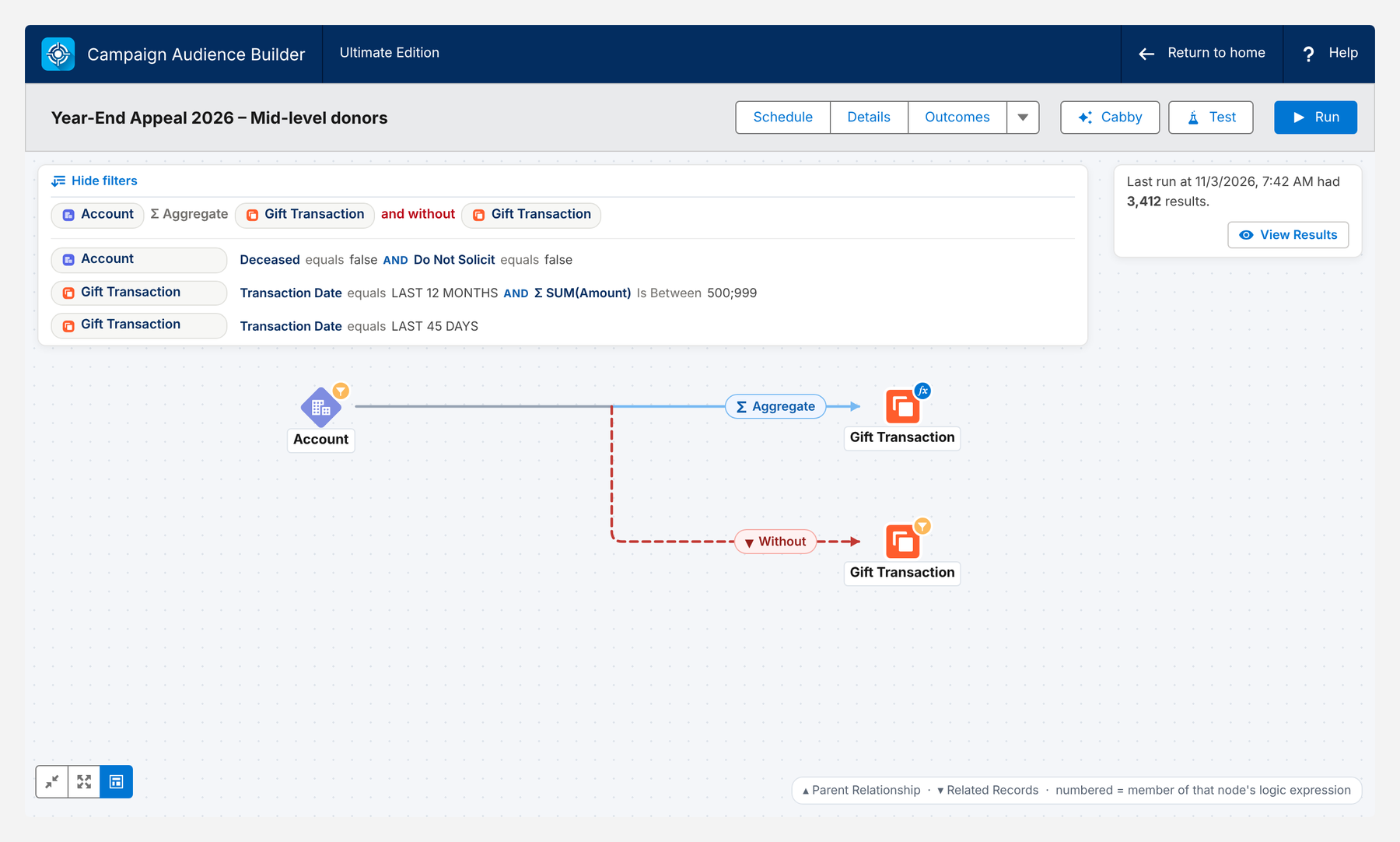
Here is the mid-level segment from the year-end appeal on Nonprofit Cloud data: donors whose gifts in the last 12 months add up to 500–999, excluding everyone who gave in the last 45 days.
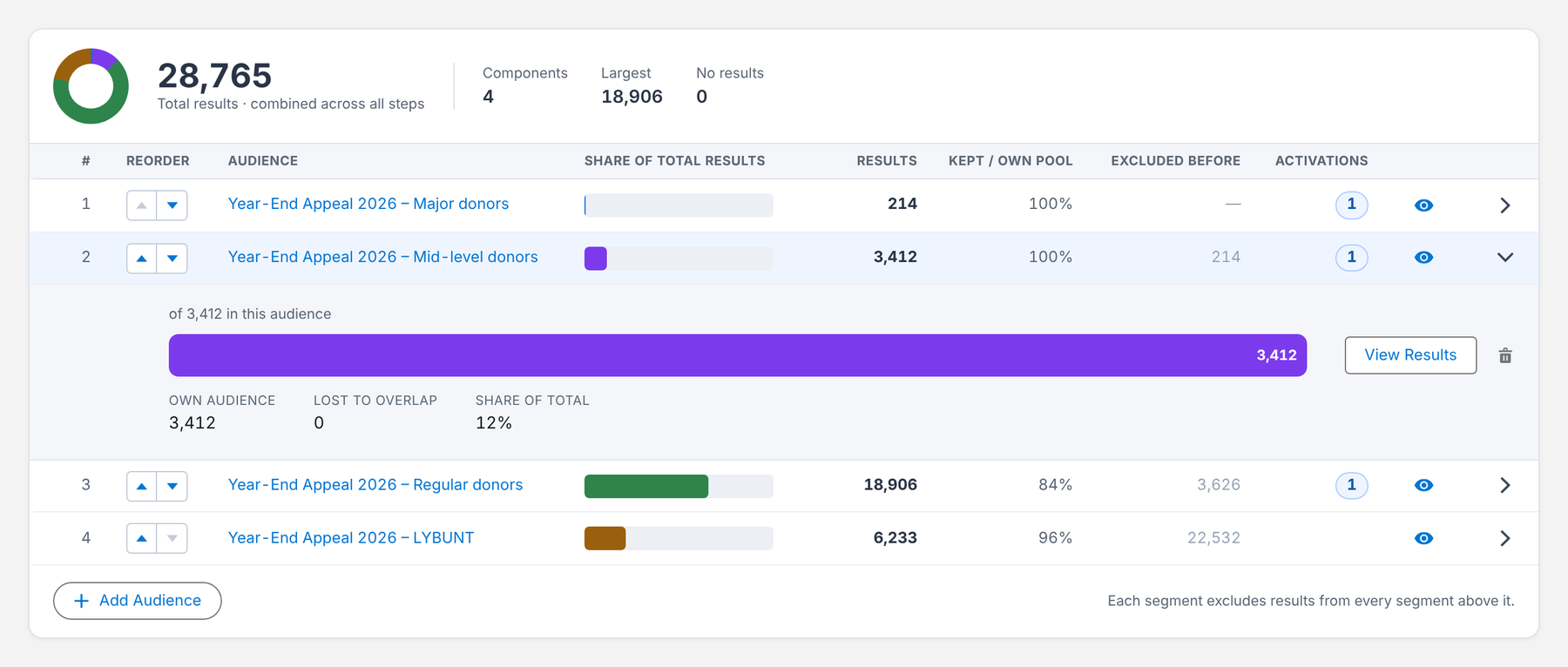
The whole appeal runs as a waterfall: major donors first, then mid-level, regular donors and LYBUNT – each step excludes everyone already reached, so every donor receives exactly one version.
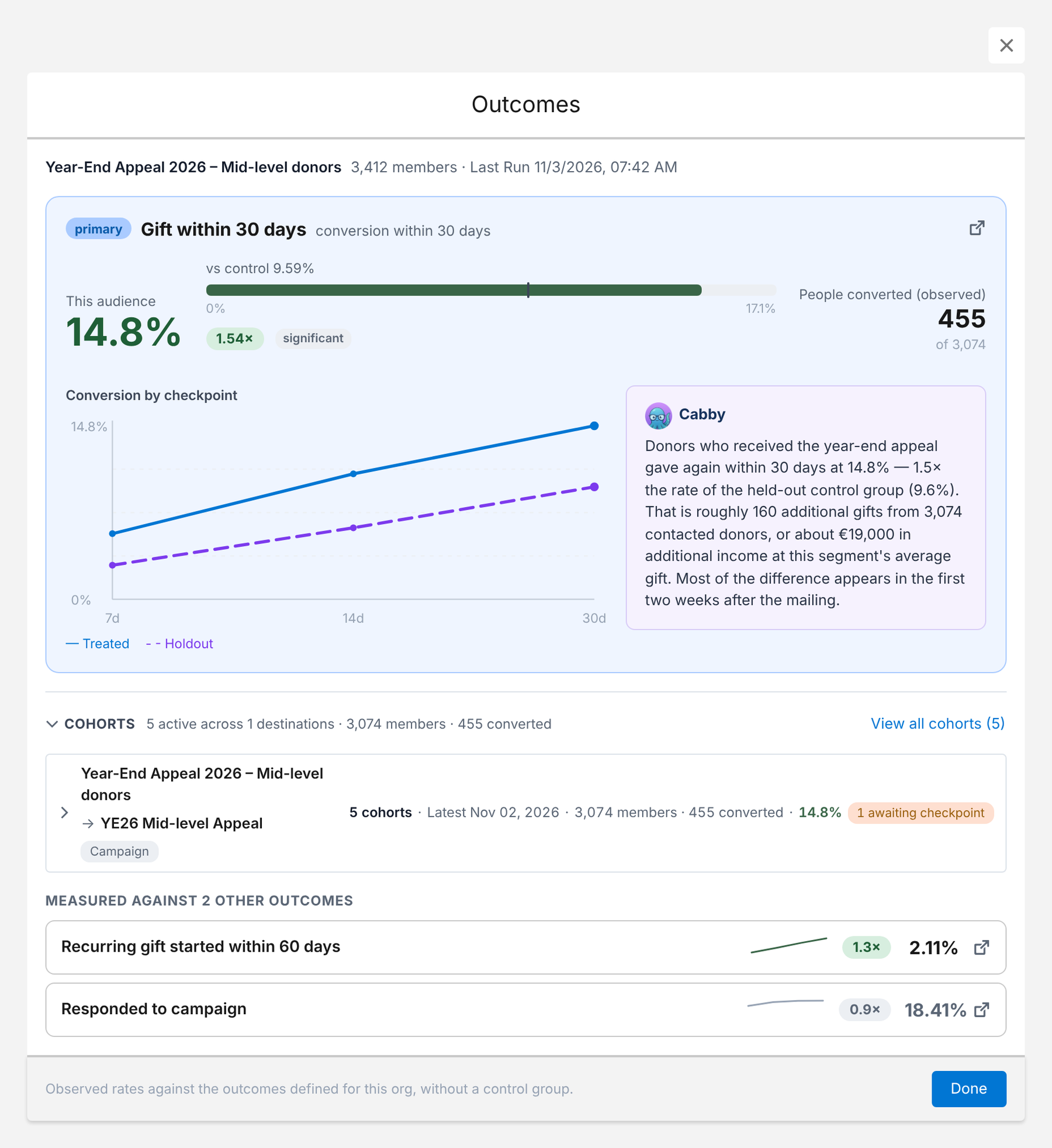
After the mailing, Outcomes shows how many donors gave within 30 days – compared with a held-out control group that didn’t receive the appeal.
Because the data never leaves Salesforce, there’s nothing to export, re-import or reconcile – and the segment library from your fundraising calendar becomes a set of audiences that maintain themselves.
Conclusion
Donor segmentation in Salesforce comes down to knowing where each supporter stands – and turning that into appeals that fit. NPSP and Nonprofit Cloud store all the data you need; rollup fields and reports cover the basics. As soon as segments depend on individual gifts, causes, recurring commitments or households, and as soon as they have to stay current until the send date, you need more than reports.
Start with the twelve segments above, structure every appeal as a campaign hierarchy, exclude recent donors in every segment and measure each appeal against a control group. That alone will change how your supporters experience your fundraising.
How Campaign Audience Builder helps
Campaign Audience Builder runs natively in Salesforce and turns NPSP or Nonprofit Cloud data into appeal audiences – without reports, exports or manual list work.
- Segment on gifts, totals, recurring donations, soft credits and designations
- Prioritize appeals with waterfall sequences and send one letter per household
- Remove donors who gave since selection and measure gifts against a control group
FAQ
What is donor segmentation?
Donor segmentation means grouping supporters by shared characteristics – how recently, how often and how much they give, whether they give once or regularly, which causes they support and how they want to be contacted – so each group receives an appeal that fits. In Salesforce, segments are built from donation, household and campaign data and usually end up as campaign members.
What do LYBUNT and SYBUNT mean?
LYBUNT stands for 'Last Year But Unfortunately Not This year' – donors who gave last year but not yet this year. SYBUNT stands for 'Some Year But Unfortunately Not This year' – donors who gave in any earlier year but not this year. Both are classic reactivation segments. NPSP includes a LYBUNT report at account level; SYBUNT and contact-level versions need custom reports or a segmentation tool.
Should I segment donors at household or contact level?
Both, depending on the channel. Giving totals in NPSP are usually summarized per household account, and printed appeals should go once per household. Emails and personal outreach work at contact level. A good setup segments on household giving and then picks the right contact – and removes duplicate addresses before printing.
What changes for segmentation when moving from NPSP to Nonprofit Cloud?
The data model changes: donations become gift transactions, recurring donations and pledges become gift commitments, households are modeled with person accounts and party relationship groups, and giving summaries live on the Donor Gift Summary. Segment definitions have to be rebuilt on the new objects, so it's a good moment to clean up and document your segment library.
How do I avoid asking donors who just gave?
Exclude everyone with a gift in the last 30 to 60 days in every appeal segment, and refresh the segment right before the send. Segments that were built weeks earlier keep donors who gave in the meantime unless they are removed automatically.
Do nonprofits need Data 360 for donor segmentation?
Usually not. If donations, households, campaigns and engagement data already live in your Salesforce org, segmenting directly on that data is faster to set up and considerably cheaper. Data 360 makes sense when you need to unify large volumes of data from many systems outside Salesforce.