

Nonprofits on Salesforce rarely use a single marketing tool. Email runs through Marketing Cloud, Account Engagement, Mailchimp, Brevo or Optimizely; print appeals go to one or more lettershops; phone and events add their own lists. The tools differ – but the problem behind most stacks is the same: segmentation is limited, scattered across tools, or done in spreadsheets. The fix isn’t another sending tool. It’s building segments once, in Salesforce, and delivering them to every channel. This guide compares the common options and shows how to connect them.
This article is part of our guide to donor segmentation in Salesforce.
The channels of a fundraising program
| Channel | Typical use | Where it runs |
|---|---|---|
| Appeals, reactivation, year-end, legacy, thank-you letters | Lettershops and mail houses | |
| Newsletters, appeal follow-ups, welcome series, renewals | Marketing Cloud, Account Engagement, third-party email tools | |
| Phone | Upgrades, failed payments, major donor follow-up | Call lists, telefundraising agencies |
| SMS | Reminders, emergency appeals | SMS providers, often connected to the email tool |
| Events | Invitations, volunteer calls | Event tools, Salesforce campaigns |
Print is still one of the most important channels for many nonprofits – especially for older donor groups and high-value appeals. Any stack that only thinks about email misses a large part of the program.
The options compared
| Option | Strengths | Watch out for |
|---|---|---|
| Marketing Cloud | Deep Salesforce integration, journeys, large volumes, many channels | Cost and complexity; segmentation often moves into SQL queries and data extensions outside Salesforce |
| Account Engagement (Pardot) | Native Salesforce integration, email and forms, scoring | Built for B2B lead management; lists and dynamic lists see only synced fields, not gifts, households or recurring commitments |
| Third-party email tools (Mailchimp, Brevo, Optimizely and others) | Affordable, easy to use, good templates | Segments only see what you sync; every tool has its own sync logic and limits |
| Lettershops and mail houses | Print, personalization, postage optimization | Need a clean file; selection logic often lives in Excel or at the mail house |
| Data 360 | Unifies many data sources into one profile, segments across all of them | Separate platform with consumption-based pricing; only worth it with many sources |
Where Data 360 fits
Data 360 solves a specific problem: many data sources – several CRMs, ticketing, e-commerce, web and app behavior – that have to be unified before you can segment. Most nonprofits don’t have that problem. They run Nonprofit Cloud or NPSP with a few add-ons for payments, forms or events, and everything relevant for segmentation – gifts, commitments, households, campaigns, volunteering – is already in Salesforce. For them, Data 360 adds a second data model and a consumption bill on top of data that’s already in one place.
Why segmentation belongs in Salesforce
Whatever tools you send with, the segmentation should happen where the data lives:
- Complete data. Gifts, soft credits, designations, recurring commitments, households and campaign history are in Salesforce. An email tool only sees the fields you sync – usually a handful of rollups.
- One logic for all channels. The same priority order, the same suppressions and the same household rules for print, email and phone. Segments built in each tool drift apart.
- Print included. Lettershops don’t segment for you – or they do it in a way nobody can trace back. Segments in Salesforce give them a final, documented file.
- Measurable. When every selection lands in a Salesforce campaign, gifts can be attributed and compared against a control group – across channels.
- Independent of the sending tool. Switching from one email tool to another doesn’t mean rebuilding every segment.
The limits of native Salesforce segmentation – reports that can’t combine “with” and “without” conditions across gifts, households and commitments, and the 50,000-record limit of “Add to Campaign” – are exactly what pushes many nonprofits into spreadsheets or into segmenting in each tool. We describe them in our articles on LYBUNT & SYBUNT, major donors, recurring donors and fundraising appeals.
Three ways from Salesforce to every channel
1. Direct export for print and agencies
Lettershops, mail houses and phone agencies usually want a file. Export the final audience – after prioritization, suppressions and one mailing per household – in the format they expect: Excel, or CSV with the delimiter and encoding their systems read. Keep the same selection in a Salesforce campaign, so you know who was mailed and can attribute the gifts.
2. Via Salesforce campaigns
Most marketing tools can sync from Salesforce campaigns. If your segments fill campaigns, every connected tool picks them up – Account Engagement, many third-party email tools, event and SMS tools. The campaign is the handover point, and it stays the record of who received what.
3. Via direct integrations and APIs
For tools with their own data structures, a direct route is cleaner:
- Marketing Cloud: write segments into data extensions.
- Account Engagement: sync segments into lists.
- Third-party tools: call the tool’s API from a Flow or Apex action, for example to add contacts to a Mailchimp, Brevo or Optimizely list.
Recommended stacks by size
| Organization | Typical stack | Segmentation |
|---|---|---|
| Small | NPSP or Nonprofit Cloud, a third-party email tool, one lettershop | Segments in Salesforce, email via campaign sync, print via export |
| Mid-sized | Nonprofit Cloud, Account Engagement or a third-party email tool, several lettershops, phone agency | Segments in Salesforce with priority sequences, household deduplication and control groups |
| Large | Nonprofit Cloud, Marketing Cloud, several print and phone partners | Segments in Salesforce feeding data extensions; Data 360 only if many external sources need unifying |
Your marketing stack with Campaign Audience Builder
Campaign Audience Builder builds segments natively on NPSP and Nonprofit Cloud data and delivers them to every channel you use:
- Export: Excel or CSV with the delimiter and encoding your lettershop needs – including a sheet documenting the selection criteria.
- Campaigns: audiences fill and refresh Salesforce campaigns, with campaign cleansing and control groups – the handover point for every connected tool.
- Integrations: Marketing Cloud data extensions, Account Engagement lists, and Flow or Apex actions for any third-party tool with an API.
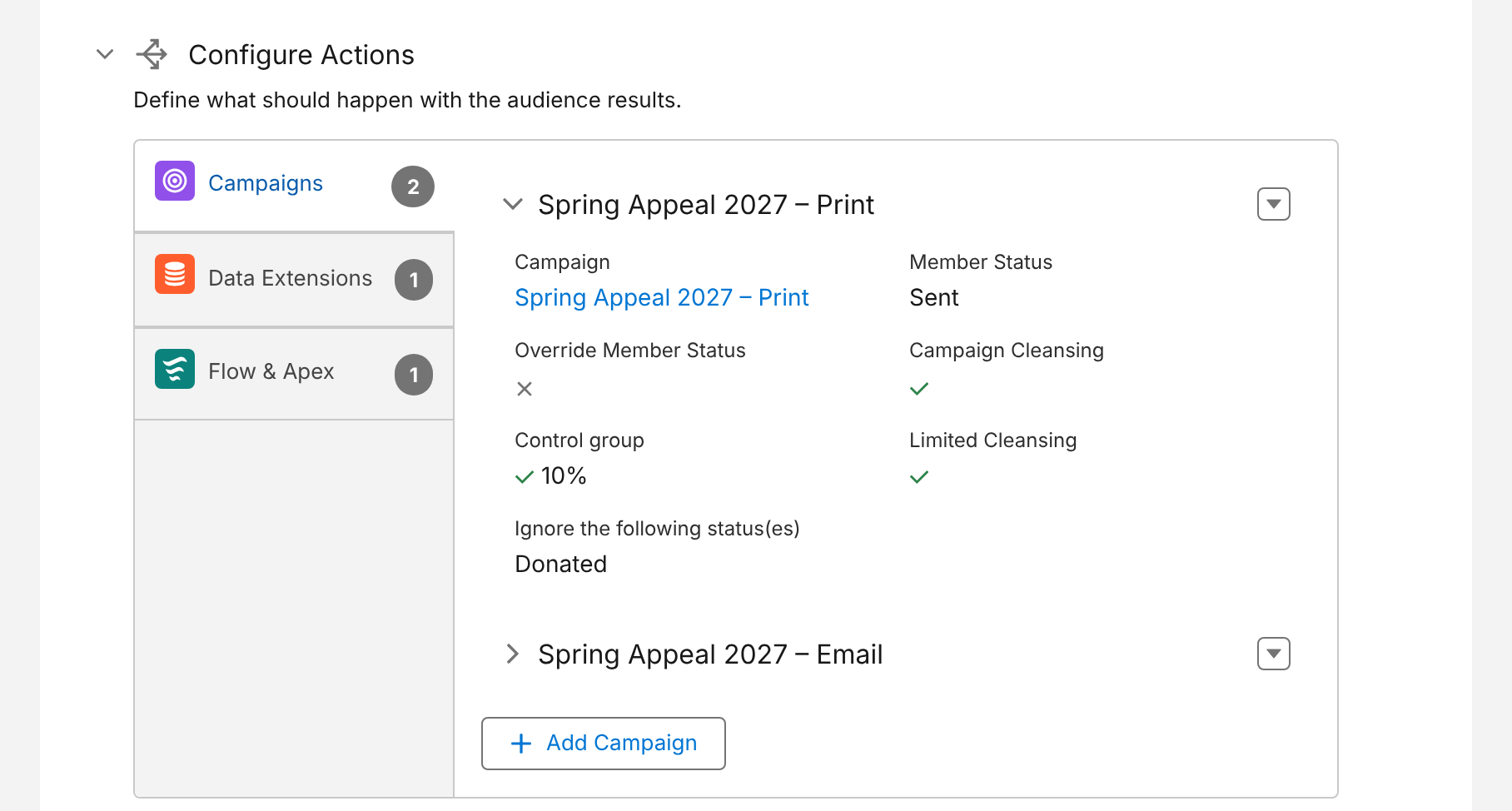
- One audience, several channels: the same appeal segment can fill a print campaign, an email campaign and a data extension in one run.
Here is one appeal audience delivering to two campaigns – print and email – plus a Marketing Cloud data extension and a Flow action:
Conclusion
The right sending tools depend on your size, budget and channels – and most nonprofits will keep using several. What shouldn’t be scattered is the segmentation. Build segments once in Salesforce, where gifts, households and commitments live, and deliver them by export, campaign or integration to every channel. Data 360 is the answer to many data sources, not to limited segmentation; for most nonprofits on Nonprofit Cloud or NPSP, the data is already where it needs to be.
How Campaign Audience Builder helps
Campaign Audience Builder runs natively in Salesforce and turns NPSP or Nonprofit Cloud data into appeal audiences – without reports, exports or manual list work.
- Segment on gifts, totals, recurring donations, soft credits and designations
- Prioritize appeals with waterfall sequences and send one letter per household
- Remove donors who gave since selection and measure gifts against a control group
FAQ
Which email marketing tool is best for nonprofits on Salesforce?
There is no single answer. Marketing Cloud and Account Engagement integrate most deeply with Salesforce; third-party tools like Mailchimp, Brevo or Optimizely are often cheaper and simpler. What matters more than the tool is where segmentation happens: if segments are built in Salesforce, the email tool only has to send.
Do nonprofits need Data 360 for segmentation?
Usually not. Data 360 makes sense when you have many data sources – several CRMs, ticketing, e-commerce, web data – that need to be unified into one profile. Most nonprofits run Nonprofit Cloud or NPSP with a few add-ons, and all the data needed for segmentation is already in Salesforce.
How do I get Salesforce segments to a lettershop?
Export the final audience – after prioritization, suppressions and household deduplication – as a CSV or Excel file in the format your lettershop expects, and keep the selection in a Salesforce campaign so responses and gifts can be attributed later.
Should I segment in my email tool or in Salesforce?
In Salesforce. Your gifts, households, recurring commitments and campaign history live there. Segments built in the email tool only see the fields you sync, have to be rebuilt for print and phone, and can't be measured against a control group in Salesforce.
Can one segment feed several channels?
Yes. A segment can fill a print campaign and an email campaign at the same time, for example with the same priority order and exclusions. That keeps channels consistent and avoids donors receiving a letter and a conflicting email.