

Salesforce segmentation is the process of grouping the leads, contacts and accounts in your org by shared characteristics, turning those groups into campaign audiences and keeping them accurate as your data changes. Done well, it’s the backbone of every campaign: the right people get the right message, sales gets the right follow-up lists, and you can see which audiences actually produce pipeline.
This guide covers the whole picture:
- what segmentation means in a Salesforce org and the terms you’ll run into
- the main segmentation types, with ten example segments you can adapt
- where segments live across Sales Cloud, Account Engagement (Pardot), Marketing Cloud, Data 360 and third-party email tools
- the three-step process from segment to campaign result
- how to set up a segmentation strategy, measure it and pick the right tools
If you’re mainly here because list views and reports keep hitting their limits, start with our article on Salesforce segmentation challenges and how to solve them.
What segmentation means in Salesforce
In Salesforce, segmentation always answers two questions: who belongs to a target group, and where that group ends up so you can act on it.
The “who” is made of records. In a typical B2B or B2C org, these are the objects that represent your audience:
| Object | Represents | Can be a campaign member? |
|---|---|---|
| Lead | A person you don’t have a customer relationship with yet | Yes |
| Contact | A person linked to an account | Yes |
| Person account | A private customer (B2C), combining account and contact | Yes, via its contact |
| Account | A company or organization | No – account segments are turned into the contacts behind them |
Two things make this harder than it looks. Leads and contacts are separate objects, so “everyone in Germany interested in product A” often means two segments that have to be combined. And the criteria that make a segment valuable – purchases, contracts, cases, usage – rarely sit on the person record itself. They live on related objects.
The “where” is almost always a campaign. Once records are campaign members, they can be emailed, synced to your marketing automation, assigned to sales and reported on.
The terms people use for all of this overlap, so here’s how we use them in this guide:
| Term | Meaning |
|---|---|
| Segment | The definition of a target group: the criteria, written in business language and then as filters |
| Audience | The concrete set of records that match a segment at a given moment |
| Campaign | The Salesforce record that holds the audience as campaign members, tracks their status and connects them to marketing tools |
| List view / report | Native Salesforce tools to filter records – often used to build simple segments |
| Pardot list | A static or dynamic list of prospects in Account Engagement |
| Data extension | A table in Marketing Cloud Engagement that holds subscribers for sends |
| Data 360 segment | A segment built on unified profiles in Data 360 (formerly Data Cloud) |
Segmentation types – with 10 example segments
Most segments are built from five types of criteria:
- Firmographic: account industry, size, region, type
- Role-based: contact title, department, seniority, buying role
- Transactional: opportunities, products, orders, contracts, assets
- Behavioral: campaign responses, activities, cases, email engagement
- Lifecycle: lead status, opportunity stage, customer since, renewal dates
On their own, these types are rarely enough. The segments that drive revenue combine them – and that’s where they start to span several objects. Here are ten segments we see in almost every org:
| # | Segment | Criteria | Objects involved |
|---|---|---|---|
| 1 | Cross-sell | Customers who bought product A but not product B | Account, Opportunity, Opportunity Product |
| 2 | Renewals | Decision makers at accounts whose contract ends in the next 120 days | Contract, Account, Contact |
| 3 | Event follow-up | Webinar attendees without an open opportunity | Campaign Member, Opportunity |
| 4 | Re-engagement | Contacts without any activity or campaign response in 12 months | Contact, Task/Event, Campaign Member |
| 5 | ICP prospects | Accounts in target industries and regions above a size threshold that aren’t customers yet | Account |
| 6 | Buying committee | All contacts with a role on open opportunities in a late stage | Opportunity, Opportunity Contact Role, Contact |
| 7 | Service-sensitive customers | Accounts with several open or escalated cases – excluded from promotional sends | Case, Account |
| 8 | Lead nurture | Unconverted leads from specific sources with no activity in 30 days | Lead, Task/Event |
| 9 | Replacement campaign | Customers with an installed asset older than five years | Asset, Account, Contact |
| 10 | Partner newsletter | Contacts at partner accounts in a specific region | Account, Contact |
Every one of these also needs the same base exclusions: no opt-outs, no bounced email addresses, no competitors and no duplicates. Define those once and reuse them in every segment – more on that in the strategy section below.
Segments 1, 2, 3, 6, 7 and 9 are where native tools usually struggle, because the criteria sit on several related objects or need exclusions across objects. We compare what list views, reports and a dedicated audience builder can do in List Views vs. Report Builder vs. Campaign Audience Builder.
Where segments live in your Salesforce stack
Every marketing tool in the Salesforce ecosystem has its own way of building segments. The important question is which data each one can actually see:
| Tool | How segments are built | Data it can use | Typical limit for CRM-based segments |
|---|---|---|---|
| Sales Cloud | List views, reports with “Add to Campaign”, Flow, Apex | All objects in your org | Reports join max. four objects and allow three cross filters; audiences are snapshots; “Add to Campaign” stops at 50,000 records |
| Account Engagement (Pardot) | Dynamic lists, segmentation rules, automation rules | Prospect fields and synced lead, contact, account and opportunity data; custom objects in higher editions | Only custom objects directly related to leads, contacts or accounts; nested objects can’t be synced |
| Marketing Cloud Engagement | Data extensions, filters, SQL query activities (Audience Builder is being retired – see the alternatives) | Salesforce objects synchronized via Marketing Cloud Connect, plus Marketing Cloud data | Each object has to be synchronized; complex segments usually need SQL |
| Marketing Cloud Next / Data 360 | Data 360 segments on unified profiles | Data mapped into Data 360 from Salesforce and other sources | Data modeling and mapping before the first segment; separate licensing and consumption costs |
| Third-party email tools (e.g. HubSpot, Mailchimp, Brevo) | The tool’s own lists or segments | Whatever the integration syncs over – usually contacts and a few fields | Related Salesforce objects are rarely available; criteria have to be copied into fields |
The pattern is the same everywhere: the further a tool sits from your CRM, the less of your Salesforce data it can use for segmentation. Every object you want to filter on has to be synced, mapped or flattened into fields first.
That leads to a simple rule of thumb:
Build the segment where the data lives. Activate it in the tool that sends.
If your criteria are opportunities, products, contracts, cases or custom objects, they live in Salesforce – so segment there and hand the result to your marketing tool. Engagement data that only exists in the marketing tool, like email clicks or page visits, is best used in that tool. Our articles on Pardot dynamic lists with Salesforce data, CAB vs. Data 360 and segments for third-party email tools via API go deeper into each route. For the details per tool, see our guides to Pardot segmentation and Marketing Cloud segmentation without SQL.
The audience management process: segment, activate, act
Segmentation isn’t a one-off filter. It’s a process with three steps, and most problems show up between them.
1. Segment
Define who belongs in the target group. Start in business language (“customers with a contract ending this quarter, excluding open escalations”), then translate it into criteria on objects and fields. Check the count and a sample of records before you use it – an unexpected number is the fastest way to catch a wrong filter.
2. Activate
Turn the audience into something your tools can work with. In Salesforce, that’s a campaign:
- Campaign members hold the audience. Leads and contacts can both be members, so a single campaign can combine both.
- Campaign member statuses track what happened – for example Targeted, Sent, Registered, Attended. Define them per campaign and mark which ones count as Responded.
- Syncs pass the audience on:
- Account Engagement uses campaign membership in dynamic lists and automation rules, or receives lists directly from a segmentation app. See Pardot sync rules explained.
- Marketing Cloud Engagement reads campaign members through Marketing Cloud Connect, for example as a Journey Builder entry source.
- Third-party email tools receive the members through their API.
Activation is also where audiences have to stay current. A segment that adds new matches but never removes records that stopped matching will slowly drift away from its definition. Large audiences need a route around the 50,000-record limit of “Add to Campaign” – see how to add more than 50,000 campaign members. And duplicates should be removed before anything is sent – see how to deduplicate campaign members.
3. Act
Send the email, start the journey, create follow-up tasks for sales, update fields on the records. Then close the loop: responses flow back into campaign member statuses, opportunities get attributed to campaigns, and those results tell you which segments to keep, refine or retire.
Prefer a PDF? The Ultimate Segmentation Guide for Salesforce covers this process, the requirements for scalable segmentation and the common workarounds as a free eBook.
How to build a segmentation strategy
Most orgs don’t lack segments – they have too many, built ad hoc, with nobody sure which one is current. A strategy fixes that with a few decisions made once.
Step 1: Start from campaigns, not from fields
List the campaigns and sales motions you run during a year: newsletters, events, nurture tracks, renewals, cross-sell pushes, partner programs. For each one, write down who it should reach. Most companies end up with 15 to 40 recurring segments – far fewer than the number of reports and list views in their org.
Step 2: Map the data behind each segment
For every segment, note which objects and fields hold the criteria. This shows you quickly where native tools will be enough and where criteria span several objects. It also reveals data quality gaps – a “customers by product” segment is only as good as the opportunity products behind it.
Step 3: Build a segment library
Keep one shared overview of all recurring segments. A simple table is enough:
| Segment | Business definition | Criteria (objects) | Owner | Refresh | Used in |
|---|---|---|---|---|---|
| Customers – Product A, no B – DACH | Customers in DACH who bought A but not B | Account, Opportunity Product | Marketing Ops | Weekly | Cross-sell nurture, sales call list |
| Renewals – next 120 days | Decision makers at accounts with a contract ending in 120 days | Contract, Contact | Customer Success | Daily | Renewal journey |
Step 4: Agree on naming conventions
Use the same pattern for segments and campaigns, for example SEG | Customers | Product A no B | DACH and 2026-Q1 | Cross-sell A→B | DACH. It sounds trivial, but it prevents duplicate segments and makes reports readable.
Step 5: Define base filters once
Mailable, not a competitor, not a duplicate, consent given, region – these filters appear in almost every segment. Build them as reusable building blocks so every new segment starts compliant.
Step 6: Set refresh rhythms and ownership
Decide per segment how often it refreshes and who owns it:
- One-off for event invitations
- Right before each send for newsletters
- Daily or weekly for nurture and sales follow-up
Review the library every quarter and retire segments nobody uses.
Measuring segment performance
A segment is only as good as the results it produces. Salesforce has everything you need to measure that, as long as each segment maps to a campaign:
- Responses per segment: campaign member statuses show who registered, attended or clicked. A campaign report with campaign members gives you response rates per segment.
- Campaign hierarchy: group segment-level campaigns under a parent program. The hierarchy supports up to five levels, and the parent shows rolled-up statistics for all its children.
- Campaign influence: connect campaigns to opportunities to see which segments contribute to pipeline and revenue. Influence depends on opportunity contact roles, so make sure sales maintains them.
- Comparisons over time: run the same segment definition across several campaigns and compare. Segments that consistently underperform are candidates for refinement or retirement.
For a deeper look at running and automating campaigns end to end, see our guide to Salesforce campaign management and automation.
Choosing the right segmentation tool
No single tool is right for every segment. This overview shows what to use when:
| If you need … | Use |
|---|---|
| A quick filter on a single object | List view |
| A one-off audience with criteria on up to four related objects and fewer than 50,000 records | Report + “Add to Campaign” |
| Fully custom segment logic and you have developer capacity | Flow or Apex |
| Segments based on prospect engagement inside Account Engagement | Pardot dynamic lists |
| A unified profile across many systems – web, app, commerce, data warehouse | Data 360 |
| Recurring segments across any Salesforce objects, refreshed automatically, built by marketing without code | A native segmentation app such as Campaign Audience Builder |
Teams typically outgrow native tools when criteria span several objects, when audiences need to stay current automatically, or when every new segment becomes a ticket for the admin team. The workarounds that follow – Excel exports, helper fields, custom code, a full data platform – each come with side effects. We cover them in detail in Salesforce segmentation challenges and how to solve them. For a side-by-side look at the tools themselves – native features, apps, Marketing Cloud tools, Data 360 and CDPs – see our comparison of audience segmentation tools for Salesforce.
How Campaign Audience Builder fits in
Campaign Audience Builder is a native Salesforce app on the AppExchange, built for exactly the segments that are hard with list views and reports. It covers all three steps of the audience process inside your org:
- Segment: build audiences visually with criteria on any standard or custom object – opportunities, products, contracts, assets, cases, activities and nested custom objects – with AND/OR logic and exclusions.
- Activate: write the result into Salesforce campaigns with the member status you choose, without the 50,000-record limit. Schedules refresh audiences automatically, and campaign cleansing removes records that no longer match. Duplicate members sharing an email address are removed in two clicks.
- Act: campaigns feed Account Engagement lists, Marketing Cloud and your reporting as usual. Third-party email tools can receive audiences through the Flow & Apex integration.
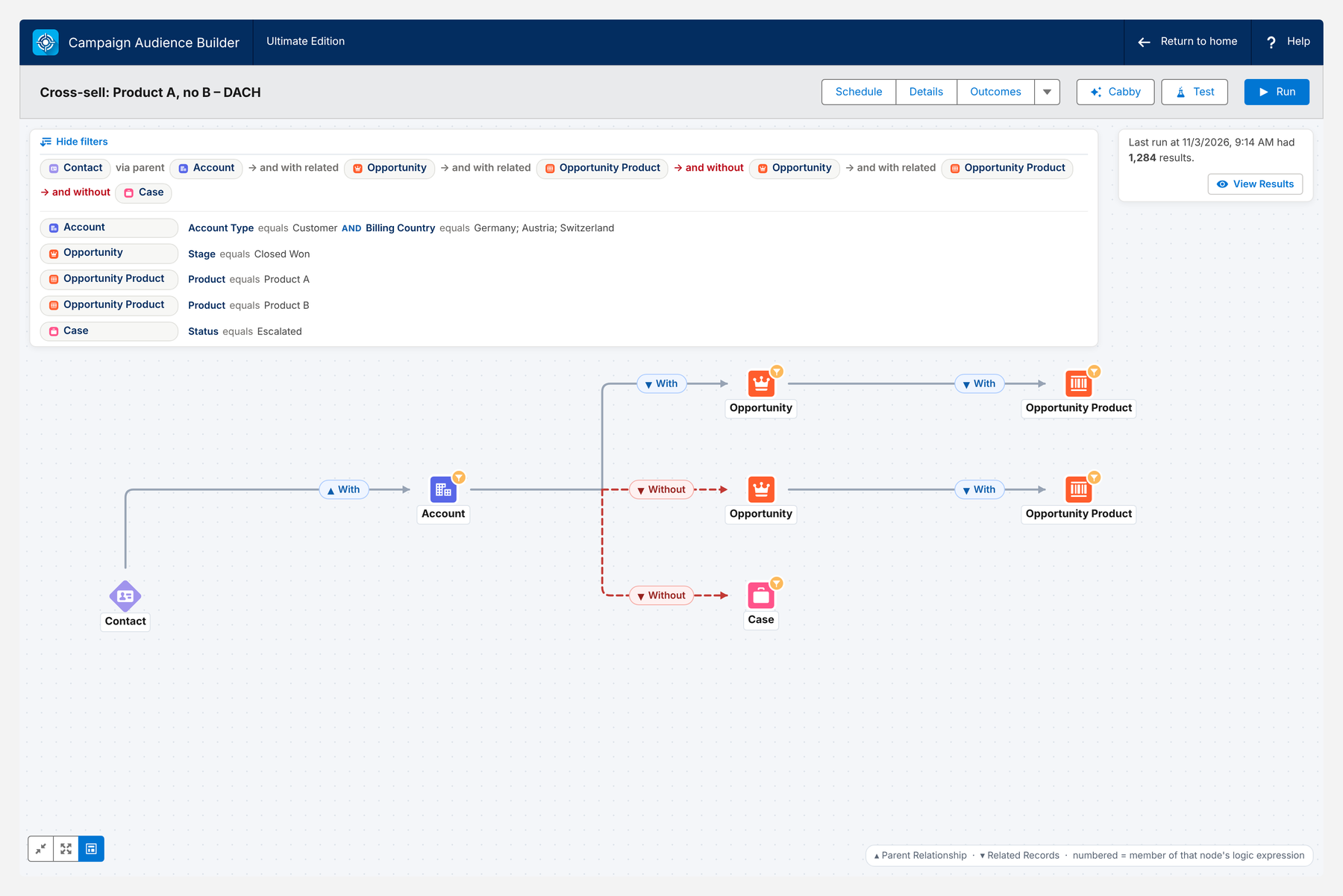
Because the data never leaves Salesforce, there’s nothing to sync, map or export – and the segment library from your strategy becomes a set of audiences that maintain themselves.
Conclusion
Salesforce segmentation comes down to three things: defining target groups on the data you already have, turning them into campaigns your marketing tools can use, and keeping those campaigns accurate over time.
Native tools handle simple, one-off segments well. As soon as criteria span several objects or audiences have to stay current, the tool should move closer to the data, not further away. Build segments where the data lives, activate them in the tool that sends, and measure every segment through its campaign.
How Campaign Audience Builder helps
Campaign Audience Builder gives marketing and ops teams a visual audience builder inside Salesforce that goes far beyond list views and reports.
- Combine criteria across any related standard or custom object
- Reuse filters and keep audiences up to date automatically
- Push audiences to campaigns, Account Engagement, Marketing Cloud and more
FAQ
What are the main types of segmentation in Salesforce?
The most common types are firmographic (account industry, size, region), role-based (contact title, department), transactional (opportunities, products, contracts, assets), behavioral (campaign responses, activities, cases) and lifecycle segmentation (lead status, opportunity stage, renewal dates). The most valuable segments combine several types, which usually means criteria on several related objects.
Should I build segments in Salesforce or in my marketing tool?
Build the segment where the data lives and activate it in the tool that sends. If your criteria are opportunities, products, contracts, cases or custom objects, they live in Salesforce – segmenting there avoids syncing every object into Account Engagement, Marketing Cloud or a third-party email tool. Engagement data that only exists in the marketing tool, such as email clicks, is best used there.
Can I segment in Salesforce without Marketing Cloud or Data 360?
Yes. Sales Cloud includes list views, reports and campaigns for segmentation, and Flow or Apex can automate segment logic. For recurring segments across many objects without code, native AppExchange apps like Campaign Audience Builder work directly on your CRM data. Data 360 is mainly needed when you have to unify data from many systems outside Salesforce.
How do I get a Salesforce segment into Account Engagement, Marketing Cloud or another email tool?
The usual hub is a Salesforce campaign. Account Engagement can use campaign membership in dynamic lists and automation rules, Marketing Cloud Engagement can read campaign members through Marketing Cloud Connect, and third-party email tools can receive the members through their API – for example triggered by a Flow.
How do I measure whether a segment performs?
Give each segment its own campaign or child campaign, track responses with campaign member statuses and roll results up with the campaign hierarchy. With campaign influence and opportunity contact roles, you can also see which segments contribute to pipeline and revenue.
How often should Salesforce segments be refreshed?
It depends on the use case: one-off event invitations need a single run, newsletters should refresh right before each send, and nurture or sales follow-up segments are typically refreshed daily or weekly. In every case, records that no longer match should be removed as well as new matches added.