












Available on AppExchange

Run your own logic on every audience.

Final Actions pass audience results to an autolaunched Flow or an Apex class – to update records, create related records or call any external API. Campaign Audience Builder handles batching, scheduling and notifications.

Included in Professional and Ultimate

Campaign Audience Builder · Final ActionScheduled
  1. 01
    Salesforce dataAccountContactOpportunityCase
  2. 02
    Churn risk – service-heavy accounts417 contacts · weekly
  3. Flow · ApexBatches of 200 · any API

How it works. Three steps from Salesforce data to activation.

  1. 01

    Build the logic in Flow or Apex

    An active autolaunched Flow with input variables, or an Apex class that implements CAB’s Final Action interface.

  2. 02

    Register it as a Final Action

    In CAB Settings: name, type, audience object, the fields your logic needs, input values, batch size and an optional custom permission.

  3. 03

    Run it on any audience

    Start it from the audience results or add it to a schedule – next to campaigns, Pardot lists and data extensions.

Extend CAB without rebuilding it. Your logic, CAB’s audiences, scheduling and batching.

Register once, use on every audience

Admins register a Flow or Apex class as a Final Action in CAB Settings. Marketers then pick it like any other action – without touching the logic behind it.

  • Autolaunched Flows with their input variables
  • Apex via lb.FinalAction_ManagedAsync_Interface
  • Description and success message for users
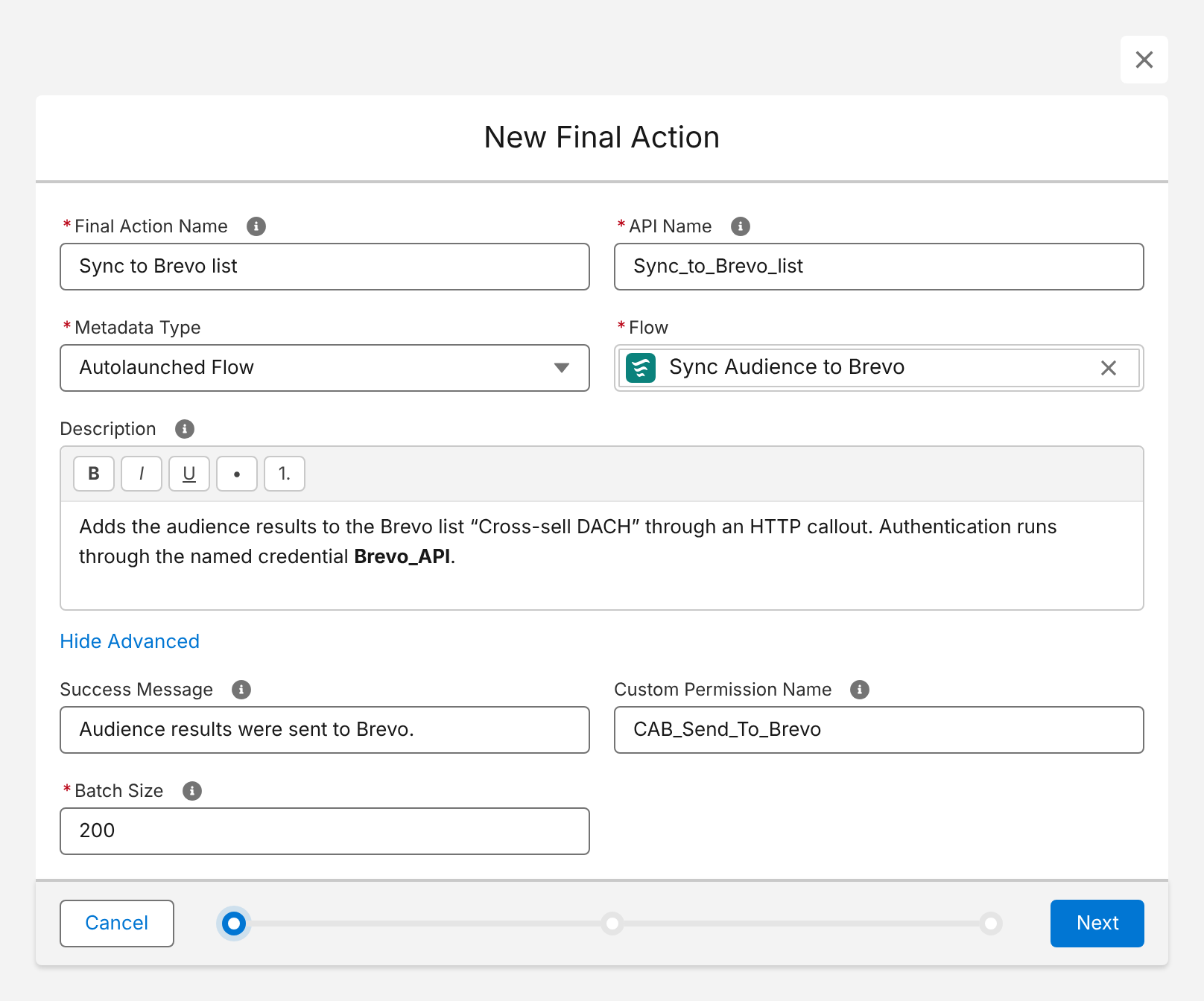
New Final Action in CAB Settings: an autolaunched Flow that sends audience results to Brevo, with success message, custom permission and batch size

CAB handles the batching

Results are passed in batches of the size you set. Apex classes implement one runSync method per batch – the heap-safe path for large audiences.

Governed access

A custom permission limits who can run an action. Actions are offered only for audiences of the object they were built for.

Manual or scheduled

Run an action once from the results, or let it run with every scheduled audience refresh – alongside your other destinations.

Third-party email tools via API. Mailchimp, Brevo, Optimizely, HubSpot – any tool with an API can receive CAB audiences.

  1. 01

    Audience in Salesforce

    Built on any object, refreshed on a schedule.

  2. 02

    Final Action

    A Flow with an HTTP callout or an Apex class receives each batch of results.

  3. 03

    The tool’s API

    Contacts are added or updated in the target list or audience.

MailchimpBrevoOptimizelyHubSpotREST API

What to plan for

  • You build and own the callout – in Flow with an HTTP callout action, or in Apex.
  • Authenticate with named credentials instead of keys in code.
  • Set the batch size to the tool’s API limits for bulk requests.
  • Select the fields your payload needs as available fields, so they’re populated.
  • Unsubscribes and consent stay in the email tool – sync them back if Salesforce needs them.
Read: one segment logic for every channel

What teams build with Final Actions. Anything your org can do with a set of records.

Third-party email tools

Send audiences to Mailchimp, Brevo, Optimizely or any tool with an API.

Sales follow-up tasks

Create a task for each account owner when an account enters a churn-risk audience.

Record updates

Set a segment flag, a priority or a next-best-offer field on every record in the audience.

Related records

Create opportunities, cases or custom records for every audience member.

Downstream systems

Hand audiences to ERP, ticketing or data platforms through Apex callouts or platform events.

Ad and SMS platforms

Push contacts to custom audiences or SMS providers that offer an API.

Native vs. with Campaign Audience Builder. Where the integration changes the work.

TopicFlow and Apex aloneWith Campaign Audience Builder
Selecting the recordsGet Records or SOQL in every flow and class Audience canvas, maintained by marketing
Cross-object criteriaBuilt into each automation “With” and “without” conditions, aggregates, sequences
Large volumesYour own batch classes and limit handling Package-managed batching with a configurable batch size
SchedulingScheduled flows per object Audience schedules with several destinations
Who can run itWhoever can start the automation Custom permission per Final Action

Requirements and setup. What you need – and where the setup guide lives.

Requirements

  • Campaign Audience Builder Professional or Ultimate
  • An active autolaunched Flow (no trigger) or an Apex class implementing lb.FinalAction_ManagedAsync_Interface
  • A CAB administrator to register the Final Action in CAB Settings
  • For external APIs: a named credential and the tool’s API access

Setup guides

Step-by-step instructions in the Campaign Audience Builder documentation. Test everything in a sandbox without a time limit.

Questions, answered.

What teams ask about the Flow & Apex integration.