
Two identical appeal letters in one mailbox cost twice the print and postage – and tell the donors you don’t know who they are. In Salesforce, it happens because appeal segments are built on people while letters go to households. The fix is a clear household key, one consistent rule for who receives the letter, and deduplication that runs every time the audience is built, not once at the mail house. This guide shows how to define households in NPSP and Nonprofit Cloud, which member to keep, and how to send exactly one mailing per household.
This article is part of our guide to donor segmentation in Salesforce.
Why households receive the same letter twice
Segments select people: donors who gave last year, mid-level donors, LYBUNT. Several people in the same household often qualify at the same time:
- Couples who both give. Each partner has their own gifts, so both land in the segment.
- Soft credits. A gift credited to one partner and soft-credited to the other can qualify both.
- Several households at one address. An adult child moves back home, a second household is created by an import.
- Duplicate records. The same person twice, or a lead next to a contact.
- Overlapping segments. One partner lands in the mid-level segment, the other in the general segment – two different letters to the same kitchen table.
The cost isn’t just print and postage. Duplicate letters look careless, they distort response rates – one household, two letters, at most one response – and they annoy exactly the loyal donors who give as a couple.
Step 1: Define what a household is
| Concept | NPSP | Nonprofit Cloud |
|---|---|---|
| Household record | Household account, created automatically for every contact | Business account representing the household |
| Membership | Contact’s account lookup | Party relationship group of the type household, members linked via account-contact relationships |
| One person, several households | Not possible – one account per contact | Possible – a person can belong to several groups |
| Greeting | Formal and informal greeting on the household account | Household name; greetings usually configured by the organization |
| Natural household key | Account ID | A maintained household key or a normalized address |
Two practical points:
- NPSP makes it easy. Every contact has exactly one household account, so the account ID is the household key – as long as your appeal audience only contains household contacts. Contacts of organizations share their organization’s account and should be filtered out or handled separately.
- Nonprofit Cloud needs a decision. Because a person can belong to several groups, decide which household counts for mailings – and store it as a key on the person account, maintained by a flow. Alternatively, use the address.
Address as a household key
Sometimes the address is the better key: several households at one address, or unmerged duplicates with different accounts. Build a normalized address key – street and postal code in lower case, without extra spaces – in a text field maintained by a flow. Formula fields don’t work for this, because Salesforce can’t group by them, and a plain comparison is case-sensitive.
Step 2: Decide who receives the letter
One household, one letter – but addressed to whom? Pick one rule and use it everywhere:
| Rule | When it fits |
|---|---|
| Highest giving | Most appeals – the letter goes to the household’s main donor |
| Most recent gift | Reactivation and LYBUNT appeals |
| Primary contact | When your team maintains it carefully |
| Oldest record | Simple and stable, but says nothing about giving |
Then address the letter to the household, not the person: “Dear Anna and Tom” via the household greeting. That way, the selection rule decides who is in the campaign, while the letter speaks to everyone.
Step 3: Deduplicate in the right order
Household deduplication only works if it runs at the right moment:
- Segment and prioritize first. Build the segments and put them in priority order – major donors, mid-level, regular, LYBUNT. A household that qualifies for several segments belongs to the highest one.
- Then collapse households. Within the final audience, keep one person per household.
- Then apply household suppressions. If one member asked not to be contacted, decide whether that applies to the whole household letter – and apply the same rule in every appeal.
- Check the counts. Compare people before and after deduplication. A sudden jump in removed records usually means a broken key – for example blank or shared addresses.
When not to deduplicate by household
- Email: every household member has their own address and consent.
- Gift acknowledgements and tax receipts: they belong to the donor who gave.
- Major donor letters: personal by definition – the gift officer decides.
- Event invitations with personal registration.
Native approaches and their limits
| Approach | How it works | Where it stops |
|---|---|---|
| Report grouped by household | Group campaign members by account or address, remove extras by hand | Manual, every appeal again, error-prone with thousands of members |
| Excel or export | Export, remove duplicates, re-import | Data leaves Salesforce; the campaign doesn’t match what was mailed |
| Merge/purge at the mail house | The mail house removes duplicates before printing | Happens after selection – Salesforce doesn’t know who was actually mailed, so response rates and control groups are off |
| Campaign member deduplication by email | Removes members sharing an email address | Household members have different emails – it doesn’t catch them |
One mailing per household with Campaign Audience Builder
Campaign Audience Builder deduplicates audiences while they are built – before they are counted, written to a campaign or sent anywhere:
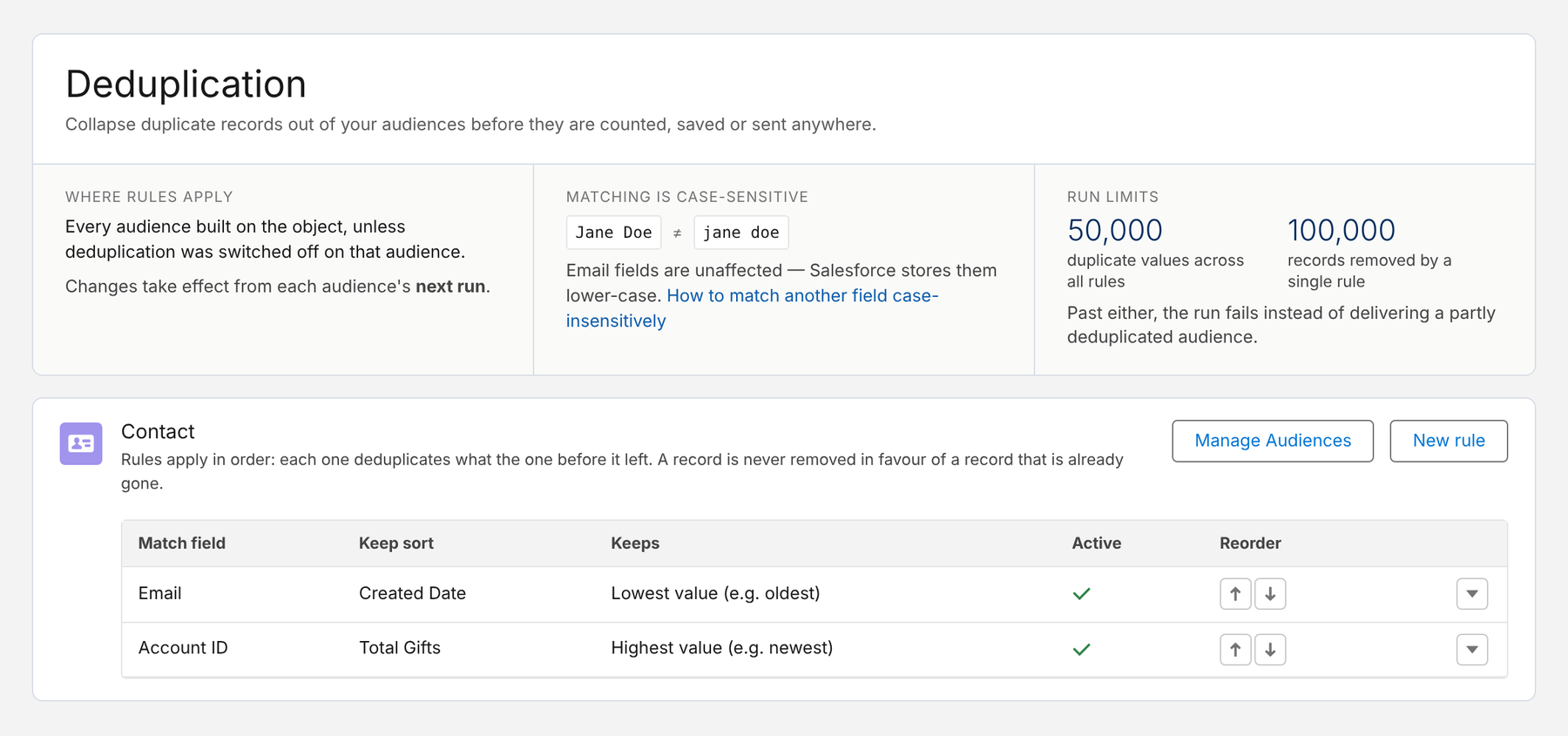
- Deduplication rules per object: for example, first by email address (keep the oldest record), then by household account ID (keep the contact with the highest total gifts). Rules run in order, each on what the previous one left.
- Any key you need: a lookup like the household account, or a normalized address or household key field for Nonprofit Cloud.
- Priority across segments: in a waterfall sequence, an earlier step wins – a household in the mid-level step is never also mailed from the general step.
- Only where it belongs: rules apply to every audience of the object, but each audience can opt out – so email audiences keep every person while print appeals get one per household.
- Transparent: run history shows how many duplicates were removed, and for each group which record was kept and which were removed.
- Current until the drop: scheduled runs repeat the deduplication every time, so the campaign always matches the letters that go out.
Here are the deduplication rules for contacts: email first, then one contact per household account – the one with the highest total gifts:
Deduplication rules are available in the Professional Edition and upwards. For removing duplicate email addresses from an existing campaign, see how to deduplicate campaign members – that one is part of the free plan.
Conclusion
One mailing per household comes down to three decisions: what a household is in your data, who receives the letter, and when deduplication runs. Use the household account in NPSP or a maintained household key in Nonprofit Cloud, keep the household’s main donor, address the letter to everyone, and deduplicate every time the audience is built – after prioritizing segments, before anything is printed. Keep email out of it: there, every person counts.
How Campaign Audience Builder helps
Campaign Audience Builder runs natively in Salesforce and turns NPSP or Nonprofit Cloud data into appeal audiences – without reports, exports or manual list work.
- Segment on gifts, totals, recurring donations, soft credits and designations
- Prioritize appeals with waterfall sequences and send one letter per household
- Remove donors who gave since selection and measure gifts against a control group
FAQ
Why do households receive the same appeal letter twice?
Because appeal segments are usually built on people, not households. If two donors in the same household both qualify – for example both gave last year – both end up in the campaign and both receive a letter. Duplicate records, a lead next to a contact, or two households at the same address add more duplicates.
How do I send one letter per household in NPSP?
In NPSP, every contact belongs to a household account, so the account ID is the household key. Keep one contact per household account in your appeal audience – for example the one with the highest giving – and address the letter with the household's formal greeting.
How are households defined in Nonprofit Cloud?
In Nonprofit Cloud, a household is a business account with a party relationship group of the type household, and members are linked through account-contact relationships. Because a person can belong to several groups, many organizations maintain a household key or a normalized address on the person account for mailing purposes.
Which household member should receive the letter?
Use one consistent rule: the primary contact, the member with the highest giving, or the most recent donor. Address the letter to the household with a greeting like 'Dear Anna and Tom' so it speaks to everyone.
Should email campaigns be deduplicated by household too?
Usually not. Email is personal – every household member has their own address and their own consent. Household deduplication belongs to print mailings and phone campaigns; email audiences are deduplicated by email address only.