

Salesforce segmentation means dividing the leads, contacts and accounts in your org into groups that share relevant characteristics – and keeping those groups accurate as your data changes. Salesforce gives you list views, reports and campaigns to do this. They work well for simple segments, but most teams hit their limits as soon as criteria span several objects or segments need to stay up to date on their own.
This guide explains what segmentation in Salesforce looks like, which options you have, the six challenges almost every org runs into, the workarounds teams use (and why they backfire) – and the practices that make segmentation reliable. For the bigger picture – segmentation types, example segments, where segments live across your stack and how to build a strategy – see our complete guide to Salesforce segmentation.
What is segmentation in Salesforce?
Segmentation is the step between “we have data” and “we send the right message to the right people”. Instead of mailing your whole database, you define target groups based on what you know about them. In a B2B Salesforce org, the most common segmentation types are:
| Segmentation type | Typical criteria in Salesforce | Example segment |
|---|---|---|
| Firmographic | Account industry, size, region, account type | Manufacturing companies in DACH with 500+ employees |
| Demographic / role | Contact title, department, seniority | Marketing decision makers |
| Transactional / product | Opportunities, opportunity products, orders, contracts, assets | Customers who bought product A but not product B |
| Behavioral | Campaign responses, email engagement, activities, cases | Contacts who attended a webinar in the last 90 days |
| Lifecycle | Lead status, opportunity stage, renewal dates | Customers with a renewal in the next 120 days |
The most valuable segments usually combine several of these – and that’s exactly where segmentation in Salesforce gets hard, because the criteria live on different objects.
In Salesforce CRM, a segment typically ends up as campaign members on a campaign. The campaign is what connects your segment to email sends, Account Engagement (Pardot), Marketing Cloud and campaign reporting.
Segmentation options in Salesforce compared
Before looking at the challenges, here is what you can use – natively and with add-ons:
| Option | What it’s good for | Where it stops |
|---|---|---|
| List views | Quick filters on a single object, e.g. “my open leads in Germany” | One object only; no related records; no automation |
| Reports + “Add to Campaign” | One-off segments with criteria on a few related objects | Max. four objects per custom report type, three cross filters; snapshot only; limit of 50,000 records per action |
| Flow / Apex | Fully automated, custom segment logic | Needs an admin or developer for every new segment; maintenance effort |
| Account Engagement (Pardot) dynamic lists | Automated lists on prospect, account and opportunity data | Can’t see most Salesforce objects – see our guide to Pardot dynamic lists |
| Marketing Cloud segmentation | Segmenting data that has been synced into Marketing Cloud | Data must be synced and modelled first; SQL skills often needed |
| Data 360 (formerly Data Cloud) | Unifying data from many systems into one profile and segmenting it | Significant licence cost and implementation effort |
| Native AppExchange segmentation apps | Cross-object segments on CRM data, built by business users and updated automatically | Additional app; check that it runs natively inside Salesforce |
For a detailed side-by-side of the native tools, read List Views vs. Report Builder vs. Campaign Audience Builder.
The 6 most common Salesforce segmentation challenges
Every org is different, but the questions admins and marketers bring up are remarkably similar.
1. Criteria are spread across many objects
“All decision makers at accounts with a Closed Won opportunity for product X, an active contract, and no open support case.” That one sentence touches Contact, Account, Opportunity, Opportunity Product, Contract and Case. Report types and cross filters can only cover part of it, and OR logic across objects or exclusions on unrelated objects are often impossible.
2. Report types don’t fit the question
A custom report type joins up to four objects along one relationship path. A report can use up to three cross filters with five subfilters each. As soon as your segment needs a different path – or a fifth object – you need a new report type, a workaround, or a developer.
3. Segments go stale
Adding report results to a campaign creates a snapshot. Tomorrow, new records match your criteria and some old ones don’t anymore – but the campaign doesn’t know. Someone has to remember to repeat the process before every send.
4. Records that no longer match aren’t removed
Even if you re-run a report and add the results again, Salesforce only adds campaign members. Customers who churned, contacts who changed jobs or leads that converted stay in the campaign until someone removes them by hand – and keep receiving messages that don’t fit.
5. Volume limits
The “Add to Campaign” action is limited to 50,000 records at a time. Large B2C or enterprise orgs hit this regularly and end up splitting segments into chunks. More on that in how to add more than 50,000 campaign members.
6. Marketing depends on admins and IT
When marketers can’t build segments themselves, every campaign starts with a ticket. That slows down campaigns, ties up admin and developer time, and makes teams think twice before testing a new target group.
Common workarounds – and their side effects
To solve these challenges, admins and consultants get creative. These are the four workarounds we see most often in Salesforce orgs – each one works at first, and each one comes with a price.
Workaround 1: “Excel voodoo”
How it works: Because one report can’t reach all the objects, several reports are exported. In Excel, VLOOKUPs build the intersections, the result is filtered into a final list, and that list is imported back into Salesforce as campaign members.
Side effects:
- Users need export permissions – which many companies restrict for good reason, because sensitive data leaves the system.
- It requires advanced Excel skills and is error-prone at every step: export, matching, import.
- It takes hours, and the result is outdated the moment it’s finished. Next week, everything starts over.
Workaround 2: “IT hero”
How it works: Marketing describes the target group in a ticket. An admin or developer translates it into SOQL queries, Apex or a Flow and loads the result into a campaign.
Side effects:
- You depend on the availability of people with scarce, expensive skills.
- Every request waits in a queue – what could take a minute takes days.
- The code is usually built for one request and thrown away afterwards, or it lives on as technical debt nobody wants to touch.
Workaround 3: “Destroy your org”
How it works: To make nested information reportable, helper fields are added to the Lead or Contact object – “Bought Product X”, “Has Open Case”, “Last Webinar Date” – and kept up to date by automation. Then a simple report on contacts does the job.
Side effects:
- Every new segment adds new fields, often for one-time use. The data model fills up with fields that don’t belong there.
- Background automation grows with every field, slows down saves and complicates the order of execution.
- Over time, nobody knows which fields are still used – and the org becomes harder to maintain and slower for everyone.
Workaround 4: The big-platform route
How it works: To get “real” segmentation, a customer data platform like Data 360 (formerly Data Cloud) is introduced – even though all relevant data already lives in the CRM.
Side effects:
- High licence and implementation costs for a problem that is mostly about querying data you already have.
- Data has to be modelled, mapped and synced before the first segment can be built.
- Marketing often still depends on specialists to build segments.
Data 360 is the right tool when you need to unify data from many systems. For segmenting CRM data, it’s usually oversized – see our comparison of Campaign Audience Builder and Data Cloud.
Free eBook: The Ultimate Segmentation Guide for Salesforce (2026 Edition). The challenges and workarounds from this article, the six requirements for segmentation that scales, a scorecard to rate any tool – and how to set up a segmentation strategy. 27 pages, plus two interactive templates: a segment library with 20 example segments and a cost calculator. Get the free guide
Best practices for segmentation in Salesforce
Whatever tool you use, these practices make segments reliable and reusable:
- Define segments in business language first. Write down who should be in the segment and why, before thinking about objects and fields. It makes requirements clear and segments easier to review.
- Keep Salesforce the single source of truth. Segment where the data lives instead of exporting it into spreadsheets or copying it into helper fields.
- Automate membership – in both directions. A good segment adds new matching records and removes records that no longer match, on a schedule that fits the campaign.
- Reuse building blocks. Criteria like “mailable”, “customer” or “DACH region” appear in many segments. Define them once and reuse them instead of rebuilding them every time.
- Use naming conventions and ownership. A clear naming scheme for segments and campaigns, plus an owner for each, prevents duplicates and orphaned audiences.
- Respect consent and data quality. Exclude opt-outs and bounced addresses in every segment and deduplicate before you send.
- Measure segment performance. Track responses and pipeline per segment through campaign influence and reporting – and retire segments that don’t perform.
Conclusion
Salesforce has everything you need for simple segments: list views for quick filters, reports and campaigns for one-off target groups. The challenges start when criteria span several objects, when segments have to stay current, and when marketing wants to move without waiting for IT.
The common workarounds – Excel exports, developer tickets, helper fields or a full data platform – solve the immediate problem but create new ones. The sustainable answer is to segment directly on your Salesforce data, automate membership in both directions, and let the people who run campaigns build segments themselves.
 Campaign Audience Builder
Solve segmentation where your data lives
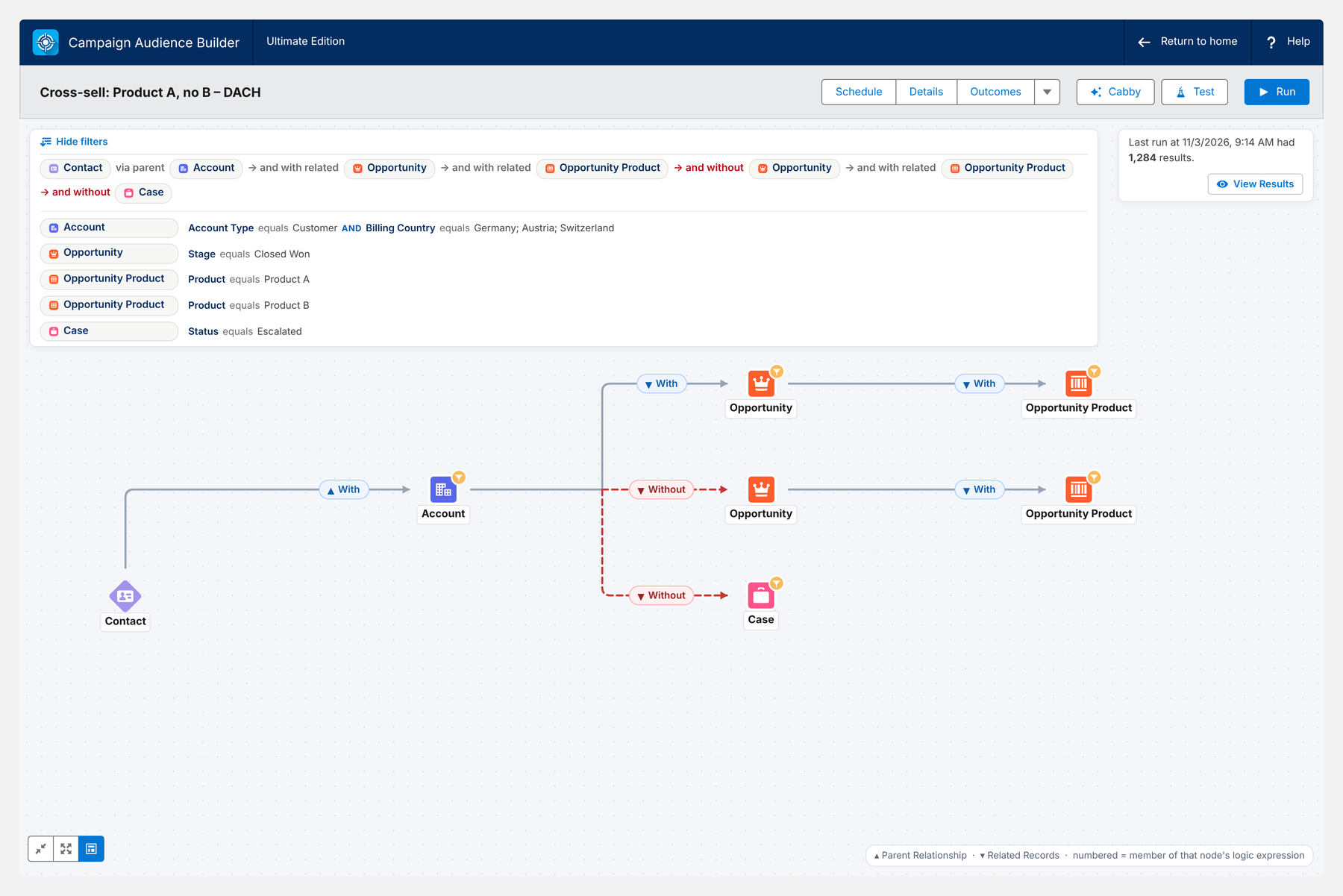
Campaign Audience Builder tackles these challenges inside Salesforce – one audience across all objects, with a clear view of why each record matched.
- Segment across any standard or custom object
- See why every record matched
- Reuse filters and keep audiences current
FAQ
What is segmentation in Salesforce?
Segmentation in Salesforce means grouping leads, contacts or accounts by shared characteristics – for example industry, purchased products, engagement or lifecycle stage – so you can target each group with relevant campaigns. In Salesforce CRM, segments are typically built with list views or reports and stored as campaign members.
Can you segment across multiple objects with Salesforce reports?
Only to a limited extent. A custom report type can join up to four related objects, and a report can use up to three cross filters with five subfilters each. Criteria that span more objects, use OR logic across objects or require exclusions on unrelated objects quickly exceed what reports can do.
How do you keep Salesforce segments up to date automatically?
Out of the box, report-based segments are snapshots: you have to re-run the report and add the results to the campaign again, and records that no longer match are not removed. To keep segments current, you need automation – custom Flows or Apex, or a segmentation app that refreshes campaign members on a schedule.
Do I need Data 360 (formerly Data Cloud) for segmentation?
Not necessarily. Data 360 is built to unify data from many systems into one customer profile. If your segmentation criteria already live in your Salesforce org, a native segmentation tool on top of your CRM data is usually faster to set up and considerably cheaper.
What is the difference between a segment and a campaign in Salesforce?
A segment is the definition of who belongs to a target group – the criteria. A campaign is the Salesforce record that holds the actual members, tracks their status and connects them to marketing tools like Account Engagement or Marketing Cloud. Good practice is to let the segment definition keep the campaign members up to date.