


LYBUNT donors gave last year but not yet this year. SYBUNT donors gave in some earlier year but not since. Both are lists of people who already trusted your organization once – which makes them the most valuable reactivation segments you have. In Salesforce, both can be built from the gift data in NPSP or Nonprofit Cloud. This guide shows how, where the built-in options stop, and how to turn the lists into a reactivation program that runs all year.
This article is part of our guide to donor segmentation in Salesforce.
What LYBUNT and SYBUNT mean
| Term | Stands for | Definition used in this guide |
|---|---|---|
| LYBUNT | Last Year But Unfortunately Not This year | Gave last year, no gift this year |
| SYBUNT | Some Year But Unfortunately Not This year | Gave in an earlier year, no gift last year or this year |
Strictly speaking, SYBUNT includes LYBUNT – “some year” could be last year. Most fundraising teams separate the two so every donor sits in exactly one group. That’s the definition we use here.
Why these two lists matter:
- They already know you. Reactivating a past donor is typically far cheaper than acquiring a new one.
- They are time-sensitive. The longer a donor has been away, the less likely they are to come back. LYBUNT donors are still within reach; SYBUNT donors need a stronger reason.
- They are measurable. Every reactivated donor is a clear, attributable result of your program.
Calendar year or fiscal year?
Before you build anything, decide which “year” you mean. If your organization plans and reports in a fiscal year – say, July to June – a donor who gave in October and again in March gave twice in the same fiscal year, but in two different calendar years.
The rule: build LYBUNT on the year your targets are set in, and make sure your rollups use the same definition. In NPSP, household and contact rollups can be set to use the fiscal year. If reports, rollups and segments use different years, your LYBUNT count will never match across them.
A second timing question comes up every December: donors who usually give at year-end are technically LYBUNT from January to November. Treat them as their own subgroup – “gave last year in Q4, nothing yet this year” – and approach them as part of your year-end planning rather than with an early reactivation ask.
LYBUNT in NPSP
NPSP gives you a head start:
- A ready-made LYBUNT report in the NPSP fundraising reports, based on household accounts.
- Rollup fields on household accounts and contacts, including Total Gifts This Year, Total Gifts Last Year, Total Gifts Two Years Ago and Last Gift Date.
A basic LYBUNT segment is therefore a simple filter: Total Gifts Last Year greater than 0 and Total Gifts This Year equals 0.
Where it stops:
| Limit | Why it matters |
|---|---|
| No SYBUNT | There’s no ready-made report, and the rollups only look back two years. Older gifts need the opportunity records. |
| Household level only | The standard report lists households. Appeals by email or personal outreach need the right contact. |
| Totals, not context | Rollups don’t tell you which fund, campaign or channel a donor gave through – you can’t build “LYBUNT donors to our water project” from them. |
| Soft credits | Depending on your rollup configuration, donors who gave through soft credits (for example via a family foundation or a peer-to-peer page) may be counted differently than you expect. |
| Snapshots | A report is correct when you run it. Donors who give the next day are still on the list you exported. |
LYBUNT and SYBUNT in Nonprofit Cloud
In Nonprofit Cloud, the donor is a person account and every gift is a gift transaction with a transaction date and amount. Depending on your configuration, giving summaries are available on the donor gift summary. You can build both segments in two ways:
- From giving summaries: quick and simple, as long as the summaries cover the years you need and use the same year definition as your reporting.
- From gift transactions: “has a paid gift transaction last year” and “has no gift transaction this year”. This works for any period, and you can add conditions on designation, campaign or channel – for example “LYBUNT donors whose last gift went to the emergency fund”.
For SYBUNT, the gift transaction approach is the reliable one: “has a gift transaction before last year” and “has no gift transaction last year or this year”.
If you are planning a move from NPSP to Nonprofit Cloud, rebuild LYBUNT and SYBUNT on gift transactions from the start. It makes both segments independent of how rollups are configured.
Refining the segments
A LYBUNT list of 6,000 donors shouldn’t receive one letter. Useful splits:
| Split | Example subgroups | What changes |
|---|---|---|
| Last year’s giving | Under 100 / 100–499 / 500+ | Ask amount, channel, personal follow-up for higher givers |
| Time since last gift (SYBUNT) | 2–3 years / 4–5 years / 6+ years | Message strength; the oldest group may only get a low-cost channel |
| Giving history | One gift ever / several years in a row | Loyal donors who stopped get a personal “we noticed” message |
| Recurring vs. one-time | Lapsed recurring donors / one-time donors | Lapsed recurring donors get a restart offer, not a one-time ask |
| Cause | Last gift to project A / B / general fund | Show the impact of the cause they cared about |
| Seasonality | Usually gives in Q4 | Hold back for the year-end appeal |
And the base exclusions, in every subgroup:
- deceased and “do not contact” supporters
- anyone who gave in the last 30–60 days (relevant when your year boundary is close)
- donors managed personally by a gift officer
- one record per household for printed mailings
A reactivation program that runs all year
LYBUNT and SYBUNT work best as a program, not a one-off mailing:
- Thank and show impact first. The first touch for LYBUNT donors is what their gift last year achieved – with a soft ask, not a hard one.
- Ask with a reason. A concrete project, a matching gift or a deadline gives lapsed donors a reason to act now.
- Use the channel they gave through. Donors who gave by mail respond to mail; online donors to email. Your gift data tells you which is which.
- Spread it across the year. Run reactivation waves in spring and autumn instead of putting everything into December, where LYBUNT donors compete with your own year-end appeal.
- Measure against a control group. Hold back a small random share of each segment. The difference in gifts within 30 or 60 days shows what the program really adds.
For running appeals with campaign hierarchies, source codes and one letter per household, see our donor segmentation guide.
Keep the lists current until the send
The most common LYBUNT mistake isn’t the wrong segment definition – it’s timing. A list exported three weeks before the mailing still contains every donor who gave in those three weeks. They get a “we miss you” letter right after donating.
Two things prevent it:
- Refresh right before every send. Not when the creative goes to design, but when the data goes to the mail house or email tool.
- Remove donors who no longer qualify automatically. As soon as a LYBUNT donor gives, they should leave the segment – and be thanked instead.
LYBUNT and SYBUNT with Campaign Audience Builder
With Campaign Audience Builder, both segments are audiences on your NPSP or Nonprofit Cloud data – built visually, refreshed automatically:
- LYBUNT: donors with a gift last year and without a gift this year – on gift transactions or opportunities, with fiscal or calendar year relative dates.
- SYBUNT: donors with a gift before last year and without a gift in the last two years.
- Refinements: aggregates such as “sum of gifts last year above 500”, conditions on designations, campaigns and recurring commitments, and all base exclusions in one place.
- One version per donor: as steps in a waterfall after major and mid-level donors, so nobody receives two letters.
- Always current: scheduled refreshes and campaign cleansing remove donors who gave since the selection.
- Measured: Outcomes such as “gift within 30 days”, compared with a held-out control group.
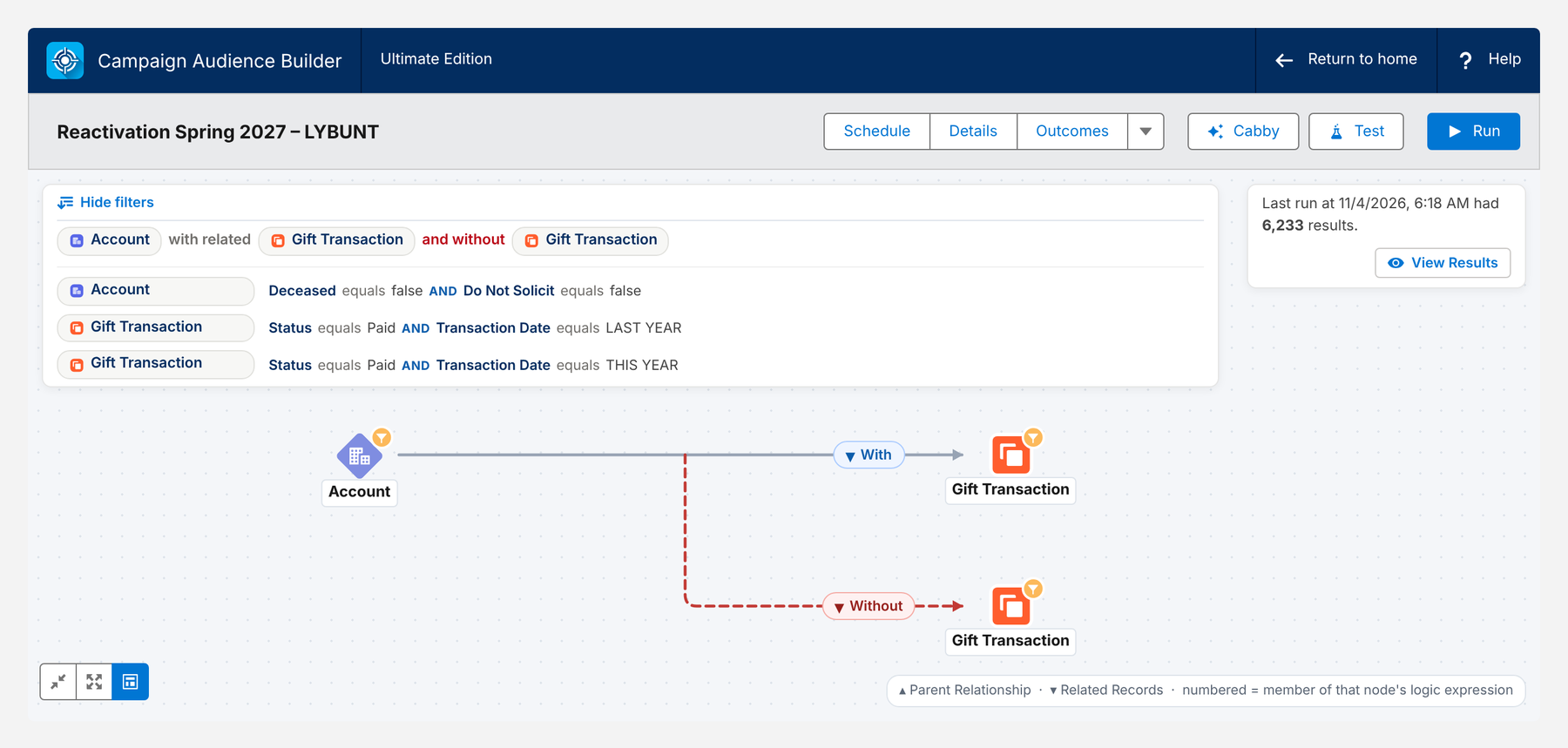
You can see how the steps fit together in the appeal waterfall in our donor segmentation guide.
Conclusion
LYBUNT and SYBUNT are the donors closest to coming back. Define them once – on the year your targets are set in, with clean exclusions – split them by giving level, time away and cause, and run reactivation as a program across the year. Build the segments on gift records rather than only on rollups, refresh them right before every send, and measure each wave against a control group. That turns a yearly report into a steady source of returning donors.
How Campaign Audience Builder helps
Campaign Audience Builder runs natively in Salesforce and turns NPSP or Nonprofit Cloud data into appeal audiences – without reports, exports or manual list work.
- Segment on gifts, totals, recurring donations, soft credits and designations
- Prioritize appeals with waterfall sequences and send one letter per household
- Remove donors who gave since selection and measure gifts against a control group
FAQ
What does LYBUNT mean?
LYBUNT stands for 'Last Year But Unfortunately Not This year'. It describes donors who gave last year but haven't given yet this year. Because they gave recently, they are usually the most responsive group in a reactivation program.
What does SYBUNT mean?
SYBUNT stands for 'Some Year But Unfortunately Not This year'. In practice, most organizations use it for donors who gave in an earlier year but neither last year nor this year – so it doesn't overlap with LYBUNT. They have been away longer and need a different approach than LYBUNT donors.
Is SYBUNT the same as lapsed donors?
Roughly, yes – SYBUNT donors are lapsed donors. The term just makes the definition explicit: they gave at some point, but not in the last two years. Many nonprofits split SYBUNT further by how long ago the last gift was, because a donor who stopped two years ago responds very differently from one who stopped eight years ago.
Should LYBUNT be based on the calendar year or the fiscal year?
Use the year your fundraising is planned and reported in. If your budget and targets follow a fiscal year, build LYBUNT on the fiscal year – and make sure your rollup settings use the same year, otherwise reports and segments won't match.
Should I build LYBUNT lists at household or contact level?
Giving in NPSP is usually summarized per household account, so a household-level LYBUNT list is the natural starting point for printed appeals. For email and personal outreach, pick the right contact in each household. In Nonprofit Cloud, the person account is the donor, and households are grouped separately.
How often should LYBUNT and SYBUNT lists be refreshed?
At least right before every send. LYBUNT donors give back throughout the year, and every one who does should leave the list immediately – nobody wants to receive a 'we miss you' letter a week after donating.