

Moving from NPSP to Nonprofit Cloud changes almost every object your donor segments are built on. Contacts with household accounts become person accounts, opportunities become gift transactions, recurring donations become gift commitments, and rollup fields move to a donor gift summary that’s calculated on a schedule. Your segments don’t migrate – they have to be redefined. This guide shows what changes for segmentation, how the same segment looks in both data models, and how to move your segments without losing a single donor along the way.
This article is part of our guide to donor segmentation in Salesforce.
Where NPSP and Nonprofit Cloud stand in 2026
- Nonprofit Cloud is now called Agentforce Nonprofit. The product is the same; Salesforce renamed it as part of its Agentforce branding. We use “Nonprofit Cloud” in this article because that’s what most teams still search for.
- NPSP is supported, but frozen. It has received no new features since 2023, and none are planned. There is no announced end of life and no requirement to migrate.
- New orgs start on Nonprofit Cloud. New qualifying organizations no longer receive a preconfigured NPSP org.
- New fundraising features only come to Nonprofit Cloud – gift commitments with failing status, outreach source codes, donor gift summaries with RFM scores.
For most nonprofits, the question isn’t whether to move, but when – and segmentation is one of the areas that needs the most preparation.
The data model for segmentation, side by side
| What you segment on | NPSP | Nonprofit Cloud |
|---|---|---|
| Donor | Contact | Person account |
| Household | Household account, created automatically | Party relationship group |
| Organization donor | Organization account | Business account |
| Gift | Opportunity (won) | Gift transaction (paid) |
| Payment | Payment on the opportunity | Gift transaction |
| Recurring gift | Recurring donation | Gift commitment with gift commitment schedule |
| Soft credit | Opportunity contact roles, partial and account soft credits | Gift soft credit |
| Fund / designation | General accounting unit with allocations | Gift designation with gift transaction designations |
| Appeal source | Campaign (primary campaign source) | Campaign and outreach source code |
| Giving totals | Rollup fields on contact and household account | Donor gift summary, calculated by the Data Processing Engine |
| Donor levels | Levels, reassigned automatically | Giving level range on the donor gift summary; anything more needs a flow |
What changes for your segments
1. The donor record changes
In NPSP, most segments start on the contact – and household segments on the household account. In Nonprofit Cloud, the donor is a person account. Every segment, report and list view that starts on the contact has to start on the account instead, and filters on contact fields move to the person account.
2. “Won opportunity” becomes “paid gift transaction”
NPSP segments filter on closed won opportunities, often with a record type for donations. In Nonprofit Cloud, a gift is a gift transaction, and “gave” means a transaction with the status paid. Check which statuses your payment integration actually sets – pending, failed and refunded transactions must not count as gifts.
3. Rollups move to the donor gift summary – on a schedule
NPSP’s rollup fields – total gifts, last gift date, this year, last year – live on the contact and the household account. In Nonprofit Cloud, they live on the donor gift summary: gift count, totals, first and last gift, this year and last year, days since last gift, soft credit totals and RFM scores. Two things to know:
- They are calculated on a schedule by the Data Processing Engine, not in real time. A donor who gave this morning still looks like a LYBUNT until the next calculation.
- They come with new possibilities. Recency, frequency and monetary scores are built in – a good starting point for RFM segments.
4. Households work differently
NPSP creates a household account for every contact automatically, and rollups exist at household level. In Nonprofit Cloud, households are party relationship groups linking person accounts. Household-level segments and “one letter per household” logic need to be rebuilt on that structure – and tested, because this is where counts most often differ.
5. Recurring donations become gift commitments
NPSP’s recurring donation with its installment opportunities becomes a gift commitment with a schedule and gift transactions. The commitment status in Nonprofit Cloud includes a failing state for declining payments – useful for the save sequences in our guide on recurring donors in Salesforce, but every status filter has to be mapped again.
6. Soft credits and designations get their own objects
Soft credits become gift soft credits, general accounting units become gift designations. Segments like “donors to the education fund” or “board members with soft credits over $10,000” need new filter paths.
The same segment in both data models
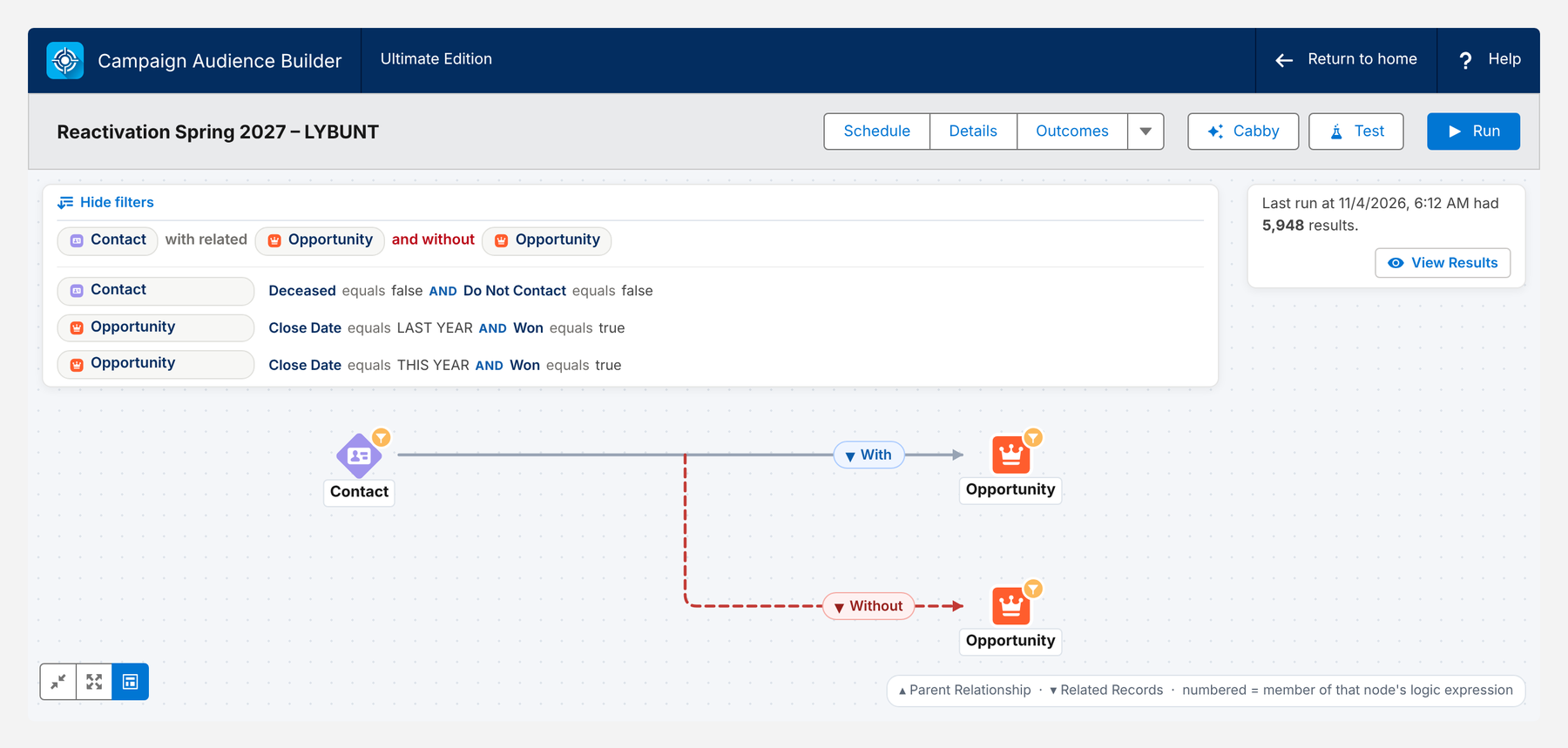
Here is a LYBUNT segment – donors who gave last year but not this year – in NPSP: a contact with a won opportunity last year and without a won opportunity this year.
And the same segment in Nonprofit Cloud: an account with a gift transaction last year and without a gift transaction this year.
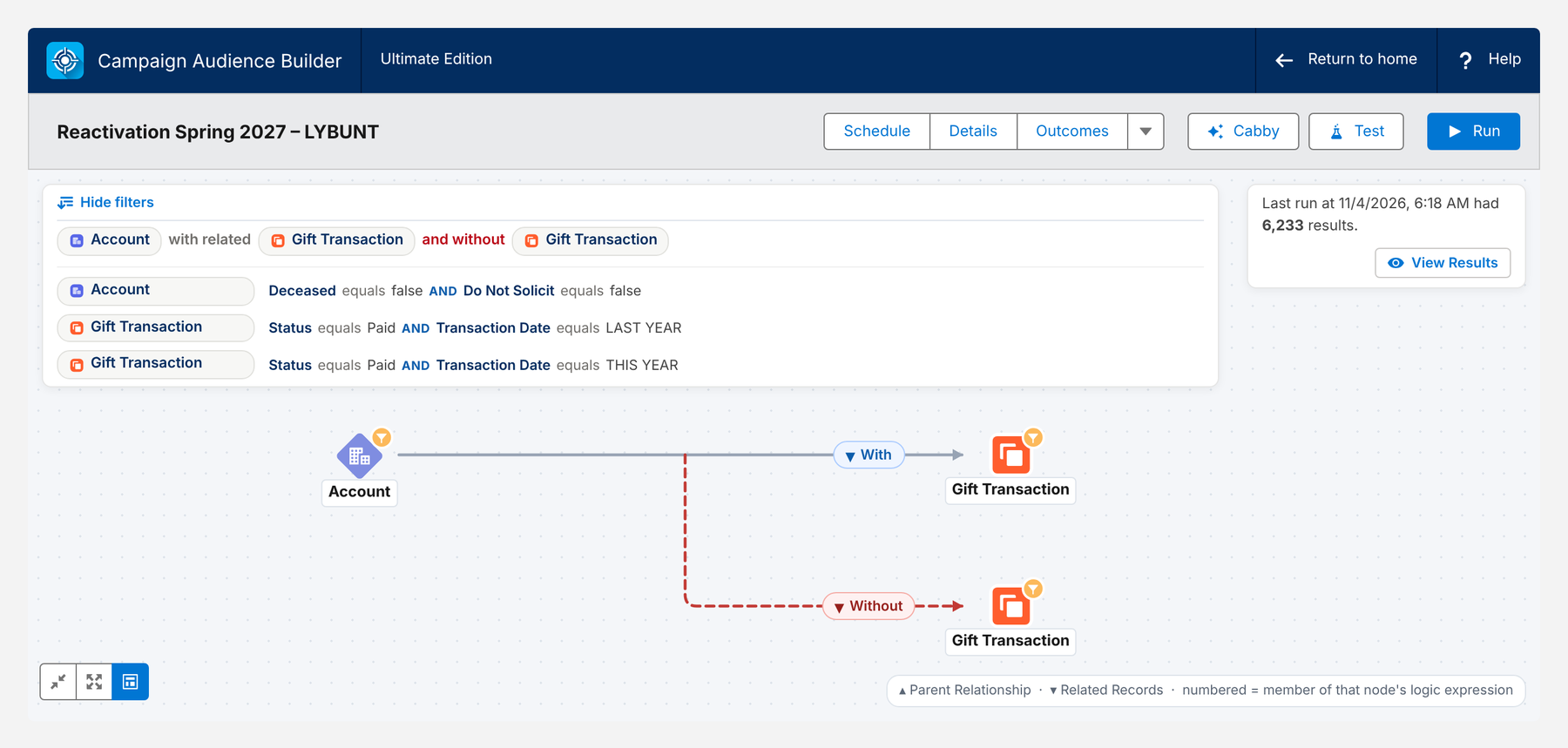
The business definition is identical. The objects, fields and status values are not. That’s the core of every segment migration – more on LYBUNT itself in our guide on LYBUNT & SYBUNT in Salesforce.
Migrating your segments in 6 steps
- Take inventory. List every report, list view, flow and external selection used for appeals, journeys and suppressions. Most orgs find far more than expected – and some nobody uses anymore.
- Write definitions in business terms. “Gave last year, not this year, not deceased, not do-not-solicit” survives the migration; “Opportunity.npo02__LastCloseDate__c” does not.
- Map every filter to the new model. Objects, fields, status values, record types, soft credits, households. Note where behavior changes – rollup timing, household logic, payment statuses.
- Rebuild in a full sandbox. Rebuild each segment on the migrated data before go-live.
- Compare counts. Run old and new segment on the same data and explain every difference. Typical causes: pending or refunded transactions, soft credits counted differently, households merged or split, rollups not yet recalculated.
- Switch suppressions first. Deceased, do not solicit and opt-outs must work on day one. A missing suppression does more damage than a missing segment.
Pitfalls we see most often
| Pitfall | Consequence | Fix |
|---|---|---|
| Segments built on rollups right after migration | Donors look lapsed until the Data Processing Engine has run | Run all calculations before the first appeal; or filter on gift transactions directly |
| All gift transaction statuses counted | Failed or refunded payments look like gifts | Filter on paid transactions |
| Household logic not rebuilt | Two letters per household, or donors missing | Rebuild on party relationship groups and compare counts |
| Levels assumed to migrate | Major donor and mid-level segments break | Rebuild level logic with flows or define segments on giving directly |
| Campaign history not migrated | No basis for LYBUNT, reactivation or appeal comparison | Migrate campaign members and source codes with the gifts |
Native tools and their limits during a migration
| Tool | Good for | Where it stops |
|---|---|---|
| Reports | Simple lists on either data model | Have to be rebuilt one by one; “with” and “without” conditions across objects are limited |
| Donor gift summary | Totals, recency, RFM scores | Scheduled, not real time; only what the Data Processing Engine calculates |
| Data 360 | Recommended by Salesforce for complex segments | Separate platform, consumption-based credits and its own data model on top |
| Flows | Replacing levels and engagement plans | Every rule is custom logic to maintain |
Segments that survive the migration with Campaign Audience Builder
Campaign Audience Builder runs natively on NPSP and on Nonprofit Cloud – on contacts and household accounts as well as on person accounts, gift transactions and gift commitments. That makes the migration a question of re-pointing, not re-inventing:
- Same logic, new objects: “with” and “without” conditions, counts, sums and periods work the same way on opportunities and on gift transactions.
- Independent of rollups: segments can filter directly on gift transactions, so they don’t depend on when the Data Processing Engine last ran.
- Side-by-side checks: build the new segment in the sandbox, compare its count with the old one, and use the Match Breakdown to see why a single donor qualifies or not.
- Suppressions from day one: deceased, do not solicit and opt-outs as reusable filters in the Filter Library, used by every audience.
- Campaigns keep working: audiences still write into Salesforce campaigns, so appeals, journeys and integrations to Marketing Cloud or Account Engagement continue as before.
Conclusion
Moving from NPSP to Nonprofit Cloud doesn’t change who your donors are – but it changes every object your segments are built on. Define segments in business terms, map them to person accounts, gift transactions and gift commitments, mind the scheduled rollups and the new household model, and compare counts before you switch. Start with the suppressions, and your first appeal on the new platform will reach exactly the donors it should.
How Campaign Audience Builder helps
Campaign Audience Builder runs natively in Salesforce and turns NPSP or Nonprofit Cloud data into appeal audiences – without reports, exports or manual list work.
- Segment on gifts, totals, recurring donations, soft credits and designations
- Prioritize appeals with waterfall sequences and send one letter per household
- Remove donors who gave since selection and measure gifts against a control group
FAQ
Do I have to migrate from NPSP to Nonprofit Cloud?
No. NPSP is still available and supported, and there is no requirement to migrate. But NPSP has received no new features since 2023 and none are planned. New fundraising features – gift commitments, outreach source codes, donor gift summaries with RFM scores – only come to Nonprofit Cloud, which Salesforce now calls Agentforce Nonprofit.
Do my reports and segments migrate automatically?
No. Nonprofit Cloud uses different objects – person accounts instead of contacts with household accounts, gift transactions instead of opportunities, gift commitments instead of recurring donations. Every report, list view, flow and segment that filters on NPSP objects has to be rebuilt on the new data model.
What replaces NPSP rollup fields in Nonprofit Cloud?
The Donor Gift Summary object. It holds totals, gift counts, first and last gift, this year and last year, soft credits and RFM scores per donor. It is calculated by the Data Processing Engine on a schedule – not in real time – so segments built on it are only as current as the last calculation.
How are households handled in Nonprofit Cloud?
In NPSP, every contact belongs to a household account that's created automatically. In Nonprofit Cloud, each donor is a person account, and households are modeled as party relationship groups. Household-level segments and 'one letter per household' logic have to be rebuilt on that structure.
How do I check that migrated segments are correct?
Write down each segment's definition in business terms, rebuild it on the new data model in a full sandbox, and compare the counts with the old segment on the same data. Differences usually point to status values, rollup timing, soft credits or household mapping.