

Volunteers and members are often the most committed people in your database – and the ones most often left out of segmentation. Segmenting them in Salesforce means looking at shifts and hours, membership dates and levels, and how both connect to giving: who is new, who is drifting away, whose membership expires next month, and which volunteers have never been asked to give. This guide shows how to build volunteer and member segments in NPSP and Nonprofit Cloud and how to turn engagement into lasting support.
This article is part of our guide to donor segmentation in Salesforce.
Why volunteers and members need their own segments
Donors give money. Volunteers give time, members commit to a relationship. Each group follows its own rhythm:
- Volunteers come in waves – events, seasons, programs. If nobody notices that a regular volunteer hasn’t signed up for months, they’re gone.
- Members have a fixed end date. Renewal is predictable – which makes a missed renewal reminder an avoidable loss.
- Both groups overlap with donors. A volunteer who has never been asked to give, or a member who receives a donation appeal the same week as their renewal notice, are both signs that segments are built in isolation.
The data model: volunteers and members in NPSP and Nonprofit Cloud
| Concept | NPSP | Nonprofit Cloud |
|---|---|---|
| Volunteer program | Campaign (Volunteers for Salesforce) | Volunteer initiative |
| Job | Volunteer job | Job position (based on a reusable position) |
| Shift | Volunteer shift | Job position shift |
| Volunteer’s participation | Volunteer hours with status (e.g. confirmed, completed, no-show) and hours worked | Job position assignment with status (e.g. upcoming, complete, absent) and actual duration |
| Volunteer profile | Contact fields such as volunteer status, skills, availability, first and last volunteer date, total hours | Person account, position qualifications and location availability |
| Hours summary | Rollups on the contact | Total volunteer hours on the donor gift summary |
| Membership | Opportunity with the membership record type: start and end date, member level, origin | No dedicated membership object out of the box – usually gift transactions or commitments with a membership type, or a membership app |
| Membership summary | Join date, end date, last level and membership status with grace period on contact and household | Depends on how memberships are modeled |
Two practical consequences:
- Status values decide everything. A “volunteer” in a segment should usually mean completed shifts – not sign-ups, cancellations or no-shows. Check which statuses your team actually uses.
- Membership in Nonprofit Cloud needs a decision first. Before you build member segments, agree how a membership, its level and its end date are stored.
8 volunteer segments
| # | Segment | Criteria | Journey |
|---|---|---|---|
| 1 | New volunteers | First completed shift in the last 90 days | Welcome, introduce the team, invite to the next shift |
| 2 | Active volunteers | Completed shift in the last 6 months | Regular updates, new opportunities matching their skills |
| 3 | Upcoming shift | Confirmed or upcoming shift in the next 7 days | Reminder with time, place and contact person |
| 4 | No-shows | Absent or no-show in the last 30 days | Friendly check-in – not a reprimand |
| 5 | Lapsing volunteers | Completed shifts before, none in the last 12 months | Personal re-invitation to a specific opportunity |
| 6 | Core volunteers | 50+ hours in the last 12 months | Recognition, leadership roles, peer recruiting |
| 7 | Skills-based | Skill or qualification matches an open position | Targeted call for help |
| 8 | Volunteers who don’t give | Completed shift in the last 12 months, no gift in 24 months | Thank-you, impact story, invitation to give |
8 member segments
| # | Segment | Criteria | Journey |
|---|---|---|---|
| 1 | New members | Joined in the last 90 days | Welcome, benefits, first event invitation |
| 2 | Renewal due | End date in the next 60 days | Renewal sequence |
| 3 | Grace period | End date passed, within the grace period | Last reminder, personal follow-up for higher levels |
| 4 | Lapsed members | Expired more than the grace period ago, within 24 months | Reacquisition offer |
| 5 | Upgrade candidates | Same level for 3+ years, or extra gifts above the next level’s fee | Invitation to the next level |
| 6 | Members who also give | Active membership and a gift in the last 12 months | Recognition – and no generic appeal |
| 7 | Auto-renewing members | Membership paid by a recurring commitment | Keep payment details current – see recurring donors |
| 8 | By level | Active membership at a given level | Level-specific benefits and events |
A renewal sequence that runs itself
- 60 days before the end date: renewal invitation with a summary of what membership made possible.
- 30 days before: reminder, ideally with an option to switch to automatic renewal.
- On the end date: “your membership ends today”.
- During the grace period: a last reminder; a phone call for higher levels.
- After the grace period: move to the lapsed segment and a reacquisition offer a few months later.
Like every time-sensitive journey, the segment has to be current every day. Members who renew must leave the sequence immediately – a “your membership has expired” email after someone paid is the fastest way to annoy a loyal supporter.
Connecting volunteering, membership and giving
The most valuable segments combine all three:
- Volunteers who don’t give – the warmest prospects you have. They know your work from the inside.
- Donors who volunteer – recognize both. A volunteer who also gives shouldn’t receive the same appeal as everyone else.
- Members in their renewal window – exclude them from donation appeals until they’ve renewed, so two asks don’t compete.
- Lapsed volunteers who still give – their connection continues; invite them back to a specific opportunity.
In NPSP, volunteer hours, memberships and gifts all hang off the contact, so these segments combine records from different objects. In Nonprofit Cloud, the person account is the common anchor for job position assignments and gift transactions.
Native tools and their limits
| Tool | Good for | Where it stops |
|---|---|---|
| V4S reports and contact fields | Volunteer lists by status, last volunteer date, total hours | “Completed shifts but no gift”, counts in a period, lapsing logic across shifts and gifts |
| NPSP membership fields | Current, grace period and expired members | Combining membership with volunteering or gifts; upgrade logic |
| Donor gift summary (Nonprofit Cloud) | Total volunteer hours alongside giving | Scheduled calculation; no period-based hours or shift status |
| Reports and list views | Simple, single-object lists | “With” and “without” conditions across volunteering, membership and giving in one list |
Volunteer and member segments with Campaign Audience Builder
With Campaign Audience Builder, every segment above is an audience on your NPSP, V4S or Nonprofit Cloud data – including conditions across volunteering, membership and giving:
- Across objects: volunteers with completed shifts and without gifts; members with an end date in the next 60 days and without a renewal.
- Counts and sums: 50+ volunteer hours in 12 months, three or more shifts in a season.
- Daily refresh for renewals and reminders: scheduled runs add new members to the renewal sequence, and campaign cleansing removes everyone who renewed.
- Clean exclusions: members in their renewal window out of donation appeals, no-shows out of recognition mailings – reusable from the Filter Library.
- Measured: Outcomes such as “first gift within 90 days” for volunteer-to-donor asks, compared with a control group.
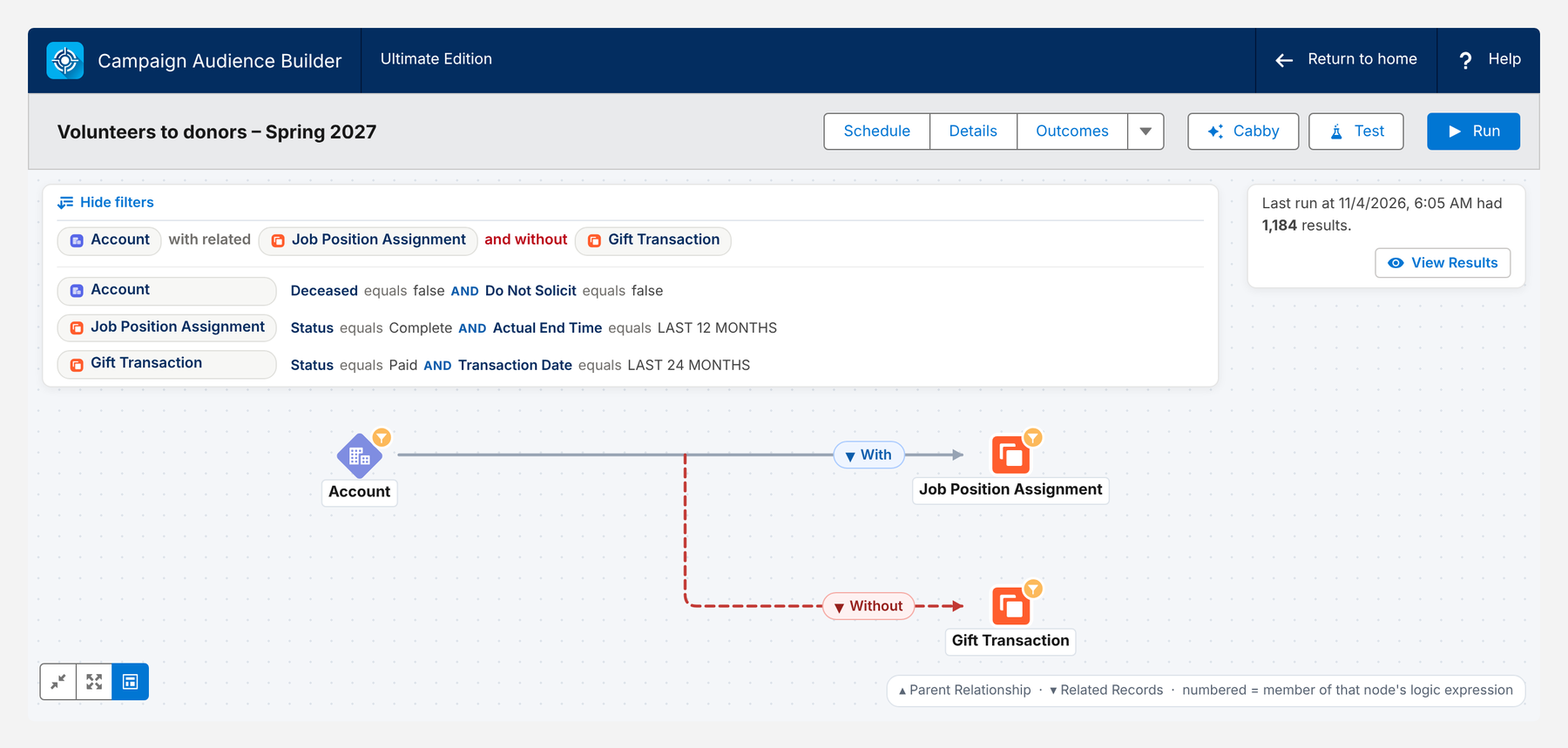
Here is the volunteer-to-donor segment on Nonprofit Cloud data – supporters with a completed shift in the last 12 months and without a paid gift in the last 24 months:
Conclusion
Volunteers and members are already committed – segmentation makes sure that commitment is noticed. Catch lapsing volunteers before they’re gone, renew members on time and stop the sequence the moment they renew, invite volunteers who have never been asked to give, and keep members in their renewal window out of competing appeals. Segments that combine volunteering, membership and giving turn engagement into lasting support.
How Campaign Audience Builder helps
Campaign Audience Builder runs natively in Salesforce and turns NPSP or Nonprofit Cloud data into appeal audiences – without reports, exports or manual list work.
- Segment on gifts, totals, recurring donations, soft credits and designations
- Prioritize appeals with waterfall sequences and send one letter per household
- Remove donors who gave since selection and measure gifts against a control group
FAQ
How are volunteers stored in Salesforce?
With NPSP, most organizations use the free Volunteers for Salesforce (V4S) package: volunteer jobs and shifts linked to campaigns, and volunteer hours records per contact. Nonprofit Cloud has its own Volunteer Management: volunteer initiatives, job positions, shifts and job position assignments with a status and the actual duration in hours.
How are memberships tracked in NPSP?
NPSP tracks memberships as opportunities with the membership record type, including start date, end date, member level and membership origin (new, renewal, reacquire). Rollups on the contact and household show the join date, end date, last level and a membership status with a configurable grace period.
How do I find volunteers who could become donors?
Select volunteers with completed shifts in the last 12 months and without a paid gift in the last 24 months. Thank them for their time first, show the impact, and invite them to give – they already know your work from the inside.
When should membership renewal reminders start?
A common sequence starts 60 days before the end date, follows up at 30 days and on the expiry date, and continues during the grace period. Members who renew must leave the sequence immediately, so the segment has to refresh daily.
Should volunteers and members receive fundraising appeals?
Yes, but with care. Members in their renewal window shouldn't receive a separate donation ask at the same time, and active volunteers deserve a version that recognizes their time. Segments that combine volunteering, membership and giving make this possible.