


A fundraising appeal in Salesforce is more than a campaign record with a list attached. It’s a structure: one campaign for the appeal, segments with their own source codes, suppressions that keep the wrong people out, gifts that are attributed back to the right segment, and results you can compare against a control group. This guide shows how to set up appeals with Salesforce campaigns in NPSP and Nonprofit Cloud – from campaign hierarchy to measuring what the appeal actually raised.
This article is part of our guide to donor segmentation in Salesforce.
How appeals map to Salesforce campaigns
Both NPSP and Nonprofit Cloud use the standard campaign object for appeals. What differs is how segments and gifts connect to it.
| Concept | NPSP | Nonprofit Cloud |
|---|---|---|
| Appeal | Campaign, often under a parent campaign for the program or year | Campaign |
| Segment | Child campaign per segment, or a field on the campaign member | Outreach source code – a combination of message, channel and audience segment |
| Who received it | Campaign members with a status such as Sent | Campaign members, or the segment linked to the outreach source code |
| Gift attribution | Primary Campaign Source on the donation opportunity | Gift transaction related to the campaign and the outreach source code |
| Responders | Donors are added to the campaign automatically with a status such as Donated | Gifts counted on the campaign and outreach source code |
| Results | Campaign rollups: number and amount of won opportunities | Rollups such as gift count and response rate on campaign and outreach source code |
Two details that matter in practice:
- Response rate needs the segment size. In Nonprofit Cloud, the response rate on an outreach source code can only be calculated if the headcount of the segment is stored on it. In NPSP, the campaign member count of the child campaign plays that role.
- Attribution needs the code on the gift. Rollups only work if gift entry – manual, batch or via your donation platform – captures the campaign or source code. A reply form without a printed code or a donation link without a parameter breaks the chain.
A campaign structure that scales
A simple hierarchy that works in both data models:
- Program or year – e.g. “Individual Giving 2027”
- Appeal – e.g. “Spring Appeal 2027”
- Segment – e.g. “SP27 – LYBUNT”
- Channel or version – e.g. “SP27 – LYBUNT – Letter A”
In NPSP, levels 3 and 4 are child campaigns, and campaign hierarchies roll up members, responses and income across up to five levels. In Nonprofit Cloud, the appeal is the campaign and each segment, channel and version combination is an outreach source code.
A consistent source code convention makes every gift readable at a glance:
| Part | Example | Meaning |
|---|---|---|
| Appeal | SP27 | Spring Appeal 2027 |
| Channel | M / E / P | Mail, email, phone |
| Segment | LYB | LYBUNT donors |
| Version | A / B | Letter or email version for testing |
SP27-M-LYB-A then means: spring appeal 2027, mail, LYBUNT donors, letter A. Put the code on the reply form and in every donation link.
If you only send one version to one segment, a single campaign with the segment stored on the campaign member is enough. Once you test versions or compare segments, separate child campaigns or source codes make reporting much easier.
The appeal workflow in 7 steps
1. Define goal and audience
Decide what the appeal should achieve – income, reactivation, recurring conversion – and which donors it’s for. A reactivation appeal and a mid-level upgrade ask are different appeals, even if they mail on the same day.
2. Build the segments in priority order
Typical appeal segments are active donors, LYBUNT and SYBUNT, mid-level donors and recent first-time donors. A donor who qualifies for several segments should land in exactly one – the one with the highest priority. Work through the segments as a waterfall, and send one piece per household where your program mails households – our guide on one mailing per household shows how.
3. Apply suppressions
Every appeal needs the same set of exclusions:
- deceased supporters and “do not solicit” / “do not mail” preferences
- donors who gave in the last 30–60 days
- active recurring donors – or a dedicated version for them
- major donors managed personally by a gift officer
- donors who asked for fewer appeals or only one appeal per year
4. Load the segments into the campaigns
Add each segment to its campaign or source code with a status such as “Sent”, and record the segment size. In NPSP, check the campaign member statuses before loading – the status for responders (e.g. “Donated”) has to exist on every campaign.
5. Refresh until the drop
Between selection and mail drop there are often two to four weeks. Refresh the audience until the last possible moment and remove everyone who gave in the meantime – otherwise your most engaged donors get an ask for a gift they’ve just made.
6. Attribute every gift
Make sure the source code reaches the gift: printed on the reply form, prefilled in the donation link, and selected in gift entry. Check unattributed gifts weekly while the appeal is running – they usually point to a missing code on one channel.
7. Measure against a control group
Compare segments by response rate, average gift and income – and hold back a random control group from each segment to see how much of that income the appeal actually caused.
Testing and measuring appeals
Three levels of measurement, from simple to meaningful:
| Level | Question | How |
|---|---|---|
| Performance | Which segment raised the most? | Response rate, average gift and income per child campaign or source code |
| Version test | Which letter works better? | Split a segment randomly into version A and B, compare response rate and average gift |
| Lift | Did the appeal cause the gifts? | Hold back a random control group, compare giving of target and control group over the same period |
Lift matters most for your best donors. Active, loyal donors often give in spring whether they receive a letter or not. A segment with a high response rate can have a low lift – and a reactivation segment with a modest response rate can be the one that really moved money.
Keep the control group small – 5 to 10% of a segment is usually enough – and keep it consistent: the same donors stay held back for the duration of the measurement.
Common appeal mistakes
| Mistake | Consequence | Fix |
|---|---|---|
| List pulled weeks before the drop | Donors who just gave receive the ask | Refresh until the drop, exclude recent gifts |
| No source code on the reply form | Gifts can’t be attributed to a segment | Code on every reply form and link |
| Overlapping segments | Donors receive two versions | Priority order, one segment per donor |
| Missing suppressions | Complaints, opt-outs, embarrassing letters | Reusable suppression set for every appeal |
| Only response rate reported | Best donors look like the best segment | Control group per segment |
| Manual exports per appeal | Hours of list work, errors in every round | Segments that run directly in Salesforce |
Native tools and their limits
| Tool | Good for | Where it stops |
|---|---|---|
| Reports and “Add to Campaign” | Simple lists into a campaign | Priority across segments, exclusions across objects, households, refresh until the drop |
| Campaign rollups | Gifts and amounts per campaign | No comparison with a control group |
| Outreach source codes (Nonprofit Cloud) | Attribution and rollups per segment | Building the segment itself – that happens in reports, Data 360 or a third-party tool |
| Data Import / Data Loader | Loading external selections | Every appeal becomes an export-import cycle |
Appeals with Campaign Audience Builder
With Campaign Audience Builder, every appeal segment is an audience that runs natively on your NPSP or Nonprofit Cloud data and writes directly into your campaigns:
- Segments in priority order: waterfall sequences put every donor into exactly one segment, with one result per household where you need it.
- Reusable suppressions: deceased, do not solicit, recent gifts and recurring donors as filters from the Filter Library – the same in every appeal.
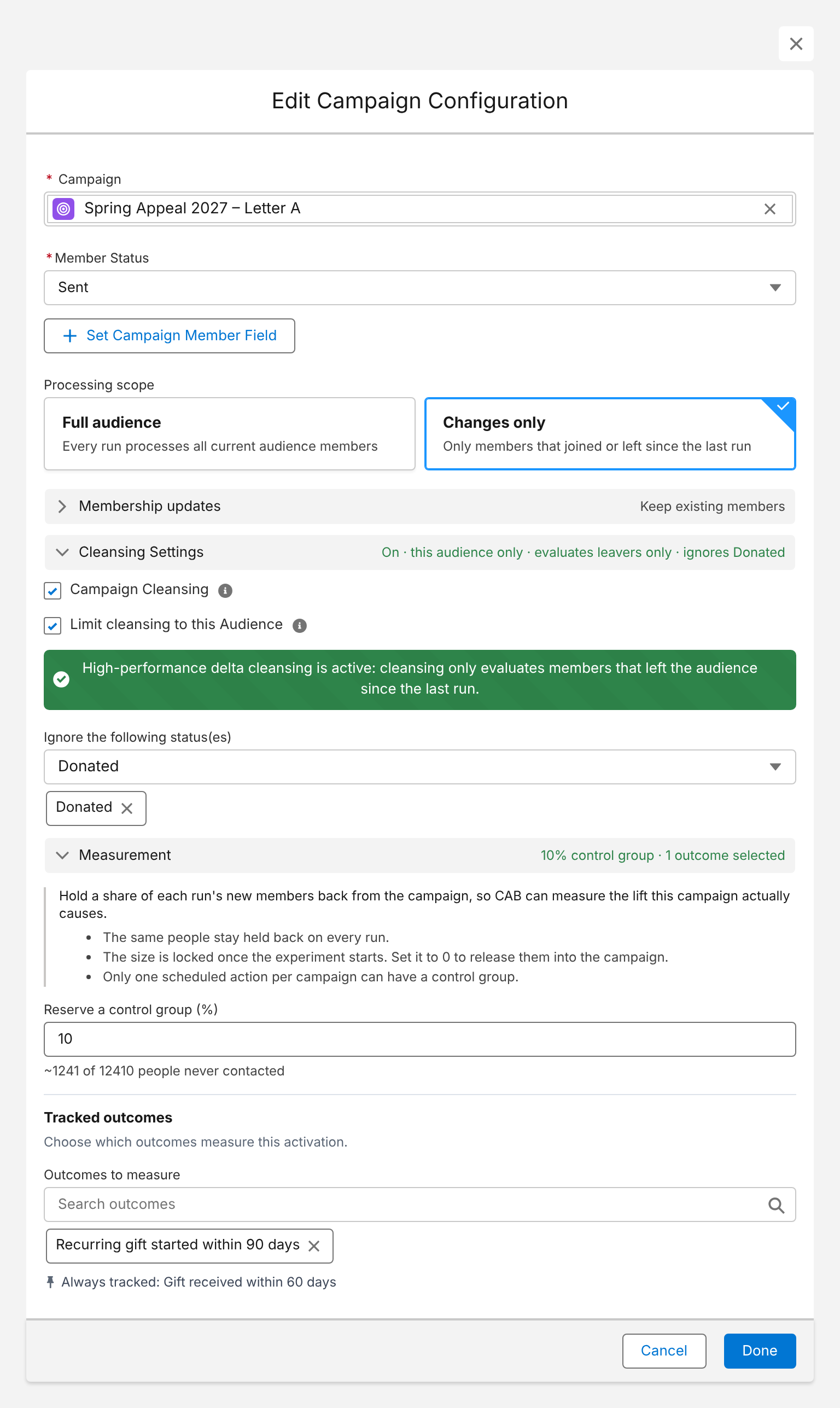
- Refresh until the drop: scheduled runs keep the campaigns current, and campaign cleansing removes donors who no longer qualify – while members with the status “Donated” stay untouched.
- Control groups and outcomes: hold back a share of every segment and measure outcomes such as “gift received within 60 days” against the control group.
- No exports: segments go straight into campaigns, and from there to Marketing Cloud, Account Engagement or your email and print tools.
Here is the campaign configuration for one appeal segment – refreshed on schedule, cleansed without touching donors who already gave, with a 10% control group and a tracked outcome:
Conclusion
Good appeals in Salesforce rest on structure: one campaign per appeal, segments with their own source codes, the same suppressions every time, and gifts that find their way back to the segment that asked for them. Refresh the audience until the drop, put every donor into exactly one segment, and measure against a control group – then you know not only which segment raised the most, but which one made the difference.
How Campaign Audience Builder helps
Campaign Audience Builder runs natively in Salesforce and turns NPSP or Nonprofit Cloud data into appeal audiences – without reports, exports or manual list work.
- Segment on gifts, totals, recurring donations, soft credits and designations
- Prioritize appeals with waterfall sequences and send one letter per household
- Remove donors who gave since selection and measure gifts against a control group
FAQ
How do I track a fundraising appeal in Salesforce?
Create a campaign for the appeal, add everyone who receives it as campaign members, and link every gift to the campaign. In NPSP, gifts are linked through the Primary Campaign Source on the opportunity. In Nonprofit Cloud, gift transactions are related to the campaign and to an outreach source code. Campaign rollups then show the number of gifts and the amount raised.
What is a source code in fundraising?
A source code identifies the combination of appeal, channel and segment a donor responded to – for example the spring appeal, sent by mail, to LYBUNT donors, letter version A. It's printed on the reply form or added to the donation link, so every gift can be attributed to exactly one segment. Nonprofit Cloud has a dedicated outreach source code object for this.
Should each appeal segment be its own campaign?
In NPSP, child campaigns per segment under one appeal campaign are the most common setup, because campaign rollups then work per segment. Alternatively, keep one campaign and store the segment or source code on the campaign member. In Nonprofit Cloud, use one campaign per appeal and one outreach source code per segment and channel.
How do I exclude donors who gave after the appeal list was pulled?
Refresh the appeal audience until the mail drop or send date and remove everyone who gave since the selection date. With a static list pulled weeks before the drop, recent donors receive an appeal asking them for a gift they've just made.
How do I measure if an appeal actually worked?
Response rate and income per segment show performance, but not effect – many donors would have given anyway. Hold back a random control group from each segment and compare giving in the target group with giving in the control group. The difference is the income the appeal actually caused.