

Recurring donors are the most valuable relationships in most fundraising programs – and the easiest to lose quietly. Segmenting them in Salesforce means watching the commitment and the payments separately: who is new, whose payment failed, who lapsed without cancelling, who is ready to give more, and which one-time donors are already giving like recurring donors. This guide shows how to build these segments in NPSP and Nonprofit Cloud and how to turn them into journeys that keep, grow and convert recurring donors.
This article is part of our guide to donor segmentation in Salesforce.
Why recurring donors need their own segments
A recurring donor doesn’t decide to give every month – they decided once. Most of what happens afterwards is out of their sight: an expired card, a failed debit, an amount that hasn’t changed in five years. That’s why recurring donors need different communication than one-time donors:
- Payment problems need action within days, not in the next appeal.
- Committed donors shouldn’t be treated like occasional ones. Sending them the standard appeal tells them you don’t know they are already giving.
- Growth comes from upgrades, not from more asks.
All of this depends on segments that look at the commitment and the payments at the same time.
The data model: NPSP vs. Nonprofit Cloud
| Concept | NPSP (Enhanced Recurring Donations) | Nonprofit Cloud |
|---|---|---|
| Commitment | Recurring donation | Gift commitment |
| Schedule | Amount, installment period and frequency on the recurring donation | Gift commitment schedule |
| Individual payment | Installment opportunity (with payments) | Gift transaction |
| Status | Active, Lapsed, Closed, Paused – with automatic lapsing after a configurable number of days | Commitment and transaction status |
| Change history | Change log with upgrades and downgrades | Changes to the commitment and its schedule |
Two practical consequences:
- Status alone isn’t enough. A commitment can be “Active” while its last two payments failed. Segments for payment problems need the payment records.
- Payment status depends on your processor integration. Whether a failed payment shows up as a failed transaction, a missing installment or a status reason depends on how your payment provider is connected. Check how a failed payment looks in your org before you build the segment.
10 recurring donor segments
| # | Segment | Criteria | Journey |
|---|---|---|---|
| 1 | New recurring donors | Commitment started in the last 90 days | Welcome series: thank, show impact, explain what happens next |
| 2 | Failed payment | Active commitment with a failed payment in the last 30 days, no successful payment since | Save sequence: update payment details |
| 3 | Lapsed, not cancelled | Status lapsed, or no successful payment for a defined period | Personal reactivation: “we noticed your support paused” |
| 4 | Paused | Status paused, pause ending in the next 30 days | Friendly reminder before restart |
| 5 | Recently cancelled | Closed in the last 12 months | Win-back after a respectful pause; ask why |
| 6 | Upgrade candidates | Active for 12+ months, reliable payments, amount unchanged for 24 months | Upgrade ask with a concrete suggested amount |
| 7 | Anniversary | First payment anniversary in the next 30 days | Thank-you with a year in review – a natural upgrade moment |
| 8 | Loyal long-term donors | Active for five years or more | Recognition, insider updates, legacy conversations |
| 9 | Recurring plus extra gifts | Active commitment and a one-time gift in the last 12 months | Emergency and project appeals – they respond to them |
| 10 | One-time to recurring candidates | Three or more one-time gifts in 24 months, no commitment | Recurring conversion ask |
And the exclusions:
- active recurring donors in standard appeals (or a dedicated version)
- donors with a recent failed payment in upgrade asks
- donors who downgraded or paused recently in upgrade asks
- deceased and “do not contact” supporters in every segment
Saving failed payments
Failed payments are the single biggest source of avoidable recurring donor loss. A simple save sequence:
- Day 1–3: a friendly email or SMS with a direct link to update payment details.
- Day 7: a second reminder, ideally from a named person.
- Day 14: a phone call for higher-value commitments.
- Day 30: a final message before the commitment is marked lapsed.
The segment behind it must be current every day. As soon as a retry succeeds or the donor updates their details, they have to leave the sequence – otherwise they receive “your payment failed” after everything is fixed. That’s why the segment checks both: a failed payment in the last 30 days and no successful payment since.
Upgrade asks at the right moment
Upgrades are the most efficient way to grow recurring income – if the timing is right:
- After reliability, not at the start. Ask after 12 months of successful payments, not in the welcome series.
- On the anniversary. A “one year together” message with impact and a small, specific upgrade suggestion works better than a generic ask.
- When the amount is outdated. Donors who have given the same amount for several years often simply never thought about it again.
- With a concrete amount. Suggest a modest increase based on the current amount instead of an open “give more”.
Keep donors with recent payment problems, pauses or downgrades out of upgrade asks. After an upgrade, track whether the higher amount is actually paid – the change log in NPSP or the commitment history in Nonprofit Cloud shows it.
Converting one-time donors
Donors who give several times a year already behave like recurring donors – the commitment just makes it easier for them. Look for:
- three or more one-time gifts in the last 24 months
- gifts at regular intervals, for example in most quarters
- no active or recently closed commitment
Ask them with a clear benefit: less paperwork, steady support for the cause they care about, and fewer appeals in their mailbox. Then exclude everyone who converts from one-time appeals – automatically.
Native tools and their limits
| Tool | Good for | Where it stops |
|---|---|---|
| Recurring donation status (NPSP) | Active / lapsed / closed / paused lists | Doesn’t show payment problems on still-active commitments |
| Reports | Lists by status, amount, start date | Commitment and payment conditions together, “no successful payment since”, counts of one-time gifts – hard or impossible in one report |
| Rollups | Totals and dates per donor | Don’t separate recurring from one-time giving unless configured to |
| Snapshots | – | A save sequence built on a weekly export reaches donors days too late |
Recurring donor segments with Campaign Audience Builder
With Campaign Audience Builder, every segment above is an audience on your NPSP or Nonprofit Cloud data – including conditions across commitments and payments:
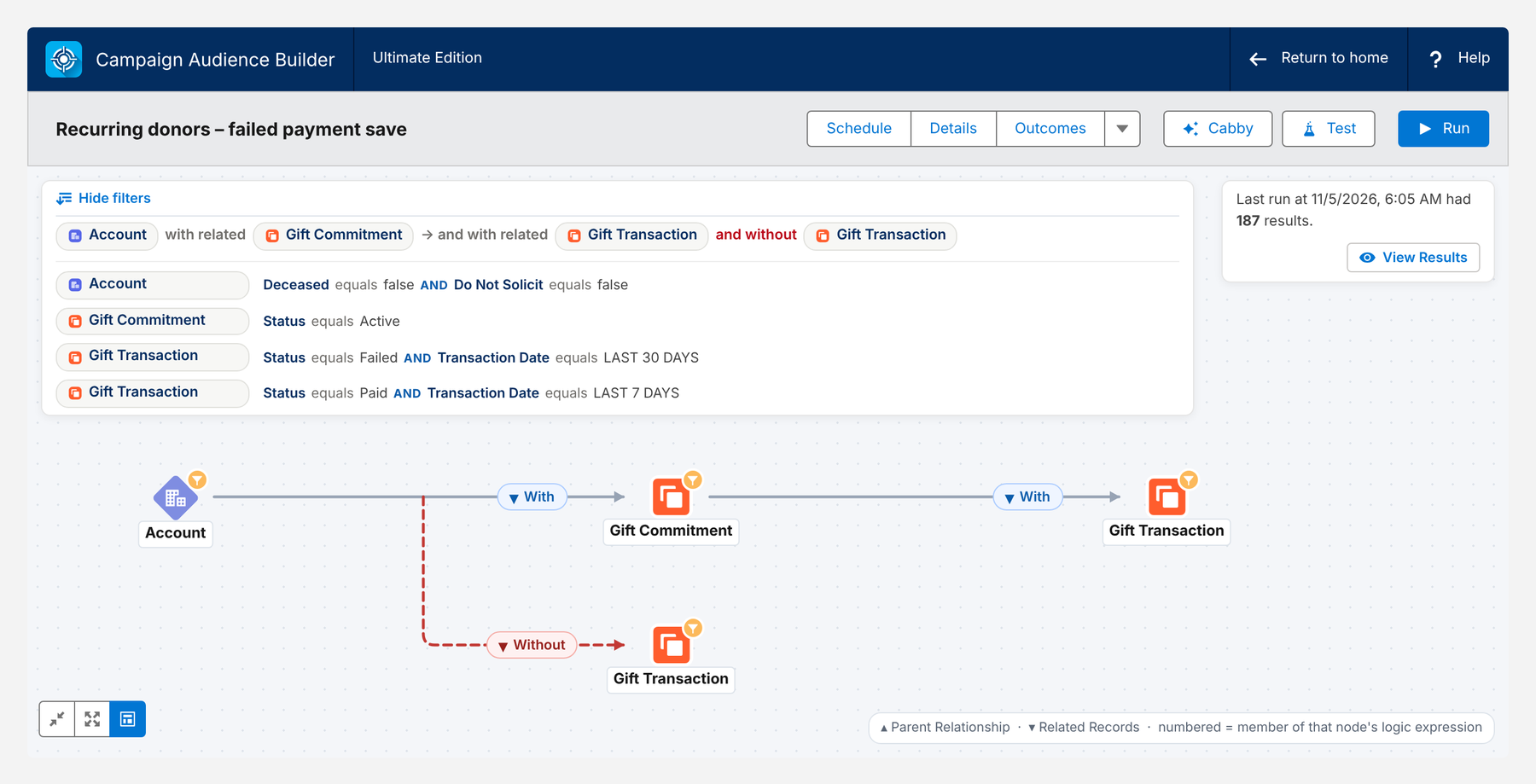
- Commitments and payments together: an active commitment with a failed payment in the last 30 days and without a successful payment since.
- Counts and periods: three or more one-time gifts in 24 months, no commitment; amount unchanged for 24 months.
- Daily refresh for save sequences: scheduled runs add new cases and campaign cleansing removes donors whose payment went through.
- Clean exclusions: active recurring donors out of standard appeals, recent payment problems out of upgrade asks – reusable from the Filter Library.
- Measured: Outcomes such as “recurring gift started within 60 days” for conversion asks, compared with a control group.
Here is the failed payment save segment on Nonprofit Cloud data – active commitments with a failed payment in the last 30 days, excluding everyone with a successful payment in the last seven days:
Conclusion
Recurring donors need segments that watch both the commitment and the payments. Save failed payments within days, reach lapsed donors before they become former donors, ask for upgrades after reliability and on anniversaries, and convert one-time donors who already give like recurring donors. Keep these segments current every day – especially the save sequence – and keep committed donors out of appeals meant for everyone else.
How Campaign Audience Builder helps
Campaign Audience Builder runs natively in Salesforce and turns NPSP or Nonprofit Cloud data into appeal audiences – without reports, exports or manual list work.
- Segment on gifts, totals, recurring donations, soft credits and designations
- Prioritize appeals with waterfall sequences and send one letter per household
- Remove donors who gave since selection and measure gifts against a control group
FAQ
How are recurring donations stored in Salesforce?
In NPSP, a recurring donation record holds the commitment – amount, frequency, status – and creates one installment opportunity per payment. In Nonprofit Cloud, the commitment is a gift commitment with a schedule, and each payment is a gift transaction. Segmentation needs both levels: the commitment for status and amount, the individual gifts for payment history.
What is a lapsed recurring donation?
A recurring donation is usually considered lapsed when expected payments have not arrived for a defined period, but the donor hasn't cancelled. NPSP's Enhanced Recurring Donations can set the status to Lapsed and later Closed automatically after a configurable number of days. Lapsed donors are the most urgent group to contact, because many of them didn't decide to stop.
When should I ask recurring donors to upgrade?
Good moments are the anniversary of the first gift, after a period of reliable payments – for example 12 months – and when the amount hasn't changed for a long time. Avoid asking donors with recent failed payments or donors who downgraded recently.
Should recurring donors receive regular appeals?
Most organizations exclude active recurring donors from standard appeals or send them a different version – a thank-you with a soft invitation for an extra gift, rather than the same request a one-time donor receives. Treating committed donors like occasional donors is one of the most common reasons they cancel.
How do I find one-time donors who could become recurring donors?
Look for donors with several one-time gifts in a short period – for example three or more gifts in 24 months – and no recurring commitment. They already give regularly; a recurring gift just makes it easier for them.