


In Marketing Cloud, SQL has become the default way to build audiences – not because marketers like it, but because joins across data extensions, Salesforce data from Marketing Cloud Connect and the retirement of Audience Builder leave few alternatives. There are six ways to segment without SQL. Which one fits depends on how complex your logic is and where the data comes from: Marketing Cloud engagement data or Salesforce CRM. This guide compares the options, maps typical segments to them and covers the details that decide whether a segment is sendable.
This article is part of our complete guide to Salesforce segmentation. If you’re replacing Audience Builder, see Audience Builder alternatives.
Why Marketing Cloud segmentation ends up in SQL
- Joins across data extensions. Real segments combine subscribers, purchases, products and engagement – stored in different data extensions.
- Synchronized data extensions aren’t sendable. Salesforce objects synced via Marketing Cloud Connect have to be copied into a sendable data extension first, typically with a query.
- Audience Builder is being retired. The point-and-click option is no longer sold to new customers.
- Data views need queries. Sends, opens, clicks and bounces live in system data views that are queried, not filtered.
The result: every new segment becomes a request to the person who writes SQL.
6 ways to segment without SQL
1. Data filters and filtered data extensions
Drag-and-drop filters on a data extension or attribute group create a filtered data extension. A filter activity in Automation Studio refreshes it on a schedule.
- Good for: attribute filters on one data extension – country, language, customer type, opt-in.
- Limits: no complex joins across several data extensions, limited logic, no aggregates.
2. Journey Builder: entry criteria and decision splits
Instead of building separate audiences, split one entry audience inside the journey with decision splits and engagement splits.
- Good for: branching an existing audience by attributes and email engagement.
- Limits: segmentation lives inside one journey and can’t be reused elsewhere; the entry audience still has to come from somewhere.
3. Audience Builder – while it lasts
Existing customers can still use it, but it’s being retired. Don’t build new processes on it; see the alternatives.
4. No-code apps on data extensions: DESelect
DESelect Segment adds drag-and-drop selections across data extensions and data views, with scheduling, deduplication and – in higher editions – aggregations and waterfalls.
- Good for: complex segments on Marketing Cloud data without SQL.
- Limits: CRM data has to be in Marketing Cloud first; paid editions are priced per Marketing Cloud org and add to the stack.
5. Data 360 segments and Marketing Cloud Next
Data 360 offers a visual segment canvas on unified profiles; Marketing Cloud Next uses those segments directly.
- Good for: organizations unifying many data sources.
- Limits: a separate platform with data modeling and consumption-based credits for publishing and refreshing segments.
6. Segment in Salesforce CRM and deliver to Marketing Cloud
When criteria come from Salesforce – account type, region, opportunities, products, contracts, cases – build the segment in Salesforce and write the result into a sendable data extension, directly or through a Salesforce campaign.
- Good for: B2B and nonprofit segments built on CRM data; no synced object copies, no SQL to join them.
- Limits: engagement data that only exists in Marketing Cloud data views is better segmented in Marketing Cloud.
The options compared
| Option | Logic depth | Data | Skills | Cost |
|---|---|---|---|---|
| Data filters | Simple | One data extension or attribute group | Marketer | Included |
| Journey Builder splits | Simple to medium, inside one journey | Entry audience and engagement | Marketer | Included |
| DESelect | Complex | Marketing Cloud data extensions and data views | Marketer | Subscription per Marketing Cloud org |
| Data 360 / Marketing Cloud Next | Complex | Unified profiles from many sources | Marketer after data modeling | Consumption-based credits |
| Segment in Salesforce CRM | Complex | Any Salesforce object | Marketer or admin | App subscription, e.g. Campaign Audience Builder |
| SQL (for comparison) | Anything | Data extensions and data views | SQL specialist | Included, but specialist time |
Which option for which segment?
| Segment | Best option |
|---|---|
| Subscribers in Germany with language German and opt-in | Data filter |
| Opened the welcome email but didn’t click – send a reminder | Journey Builder engagement split |
| Bought category X three times in 12 months, based on order data in Marketing Cloud | DESelect |
| Customers with product A but not product B, from Salesforce opportunities | Segment in Salesforce CRM |
| Contacts whose contract ends in the next 90 days | Segment in Salesforce CRM |
| One profile across web shop, app and CRM | Data 360 |
Make sure the segment is sendable
Whatever tool builds the segment, the target data extension decides whether you can send to it:
- Sendable with the right relationship. The data extension must be sendable, with the send relationship from the subscriber key to the subscriber key.
- Consistent subscriber key. If you use Marketing Cloud Connect, the subscriber key is usually the Salesforce contact or lead ID. Mixing IDs and email addresses creates duplicate contacts.
- Refresh, not append. Decide whether each run replaces the data extension or adds to it. Segments that should only contain current members need to be cleared before each refresh.
- Business units. Synchronized data lives in the top-level business unit by default; check where the target data extension needs to be.
Marketing Cloud segments from Salesforce data with Campaign Audience Builder
Campaign Audience Builder builds the segment in Salesforce and writes it into Marketing Cloud – without SQL and without syncing every related object:
- Any Salesforce object: accounts, opportunities, opportunity products, contracts, cases, custom objects – with “with” and “without” conditions, aggregates and priority sequences.
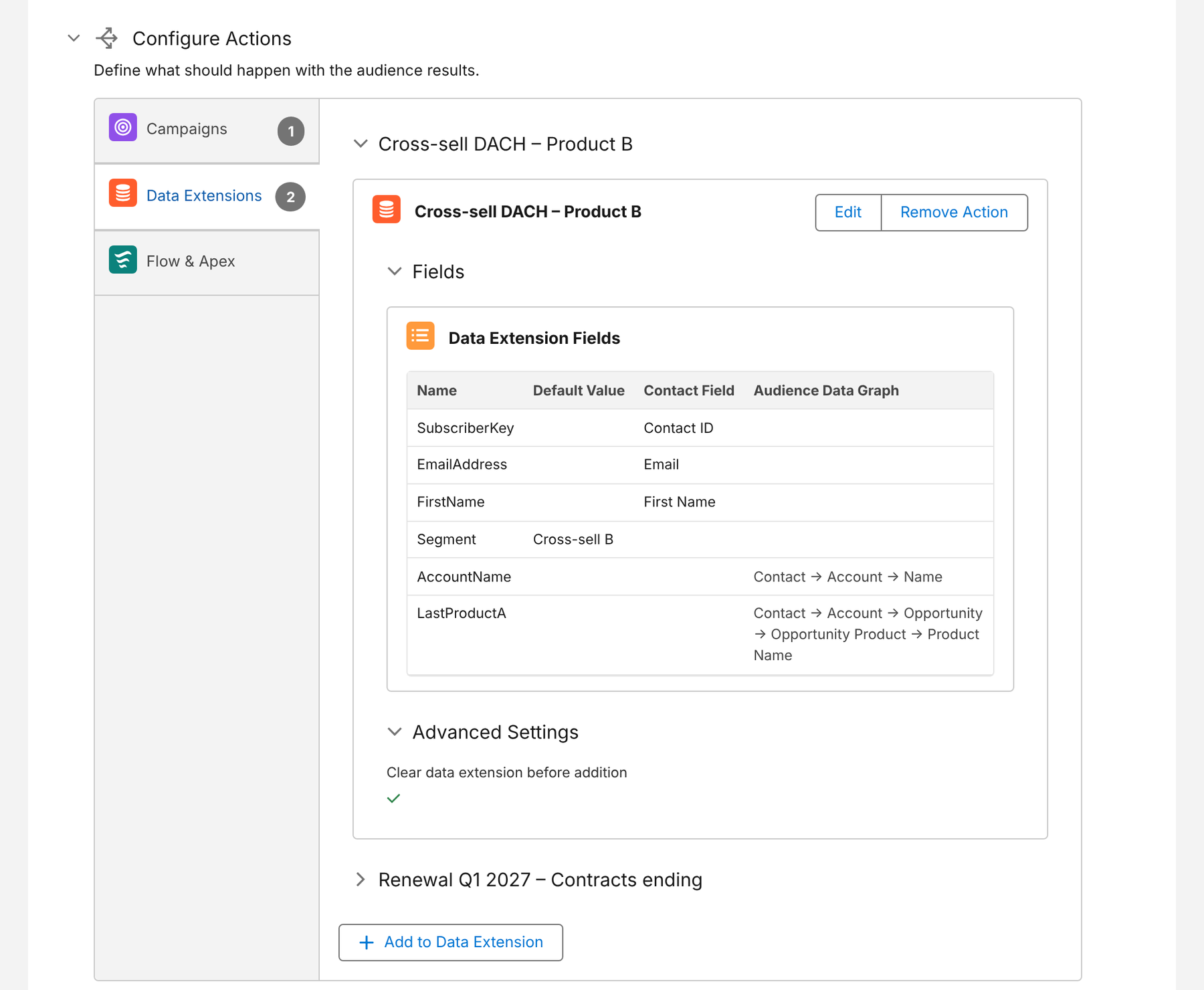
- Direct into data extensions: create a new data extension or use an existing one, map contact fields, fields from related records along the audience path, values of aggregate conditions such as total won revenue, and fixed values, and clear the data extension before each run if needed.
- Or via campaigns: fill Salesforce campaigns that Marketing Cloud picks up through Marketing Cloud Connect – the options are compared in how to sync Salesforce campaigns to Marketing Cloud.
- Scheduled: audiences refresh on a schedule, so data extensions stay current for journeys and sends.
Here are the scheduled actions of an audience – two data extensions in Marketing Cloud, filled with contact fields, a fixed segment value and fields from the account and the won product:
More on the setup on our Marketing Cloud integration page.
Conclusion
Segmenting in Marketing Cloud without SQL is possible – if you pick the option that matches the segment. Data filters and Journey Builder cover simple cases, DESelect covers complex segments on Marketing Cloud data, Data 360 covers many unified sources, and segments built on Salesforce CRM data are best built in Salesforce and written straight into a sendable data extension. Keep SQL for the cases that genuinely need it.
How Campaign Audience Builder helps
Campaign Audience Builder builds audiences on your Salesforce CRM data and delivers them to Account Engagement, Marketing Cloud and third-party tools – without reports, CSV imports or SQL.
- Segment on any standard or custom object, including products, contracts and cases
- Sync audiences into Pardot lists or Marketing Cloud data extensions on a schedule
- Reach any other tool through Salesforce campaigns or a Flow or Apex API call
FAQ
Can you segment in Marketing Cloud without SQL?
Yes. Data filters create filtered data extensions with drag and drop, Journey Builder can split audiences with decision splits, no-code apps like DESelect build complex selections on data extensions, Data 360 offers a visual segment canvas, and segments on CRM data can be built in Salesforce and written into a data extension.
Why do Marketing Cloud teams rely on SQL so much?
Because many segments need joins across data extensions, Salesforce data synchronized via Marketing Cloud Connect isn't directly sendable, and Audience Builder – the no-code option – is being retired. SQL query activities in Automation Studio are the one tool that can do all of it, but they need specialists.
Are synchronized data extensions sendable?
No. Synchronized data extensions mirror Salesforce objects but can't be used directly as a send audience. Their data has to be copied into a sendable data extension first – usually with a SQL query or a filter activity.
What is a filtered data extension?
A data extension created by applying a data filter to another data extension or attribute group. It's built with drag and drop and can be refreshed by a filter activity in Automation Studio. It's ideal for simple attribute filters, but can't join several data extensions with complex logic.
What's the easiest way to segment Salesforce CRM data for Marketing Cloud?
Build the segment in Salesforce, where accounts, opportunities, products and cases live, and write the result into a sendable data extension – directly or through a Salesforce campaign. That avoids syncing every related object and writing SQL to combine them.