


Marketing Cloud Audience Builder is being retired. Salesforce no longer sells it to new customers, and existing customers need a replacement before it’s switched off. There is no single successor – the right alternative depends on where your segment data lives: in Marketing Cloud engagement data, in Salesforce CRM, in a data warehouse, or spread across many sources. This guide compares seven options honestly, shows which one fits which situation, and walks through the migration.
For a broader look at segmentation tools beyond Marketing Cloud, see our comparison of audience segmentation tools for Salesforce.
What’s happening to Audience Builder
Audience Builder is the point-and-click segmentation tool in Marketing Cloud, a feature dating back to the ExactTarget days. It let marketers build audiences from demographic and behavioral dimensions without writing SQL. Here’s the current status:
- No new sales. Salesforce no longer sells Audience Builder to new customers.
- Retirement announced for existing customers. As of our research, no final decommissioning date has been published. Confirm the timeline for your account with Salesforce.
- Contact Builder stays. The data model – data extensions, attribute groups, relationships – isn’t affected.
- Salesforce’s direction is Data 360. Segmentation in Marketing Cloud Next runs on Data 360.
The practical consequence: every audience built in Audience Builder needs a new home, and every send or automation that depends on it needs to be switched.
First question: where does your segment data live?
Before comparing tools, look at what your Audience Builder audiences actually filter on. That decides more than any feature list.
| Your audiences are built on… | Typical criteria | Natural home for segmentation |
|---|---|---|
| Marketing Cloud engagement data | Opens, clicks, sends, subscriber attributes in data extensions | Marketing Cloud: SQL or a no-code tool on data extensions |
| Salesforce CRM data | Account type, region, won opportunities, products, contracts, cases | Salesforce CRM: segment there, deliver to Marketing Cloud |
| A data warehouse | Transactions, product usage, web events in Snowflake, BigQuery or Redshift | The warehouse: composable CDP or reverse ETL |
| Many sources that need unifying | CRM, commerce, web, app, service – one person across all of them | Data 360 and Marketing Cloud Next |
Most organizations find a mix. That’s fine – you can use one tool for engagement-based audiences and another for CRM-based audiences.
7 alternatives compared
1. SQL queries in Automation Studio
Query activities write the result of a SQL statement into a target data extension, scheduled in Automation Studio.
- Good for: any logic on data extensions and data views, included in every Marketing Cloud account.
- Watch out for: needs SQL skills; every change goes through whoever writes the queries; queries time out on large data volumes; logic is hard to review for non-technical marketers.
2. Filtered data extensions
Native filters on a data extension, configured with drag and drop.
- Good for: simple attribute filters on a single data extension.
- Watch out for: limited logic, no joins across data extensions, refresh has to be scheduled separately. A stopgap, not a replacement for complex audiences.
3. DESelect Segment
An AppExchange app for no-code segmentation on Marketing Cloud data: drag-and-drop selections across data extensions and data views, scheduled runs, deduplication and – in higher editions – aggregations and waterfall segmentation.
- Good for: marketers who segment on Marketing Cloud data and want to stay out of SQL. DESelect positions itself explicitly as an Audience Builder migration path.
- Watch out for: works on data that’s already in Marketing Cloud. CRM data has to be synced into data extensions first. Paid editions start in the high three figures per month per Marketing Cloud org, billed annually, according to DESelect’s pricing page.
4. Data 360 and Marketing Cloud Next
Data 360 unifies data from many sources into one profile; segments are built on that unified profile and activated to Marketing Cloud and other destinations. Marketing Cloud Next uses Data 360 segments directly, with static and dynamic segments and different refresh options.
- Good for: organizations that need identity resolution across many sources and want to follow Salesforce’s strategic platform.
- Watch out for: it’s a platform decision, not a tool swap. Data has to be modeled in Data 360, and publishing and refreshing segments consumes credits. We break down the cost in our comparison of Campaign Audience Builder and Data 360.
5. Composable CDP or reverse ETL on your warehouse
Tools that segment directly on your data warehouse and sync audiences to Marketing Cloud and other destinations – composable CDPs such as GrowthLoop, or reverse ETL tools such as Hightouch and Census.
- Good for: companies whose customer data already lives in a well-maintained warehouse.
- Watch out for: requires that warehouse and a data team to maintain the models. If your relevant data lives in Salesforce CRM, it first has to get into the warehouse.
6. Agency or segment-as-a-service
A Marketing Cloud partner builds and maintains audiences for you, usually in SQL.
- Good for: small teams with occasional, complex requests.
- Watch out for: every new audience is a ticket; turnaround time and cost per change add up, and the knowledge sits outside your team.
7. Segment in Salesforce CRM with Campaign Audience Builder
If your audiences are based on CRM data, the most direct route is to segment where that data lives. Campaign Audience Builder is a native AppExchange app that builds audiences on any Salesforce object and delivers them to Marketing Cloud.
- Good for: audiences based on accounts, contacts, leads, opportunities, products, contracts, cases or custom objects – with “with” and “without” conditions, aggregates and priority sequences.
- Watch out for: it segments Salesforce CRM data, not Marketing Cloud engagement data. Opens and clicks that only exist in Marketing Cloud data views are better segmented in Marketing Cloud.
Decision matrix
| Your situation | Best fit |
|---|---|
| Audiences mostly on engagement data, team knows SQL | SQL queries in Automation Studio |
| Audiences mostly on engagement data, no SQL in the team | DESelect |
| Audiences mostly on CRM data – accounts, opportunities, products, cases | Segment in Salesforce with Campaign Audience Builder, deliver to Marketing Cloud |
| Many data sources, identity resolution needed, budget for a platform | Data 360 and Marketing Cloud Next |
| Data already modeled in a warehouse, data team in place | Composable CDP or reverse ETL |
| Few, occasional audiences | Filtered data extensions or an agency |
| Mixed: engagement and CRM audiences | Two tools – for example SQL or DESelect for engagement, Campaign Audience Builder for CRM-based audiences |
Migrating away from Audience Builder in 5 steps
- Inventory. List every audience, the dimensions and filters it uses, how often it refreshes and which sends, journeys and automations depend on it. Many accounts carry audiences nobody uses anymore – retire them now.
- Classify by data source. Engagement data, CRM data, warehouse data or multiple sources. This classification decides the target tool for each audience.
- Choose the tools. One tool per class is often the best answer, rather than forcing everything into one.
- Rebuild and compare. Rebuild each audience in the new tool and compare counts with the Audience Builder version on the same day. Explain every difference before you switch.
- Switch and decommission. Point sends, journeys and automations to the new data extensions, run them in parallel for one cycle, then switch off the old audiences.
When CRM data drives your audiences
Many Audience Builder audiences were never really about engagement data. “Customers in DACH with product A but not product B”, “accounts with a contract ending in 90 days”, “contacts without an open escalation” – the data behind these lives in Salesforce CRM. Rebuilding them in Marketing Cloud means syncing more and more CRM objects into data extensions and keeping those syncs healthy.
Segmenting in Salesforce turns that around:
- All CRM objects available: accounts, opportunities, products, contracts, cases and custom objects – without syncing them into Marketing Cloud first.
- No SQL: “with” and “without” conditions, aggregates such as “sum of won opportunities in the last 12 months”, and priority sequences in a visual canvas.
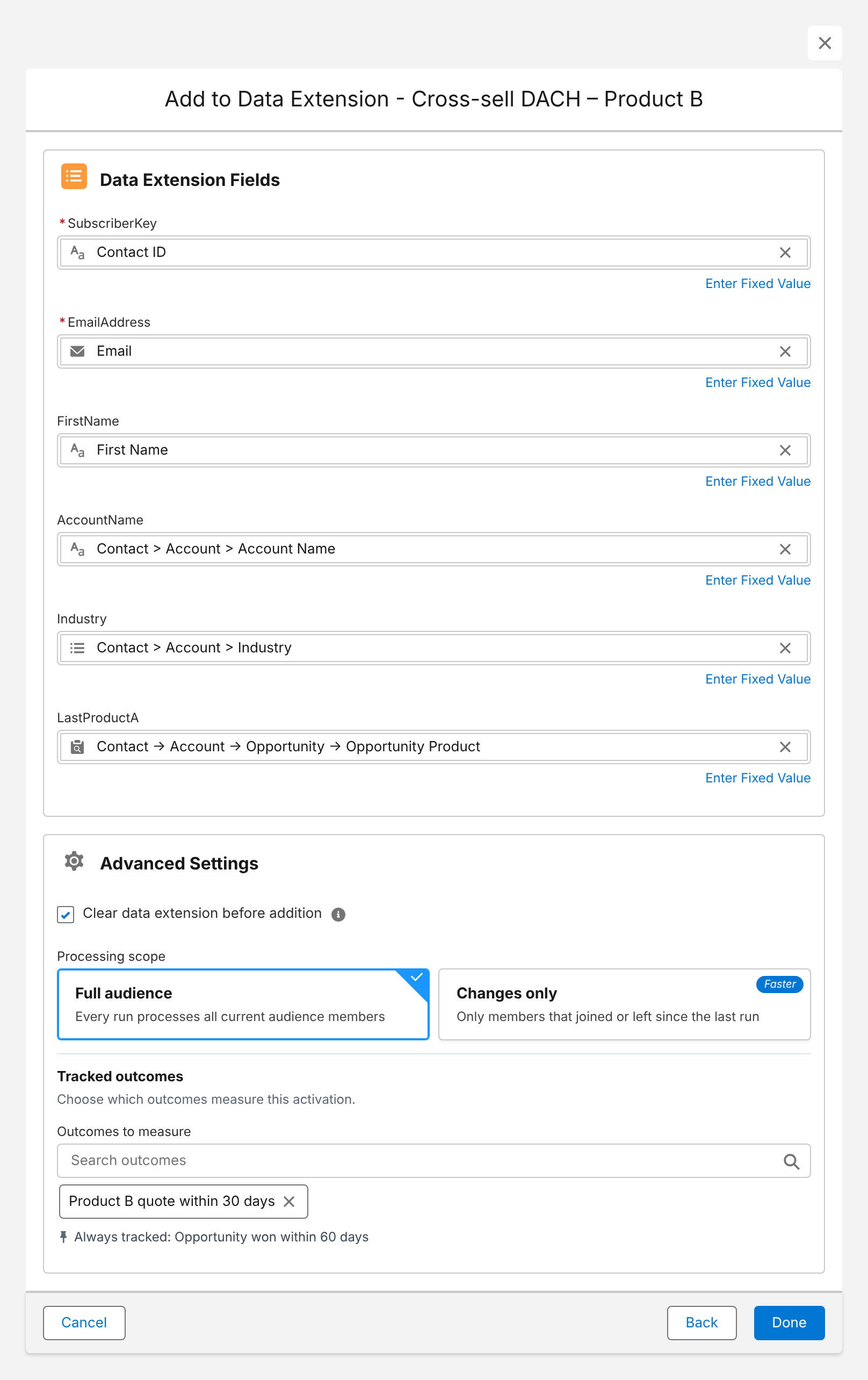
- Two ways into Marketing Cloud: write results directly into a data extension – including fields from related records such as the account or the won product, and the values of aggregate conditions – or fill a Salesforce campaign that Marketing Cloud picks up through Marketing Cloud Connect.
- Kept current: scheduled runs refresh the audience, and only changes are processed where possible.
Here is the data extension mapping for a cross-sell audience – contact fields, account fields and the won product from the audience path, written straight into Marketing Cloud:
More on the setup on our Marketing Cloud integration page.
Conclusion
There is no one-to-one successor to Audience Builder – and that’s an opportunity to put each audience where its data lives. Rebuild engagement-based audiences with SQL or DESelect, consider Data 360 and Marketing Cloud Next if you need to unify many sources, use your warehouse if that’s where your data is modeled, and segment CRM-based audiences in Salesforce, where accounts, opportunities and products already are. Start the inventory now: the migration takes longer than the switch-off notice.
How Campaign Audience Builder helps
Campaign Audience Builder builds audiences on your Salesforce CRM data and delivers them to Account Engagement, Marketing Cloud and third-party tools – without reports, CSV imports or SQL.
- Segment on any standard or custom object, including products, contracts and cases
- Sync audiences into Pardot lists or Marketing Cloud data extensions on a schedule
- Reach any other tool through Salesforce campaigns or a Flow or Apex API call
FAQ
Is Marketing Cloud Audience Builder being retired?
Yes. Salesforce no longer sells Audience Builder to new customers and has announced its retirement for existing customers. As of our research, no final decommissioning date has been published, so existing customers should confirm the timeline with their Salesforce account team. Contact Builder is not affected.
What is the best alternative to Marketing Cloud Audience Builder?
It depends on where your segment data lives. Segments on Marketing Cloud engagement data are best rebuilt with SQL queries or a no-code tool like DESelect. Segments across many data sources point to Data 360 and Marketing Cloud Next or a composable CDP on your data warehouse. Segments on CRM data – accounts, opportunities, products, cases – are best built in Salesforce itself and delivered to Marketing Cloud.
Can I segment in Marketing Cloud without SQL?
Yes, for simple cases with filtered data extensions, and for complex cases with no-code tools such as DESelect. If your criteria come from Salesforce CRM, you can also build the segment in Salesforce with an AppExchange app like Campaign Audience Builder and write the result directly into a data extension.
Is Data 360 a replacement for Audience Builder?
Data 360 – and Marketing Cloud Next, which segments on Data 360 – is Salesforce's strategic direction for segmentation. It's a strong fit when you need to unify many data sources. It's also a separate platform with consumption-based pricing, where publishing and refreshing segments uses credits, so it's a bigger step than replacing one segmentation tool.
How do I migrate audiences from Audience Builder?
Inventory your audiences and the dimensions they use, group them by data source, choose a tool for each group, rebuild the audiences and compare counts with the old ones, then switch your sends and automations before Audience Builder is switched off.