

There is no “best” segmentation tool for Salesforce – there are tools built for different data. Native reports work on CRM data but stop early. AppExchange apps like Campaign Audience Builder segment CRM data in depth. DESelect and SQL work on Marketing Cloud data. Data 360 and composable CDPs unify many sources first. Email tools segment what you sync to them. This comparison puts all seven categories side by side – with data basis, target systems, pricing logic and the cases where each one is the wrong choice, including ours.
This article is part of our complete guide to Salesforce segmentation. If you’re replacing Marketing Cloud Audience Builder specifically, see Audience Builder alternatives.
Four questions before you compare tools
- Where does your segmentation data live? Salesforce CRM, Marketing Cloud, a data warehouse, or spread across many systems.
- Where do audiences need to go? Salesforce campaigns, Marketing Cloud, Account Engagement, third-party email tools, ad platforms, print and call lists.
- Who builds segments? Marketers without SQL, admins, or a data team.
- How large and how frequent? A few hundred records once a quarter, or hundreds of thousands refreshed daily.
The answers narrow the field faster than any feature list.
The seven categories at a glance
| Category | Examples | Data basis | Delivers to | Pricing logic | Who builds |
|---|---|---|---|---|---|
| Native Salesforce | List views, reports, campaigns, flows | Salesforce CRM | Campaigns (up to 50,000 records per “Add to Campaign”) | Included | Admins, power users |
| Native segmentation apps | Campaign Audience Builder | Salesforce CRM – any standard or custom object | Campaigns, Marketing Cloud, Account Engagement, export, Flow/Apex | Subscription per org | Marketers, admins |
| Marketing Cloud segmentation | SQL query activities, filtered data extensions, DESelect | Marketing Cloud data extensions and data views | Marketing Cloud | Included (SQL) or subscription per Marketing Cloud org | Data specialists (SQL), marketers (no-code) |
| Account Engagement lists | Dynamic lists, automation rules | Prospect, account and synced opportunity fields | Account Engagement | Included | Marketers |
| Data 360 and Marketing Cloud Next | Data 360 segments | Unified profiles from many sources | Marketing Cloud, ad platforms, other destinations | Consumption-based credits | Marketers after data modeling by specialists |
| Composable CDP and reverse ETL | GrowthLoop, Hightouch, Census | Data warehouse | Many destinations, including Salesforce and Marketing Cloud | Subscription, often by destinations or volume | Data teams, then marketers |
| Segments inside email tools | Mailchimp, Brevo, HubSpot | Whatever is synced into the tool | That tool | Part of the tool’s plan | Marketers |
The categories in detail
1. Native Salesforce: list views, reports, campaigns
Strengths: included, familiar, good for quick lists on one or two objects. Limits: reports can’t combine “with” and “without” conditions across several related objects in one list, “Add to Campaign” stops at 50,000 records, and nothing refreshes or cleans up on its own. We go through the details in list views vs. reports vs. Campaign Audience Builder and Salesforce segmentation challenges. Choose it when: segments are simple, small and occasional.
2. Native segmentation apps: Campaign Audience Builder
Strengths: segments on any Salesforce object without code or data copies – “with” and “without” conditions, aggregates, priority sequences, scheduled refresh, campaign cleansing, control groups – and delivery to campaigns, Marketing Cloud, Account Engagement, files and any API via Flow or Apex. Limits: segments data that’s in Salesforce. Web behavior, app events or warehouse data that never reach Salesforce are out of scope. Choose it when: Salesforce CRM is your system of record and your audiences depend on accounts, opportunities, products, contracts, cases, gifts or custom objects.
3. Marketing Cloud segmentation: SQL and DESelect
Strengths: SQL is included and can do anything with data extensions and data views. DESelect adds no-code segmentation on the same data. Limits: both work on data that’s in Marketing Cloud. CRM-based criteria require syncing CRM objects into data extensions first. SQL needs specialists; DESelect’s paid editions start in the high three figures per month per Marketing Cloud org, according to its pricing page. Choose it when: your audiences are built on Marketing Cloud engagement data – sends, opens, clicks, subscriber attributes.
4. Account Engagement: dynamic lists
Strengths: included, maintain themselves, good for prospect fields, scores, grades and activities. Limits: only see prospect, account and limited opportunity data – products, contracts, cases and custom objects are out of reach. Our guide to Pardot dynamic lists shows the workaround via campaigns. Choose it when: segments only need what Account Engagement already knows.
5. Data 360 and Marketing Cloud Next
Strengths: unifies data from many sources with identity resolution; segments with a visual canvas; activation to Marketing Cloud, ad platforms and more. Marketing Cloud Next builds on it. Limits: a separate platform with its own data model and consumption-based pricing – publishing and refreshing segments uses credits. For data that’s already in Salesforce CRM, it adds a second layer. Choose it when: you genuinely have many sources to unify. We compare cost and fit in Campaign Audience Builder vs. Data 360.
6. Composable CDP and reverse ETL
Strengths: segment directly on your warehouse and sync to many destinations; no second copy of your data in a CDP. Limits: requires a well-modeled warehouse and a data team. If your key data is in Salesforce CRM, it first has to be loaded into the warehouse and kept in sync. Choose it when: your warehouse is already the center of your customer data.
7. Segments inside email tools
Strengths: easy, visual, part of tools marketers already use – Mailchimp, Brevo, HubSpot and others. Limits: each tool only sees the fields you sync to it, every tool has its own logic, and print, phone and other channels aren’t covered. Segments drift apart between tools. Choose it when: you work with one email tool, simple criteria and no other channels.
Which tool for which team?
| Situation | Recommended |
|---|---|
| B2B team on Sales Cloud, campaigns into Account Engagement or Marketing Cloud | Native segmentation app on the CRM |
| Nonprofit on NPSP or Nonprofit Cloud, print and email appeals | Native segmentation app on the CRM – see our nonprofit marketing stack |
| Marketing Cloud team segmenting on engagement data | SQL or DESelect |
| Enterprise with many sources and identity resolution needs | Data 360 or a composable CDP |
| Data-driven company with a central warehouse | Composable CDP or reverse ETL |
| Small team, simple lists, one email tool | Native Salesforce plus the email tool’s segments |
Many organizations combine two: one tool for engagement data in the marketing platform, one for CRM data in Salesforce.
When Campaign Audience Builder is not the right choice
- Your segments are mainly built on web, app or engagement data that doesn’t live in Salesforce CRM.
- You need to unify many sources into one profile – that’s what Data 360 and CDPs are for.
- Your warehouse is the system of record, not Salesforce.
- You only need a handful of simple lists a year – native reports will do.
When it is
- Salesforce CRM is your system of record and your audiences depend on related objects – opportunities, products, contracts, cases, gifts, custom objects.
- You deliver to several channels – campaigns, Marketing Cloud, Account Engagement, third-party email tools, print – and want one segment logic for all of them.
- Audiences need to stay current – with scheduled refresh, cleansing, priority sequences and control groups.
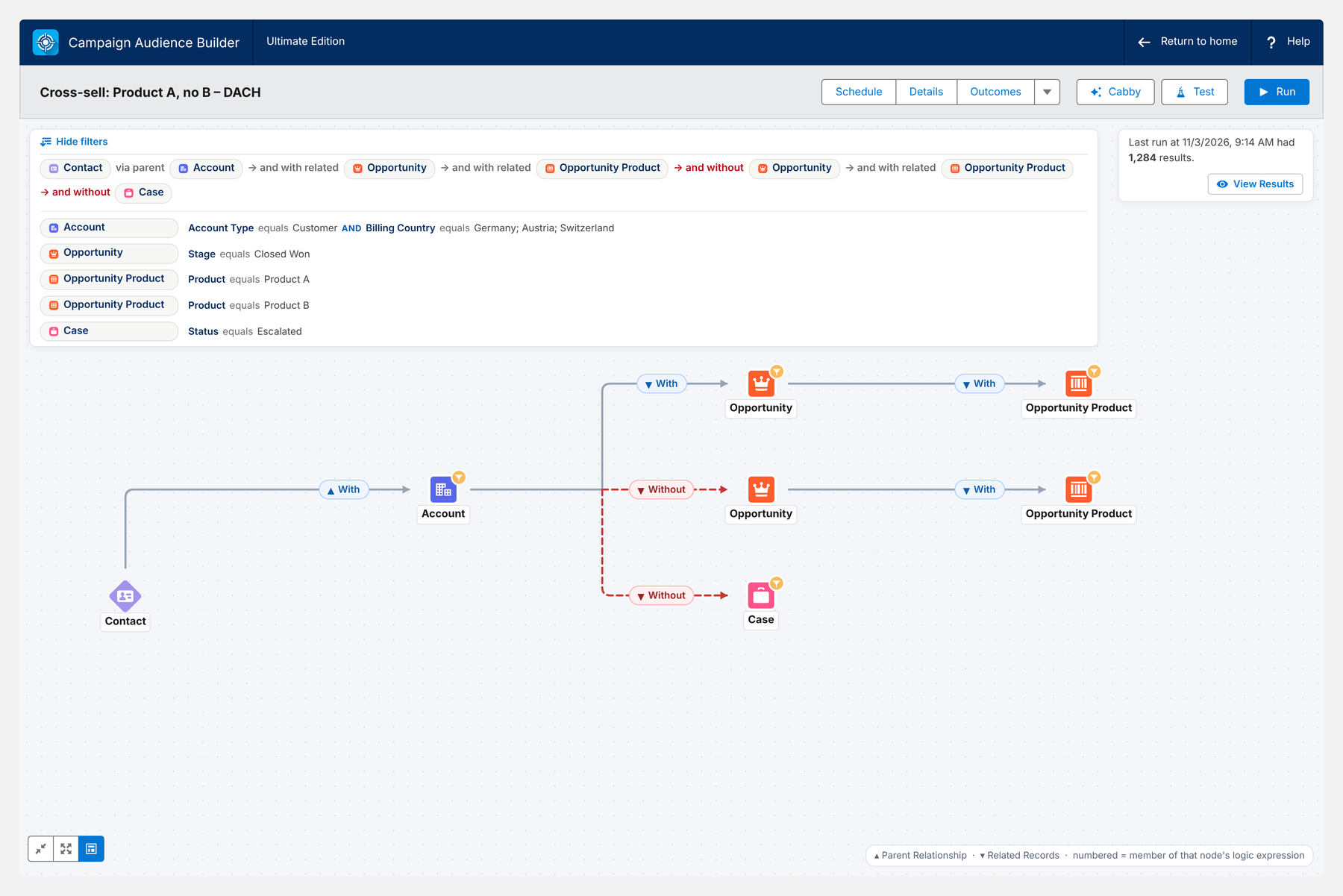
Here is a typical cross-object audience – customers in DACH with product A, without product B and without escalated cases:
Conclusion
The right segmentation tool is the one that works where your data lives. Use native features for simple lists, Marketing Cloud tools for engagement data, Data 360 or a composable CDP when many sources need unifying, and a native app like Campaign Audience Builder when your audiences come from Salesforce CRM. Answer the four questions first – data, destinations, builders and volume – and the shortlist writes itself.
How Campaign Audience Builder helps
Campaign Audience Builder gives marketing and ops teams a visual audience builder inside Salesforce that goes far beyond list views and reports.
- Combine criteria across any related standard or custom object
- Reuse filters and keep audiences up to date automatically
- Push audiences to campaigns, Account Engagement, Marketing Cloud and more
FAQ
What are the best audience segmentation tools for Salesforce?
It depends on where your data lives and where audiences go. For segments on Salesforce CRM data, native apps like Campaign Audience Builder work directly on your objects. For Marketing Cloud data, SQL or DESelect are common. For many unified data sources, Data 360 or a composable CDP on your warehouse fit better. Native reports and list views cover simple cases.
Which segmentation tools integrate with Salesforce and third-party email tools?
Most tools deliver to Salesforce campaigns, Marketing Cloud data extensions or Account Engagement lists. For third-party email tools like Mailchimp, Brevo or HubSpot, the usual routes are a campaign sync, the email tool's own Salesforce connector, an API call from Flow or Apex, or a reverse ETL tool.
Do I need Data 360 for segmentation in Salesforce?
Only if you need to unify many data sources into one profile. If your segmentation data already lives in Salesforce CRM, an app that segments directly on your objects is usually faster to set up and cheaper to run than a separate data platform with consumption-based pricing.
Are there no-code segmentation tools for Salesforce?
Yes. Campaign Audience Builder segments Salesforce CRM data without code, DESelect does the same for Marketing Cloud data, and Data 360 and Marketing Cloud Next offer a visual segment canvas. Native reports and list views are no-code too, but limited in logic and volume.
What's the difference between a CDP and a segmentation app?
A CDP collects and unifies data from many sources before you segment it. A segmentation app works on data that already lives in one place – for example your Salesforce org – and focuses on building, maintaining and delivering audiences. If your data is already in one system, you usually don't need a CDP to segment it.