


Segmentation in Account Engagement (Pardot) comes down to lists. Every email, every Engagement Studio program and every suppression works with lists – and lists are filled by dynamic list rules, segmentation and automation rules, completion actions or imports. That works well for prospect data and engagement. It gets hard when segments depend on Salesforce data Pardot doesn’t see: opportunity products, contracts, cases or custom objects. This guide covers list types, the automation toolbox, the data available for criteria, eight example segments and how to segment on everything else.
This article is part of our complete guide to Salesforce segmentation.
Lists are the unit of segmentation
In Account Engagement, almost everything targets a list:
- List emails are sent to one or more lists, with suppression lists excluding others.
- Engagement Studio programs take lists as recipients and add prospects to lists along the way.
- Preference centers show public lists that prospects can subscribe to.
- Reporting on list membership shows how segments grow and shrink.
Good segmentation therefore means two things: clean list types and a reliable way to keep list membership right.
The four list types
| List type | How membership changes | Typical use |
|---|---|---|
| Static list | Only when prospects are added or removed – manually, by import, by rules or by completion actions | Event attendees, one-off imports, historical snapshots |
| Dynamic list | Automatically, whenever a prospect starts or stops matching the list rules | Ongoing segments: region, persona, lifecycle stage, engagement |
| Test list | Manually | Internal recipients for test sends |
| Public list | Like a static or dynamic list, but visible on the email preference center | Newsletters and topics prospects can opt into |
Rule of thumb: if a segment can be described by rules, make it dynamic. Static lists are for moments in time, not for segments that should stay current.
The automation toolbox
| Tool | Runs | What it can do | Use it for |
|---|---|---|---|
| Dynamic list rules | Continuously | List membership only | Self-maintaining segments |
| Segmentation rules | Once, when you run them | Add to lists, change fields, tags and more for the prospects matching at that moment | One-off list builds and clean-ups |
| Automation rules | Continuously, optionally repeating | Add to lists, change fields, scores, assignments, Salesforce campaigns | Ongoing processes beyond list membership |
| Completion actions | When a prospect completes a specific action – form, email link, file download | Add to list, notify, change fields | Event-driven segmentation |
| Engagement Studio actions | Inside a program | Add to or remove from lists, change fields | Segments that depend on program behavior |
| Import | When you import | Add to static lists | External lists, events |
Keep each segment owned by one tool. A list filled by a dynamic rule, an automation rule and two completion actions at the same time is impossible to debug.
Which data you can use in criteria
| Data | Available? | Notes |
|---|---|---|
| Prospect fields | Yes | Default and custom prospect fields, synced from leads and contacts |
| Account fields | Yes | Synced account fields for prospects linked to an account |
| Engagement | Yes | Emails, forms, page views, files, custom redirects, score and grade |
| Tags and list membership | Yes | Useful for combining segments |
| Salesforce campaign membership | Yes | Including the campaign member status |
| Opportunities | Partly | For prospects linked via contact roles, with a limited set of fields |
| Custom objects | Partly | Can be synced in higher editions, but need mapping and maintenance |
| Opportunity products, contracts, cases, assets, other objects | No | Not available in list criteria |
Two consequences matter in practice. First, everything depends on the sync between Salesforce and Account Engagement – records that don’t sync can’t be segmented. Second, B2B segments often need exactly the data that isn’t available: which products a customer owns, when their contract ends, whether they have open cases.
8 example segments – and where they work
| # | Segment | Natively in Pardot? |
|---|---|---|
| 1 | Prospects in DACH with score over 100 and grade A or B | Yes – dynamic list |
| 2 | Visited the pricing page twice in 30 days, not a customer | Yes – dynamic list |
| 3 | Newsletter subscribers who haven’t opened in 6 months | Yes – dynamic list |
| 4 | Contacts at accounts of type Customer in a given industry | Yes, if account fields are synced |
| 5 | Contacts with an open opportunity above a certain amount | Partly – contact roles required |
| 6 | Customers with product A but not product B | No – opportunity products aren’t available |
| 7 | Contacts whose contract ends in the next 90 days | No – contracts aren’t available |
| 8 | Customers without an open escalated case | No – cases aren’t available |
Segments 1–4 belong in Pardot. Segments 5–8 are where most B2B teams start building workarounds: extra fields synced to prospects, formula fields, flows that copy related data onto the contact, or exports and imports.
Segmenting on data Pardot can’t see
There are two clean ways to bring Salesforce-based segments into Account Engagement – without copying related data into prospect fields.
Via Salesforce campaigns
Build the segment as Salesforce campaign members, then create a dynamic list with the rule “Prospect Salesforce campaign is …” and the relevant member status. The campaign does the segmenting, the dynamic list mirrors it. All three native ways – dynamic list, automation rule and import – are compared in how to add Salesforce campaign members to a Pardot list. We walk through the setup in our guide to Pardot dynamic lists with Salesforce data.
Directly into Pardot lists
Sync the segment straight into a Pardot list – no campaign in between – and keep it current on a schedule. That’s useful when the list is the only place the segment is needed, or when many segments would otherwise create many helper campaigns.
Either way, the segment itself is built in Salesforce, where opportunity products, contracts, cases and custom objects live.
Best practices for Pardot segmentation
- Naming conventions. Prefixes like
DL –for dynamic andSL –for static lists, plus purpose and region, keep hundreds of lists manageable. - One mailable base list. Opted-in, not hard-bounced, not “do not email” – referenced in other lists instead of repeating the rules everywhere.
- Suppression lists for every send. Competitors, employees, current opportunities in late stages, customers in escalation.
- Dynamic over static. Every static list that’s rebuilt before each send should be a dynamic list or a synced segment.
- Check the sync first. If counts don’t match Salesforce, the cause is usually sync visibility, the connector user or prospects in the recycle bin – see Pardot sync rules.
- Archive unused lists. Fewer lists mean fewer mistakes in the recipient selection.
Pardot segmentation with Campaign Audience Builder
Campaign Audience Builder builds segments on any Salesforce object and delivers them to Account Engagement:
- Any Salesforce data: opportunity products, contracts, cases, assets and custom objects – with “with” and “without” conditions and aggregates.
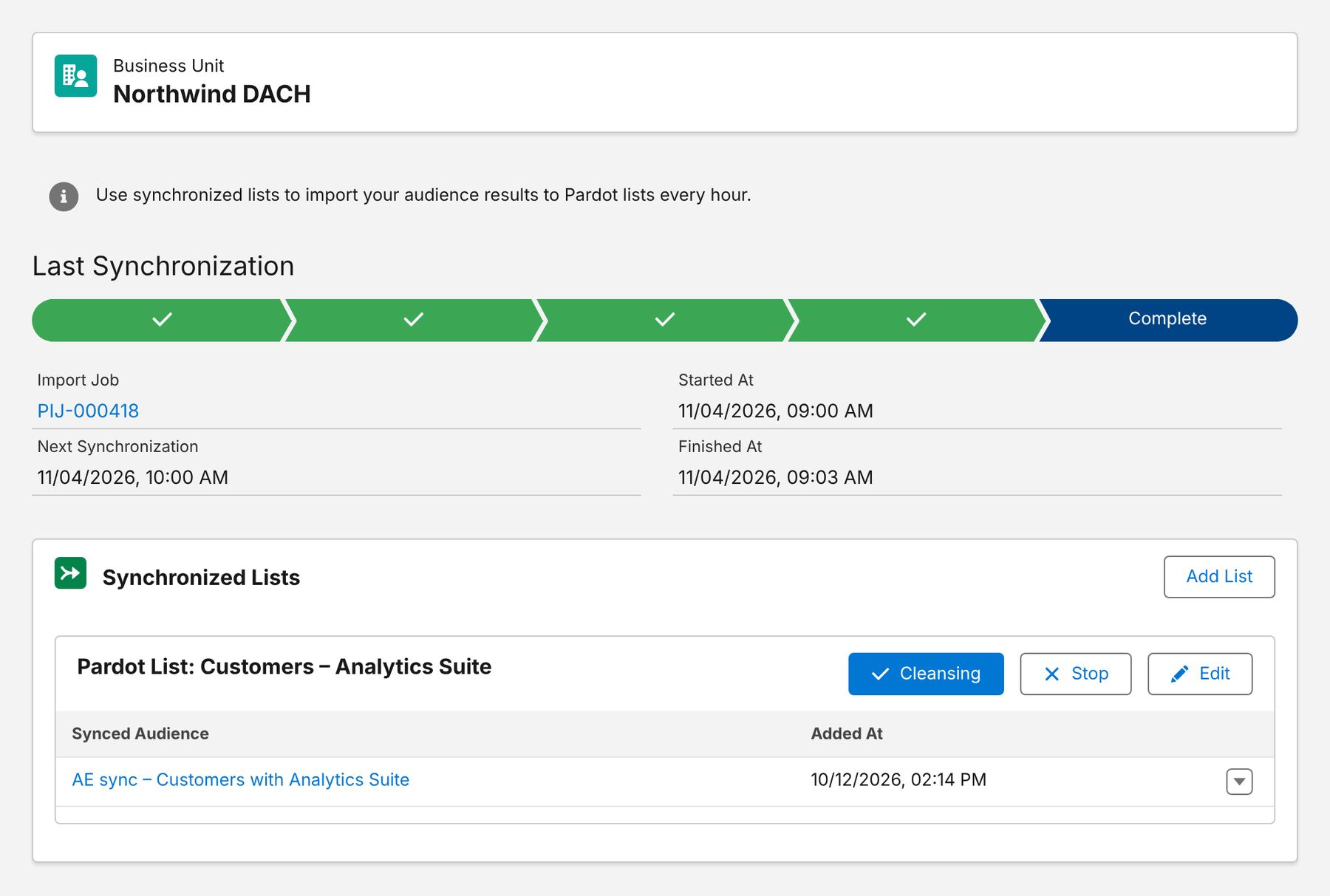
- Direct list sync: audiences sync into Pardot lists on a schedule, with list cleansing for prospects who no longer qualify and an import job history.
- Or via campaigns: audiences fill Salesforce campaigns that dynamic lists mirror.
- Controlled sync: decide with criteria which leads and contacts become prospects at all – see Pardot sync rules.
- Measured: outcomes against a control group, also for audiences delivered to Pardot lists.
Here is an active list sync – audiences assigned to Pardot lists, refreshed on a schedule:
More on the setup on our Account Engagement integration page.
Conclusion
Segmentation in Account Engagement is list management. Use dynamic lists for anything rule-based, give each segment one owner among the automation tools, keep a mailable base list and suppressions for every send, and check the sync before you blame the criteria. For segments on prospect data and engagement, Pardot is all you need. For segments on products, contracts, cases and custom objects, build them in Salesforce and let Pardot receive them – via campaigns or a direct list sync.
How Campaign Audience Builder helps
Campaign Audience Builder builds audiences on your Salesforce CRM data and delivers them to Account Engagement, Marketing Cloud and third-party tools – without reports, CSV imports or SQL.
- Segment on any standard or custom object, including products, contracts and cases
- Sync audiences into Pardot lists or Marketing Cloud data extensions on a schedule
- Reach any other tool through Salesforce campaigns or a Flow or Apex API call
FAQ
What is the difference between static and dynamic lists in Pardot?
A static list only changes when prospects are added or removed – manually, by import or by an automation. A dynamic list is defined by rules and updates itself whenever a prospect starts or stops matching them. You can't add prospects to a dynamic list by hand.
What's the difference between segmentation rules and automation rules?
Segmentation rules run once on the prospects that match at that moment – useful for one-off clean-ups or list builds. Automation rules run continuously and act on every prospect that matches now or later, optionally repeatedly. Dynamic lists only manage list membership; rules can also change fields, scores, assignments or campaigns.
Can Pardot segment on Salesforce opportunities and products?
Opportunity criteria are available for prospects linked to opportunities through contact roles, with a limited set of fields. Opportunity products, contracts, cases and most other objects are not available in list criteria. Custom objects can be synced in higher editions, but need mapping and maintenance.
How do I build Pardot lists from Salesforce data Pardot can't see?
Segment in Salesforce and hand the result to Pardot – either as Salesforce campaign members with a dynamic list on campaign membership, or by syncing the segment directly into a Pardot list with an app like Campaign Audience Builder.
How many lists should a Pardot account have?
As few as possible, as many as needed. Use dynamic lists for anything rule-based, keep one mailable base list, use clear naming conventions and archive lists that are no longer used. Hundreds of static one-off lists are a sign that segments are being rebuilt manually.