


Account Engagement (Pardot) sends list emails to Pardot lists, not to Salesforce campaigns. So when a segment lives in a Salesforce campaign, it has to become a Pardot list first. There are three native ways to do that – a dynamic list, an automation rule or an import – and each one behaves differently when members are added or removed. This guide shows all three, the pitfalls that cause missing prospects, and how to keep the list current automatically.
This article is part of our guide to Pardot segmentation.
Before you start: only prospects can be on a list
A Pardot list contains prospects. A campaign member that doesn’t exist as a prospect in Account Engagement can’t be added – no matter which method you use. Before troubleshooting list counts, check:
- Sync: does the lead or contact sync to Account Engagement at all? The connector user’s visibility, the automatic prospect creation setting and Marketing Data Sharing decide that – see Pardot sync rules.
- Email address: prospects without an email address can’t receive list emails.
- Opt-outs: opted-out prospects can be list members but won’t receive list emails.
Way 1: Dynamic list on Salesforce campaign membership
Create a dynamic list with the rule Prospect Salesforce campaign is [campaign] and, if needed, a member status – for example “Sent” or “Registered”.
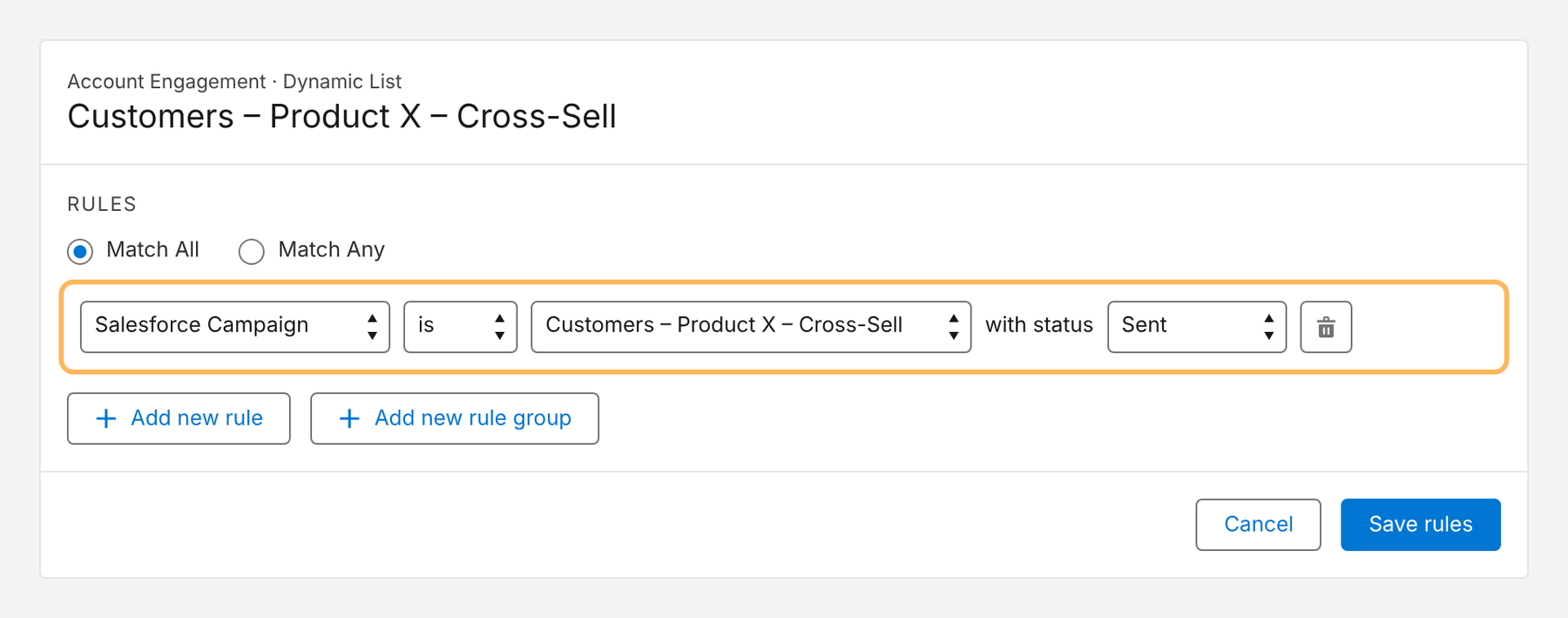
- How it behaves: the list mirrors the campaign. New members appear, removed members disappear.
- Best for: ongoing segments and recurring sends where the campaign is maintained in Salesforce.
- Watch out for: the list can only be as current as the sync and the list evaluation; you can’t add prospects to a dynamic list manually.
We cover dynamic lists in depth in our guide to Pardot dynamic lists with Salesforce data.
Way 2: Automation rule into a static list
Create an automation rule with the criterion Prospect Salesforce campaign is [campaign] (optionally with status) and the action Add prospect to list.
- How it behaves: matching prospects are added to a static list – and stay there when they leave the campaign.
- Best for: historical lists, such as everyone invited to an event, or when the list should keep growing.
- Watch out for: removals don’t happen automatically. If the list should mirror the campaign, add a second rule that removes non-members, or use a dynamic list.
Way 3: Export and import
Export the campaign members from a Salesforce report and import the file into a static Pardot list.
- Best for: one-off lists.
- Watch out for: manual, error-prone and outdated the moment the campaign changes. Imports can also create new prospects or overwrite fields if import settings aren’t checked.
Which way to choose
| Situation | Best way |
|---|---|
| The list should always match the campaign | Dynamic list |
| Members should stay on the list after leaving the campaign | Automation rule into a static list |
| One-off list, no automation needed | Import |
| Many campaigns, many lists, frequent changes | Sync the segment directly into Pardot lists |
Common pitfalls
| Pitfall | Symptom | Fix |
|---|---|---|
| Records don’t sync | List count lower than campaign count | Check connector visibility, prospect creation setting and Marketing Data Sharing |
| Wrong member status in the rule | Responders or non-invitees on the list | Set the status explicitly in the rule |
| Converted leads | Prospect linked to the old lead | Check that the prospect is now linked to the contact that’s in the campaign |
| Sending too early | Newest members missing | Check the list count right before the send |
| One helper campaign per list | Dozens of campaigns that only exist to feed lists | Sync segments directly into lists |
Automating it with Campaign Audience Builder
With Campaign Audience Builder, segments built on any Salesforce object reach Account Engagement in two ways:
- Via campaigns: audiences fill and refresh Salesforce campaigns on a schedule – with campaign cleansing – and a dynamic list mirrors each campaign.
- Directly into Pardot lists: audiences sync into Pardot lists on a schedule, without a helper campaign, with list cleansing and an import job history.
Here is the list selection in the sync setup:
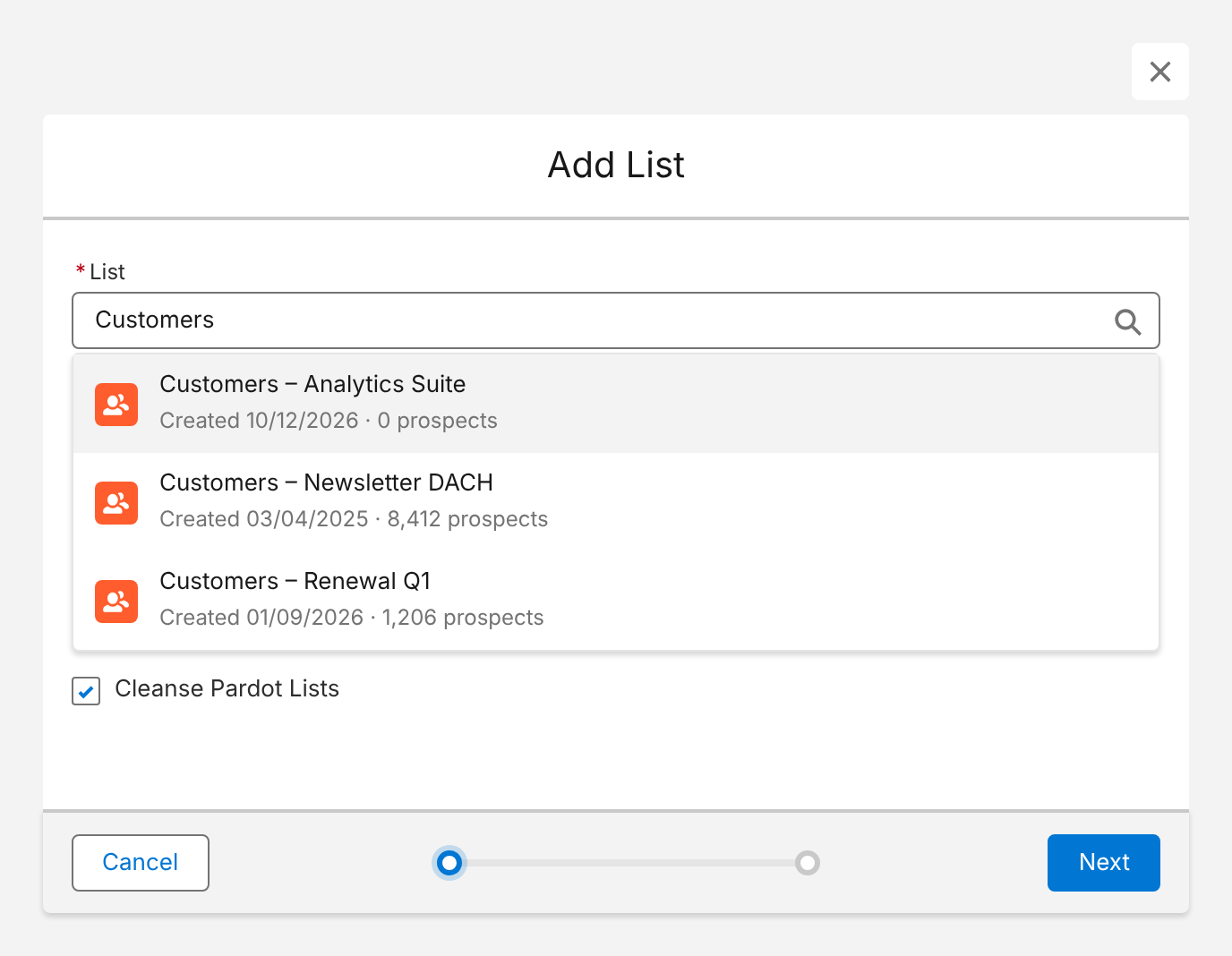
More on the setup on our Account Engagement integration page.
Conclusion
To get Salesforce campaign members into a Pardot list, use a dynamic list when the list should mirror the campaign, an automation rule when members should stay, and an import only for one-offs. Check the sync first – most missing members never made it into Account Engagement in the first place. And when lists multiply, sync segments directly instead of maintaining a helper campaign for each one.
How Campaign Audience Builder helps
Campaign Audience Builder builds audiences on your Salesforce CRM data and delivers them to Account Engagement, Marketing Cloud and third-party tools – without reports, CSV imports or SQL.
- Segment on any standard or custom object, including products, contracts and cases
- Sync audiences into Pardot lists or Marketing Cloud data extensions on a schedule
- Reach any other tool through Salesforce campaigns or a Flow or Apex API call
FAQ
Can I send a Pardot email directly to a Salesforce campaign?
List emails in Account Engagement are sent to Pardot lists, not to Salesforce campaigns. The usual bridge is a dynamic list with the rule 'Prospect Salesforce campaign is …', which mirrors the campaign's members as a list.
Why are some campaign members missing from my Pardot list?
Only campaign members that exist as prospects in Account Engagement can be on a Pardot list. Leads and contacts that don't sync – because of the connector user's visibility, the automatic prospect creation setting or Marketing Data Sharing rules – are missing. Check the member status filter of the rule, too.
Should I use a dynamic list or an automation rule?
Use a dynamic list when the Pardot list should always mirror the campaign – members who leave the campaign also leave the list. Use an automation rule when prospects should be added to a static list once and stay there, for example for a historical event list.
How long does it take until new campaign members appear in the list?
It depends on the sync between Salesforce and Account Engagement and on when the dynamic list or automation rule is evaluated. Plan for a delay rather than expecting real time, and check the list count before every send.
Can I filter by campaign member status?
Yes. The Salesforce campaign criterion in dynamic lists and automation rules can include the member status, for example only members with the status 'Registered' or 'Sent'.