


Salesforce campaigns are where many segments live – event invitations, appeals, cross-sell lists, renewal reminders. Marketing Cloud Engagement sends from data extensions and journeys. Getting campaign members from one to the other works in four ways: Salesforce sends, synchronized data extensions, Journey Builder entry sources, or writing the segment directly into a data extension. Each fits a different kind of send. This guide compares them, shows the limits that cause most trouble, and when to skip the campaign step entirely.
This article is part of our guide to segmenting in Marketing Cloud without SQL.
Way 1: Salesforce sends from Email Studio
With Marketing Cloud Connect, Email Studio can send an email directly to a Salesforce campaign or report.
- Good for: simple one-off sends to an existing campaign, with send results tracked back to Salesforce.
- Limits: limited personalization with related data, no journey logic, and the campaign has to be complete and correct at the moment of the send.
Way 2: Synchronized data extensions
Add CampaignMember (and Campaign, if you need campaign fields) as synchronized data sources in Contact Builder. Marketing Cloud then keeps a copy of the campaign members.
- Good for: recurring sends and journeys that need campaign membership alongside other Marketing Cloud data.
- Limits:
- Synchronized data extensions are not sendable – a query or filter activity in Automation Studio has to copy the relevant members into a sendable data extension.
- They poll on a schedule, typically every 15 minutes, 30 minutes or hourly – not real time.
- Synchronized data is available in the top-level business unit by default; child business units need extra steps.
- Every additional object or field you need for personalization has to be synchronized as well.
Way 3: Journey Builder – Salesforce Data entry source
Configure a journey with the Salesforce Data entry source on campaign members: when a contact or lead is added to a campaign and matches the filter criteria, they enter the journey.
- Good for: triggered one-to-one messages – registration confirmations, reminders, welcome emails.
- Limits: subject to Salesforce platform limits; not designed for large batch audiences or segments that combine several objects.
Way 4: Write the segment directly into a data extension
Skip the campaign-to-Marketing-Cloud copy: build the segment in Salesforce and write the result straight into a sendable data extension – with the fields you need for personalization.
- Good for: recurring, data-rich audiences built on CRM data – cross-sell, renewals, appeals – that should be sendable without queries.
- Limits: segments on Marketing Cloud engagement data (opens, clicks) are better built in Marketing Cloud.
Which way to choose
| Situation | Best way |
|---|---|
| One-off send to an existing campaign | Salesforce send |
| Journey that combines campaign membership with Marketing Cloud data | Synchronized data extensions plus a query or filter activity |
| Triggered message when someone joins a campaign | Journey Builder Salesforce Data entry source |
| Recurring audience on CRM data, with personalization fields, refreshed on a schedule | Write the segment directly into a data extension |
Many teams combine them: the campaign stays the record in Salesforce for reporting, while the data extension is what Marketing Cloud sends to.
Tips that avoid most problems
- Consistent subscriber key. With Marketing Cloud Connect, the subscriber key is usually the Salesforce contact or lead ID – use the same key in every data extension.
- Sendable relationship. Sendable data extensions need the send relationship from the subscriber key to the subscriber key.
- Replace or append – decide per audience. Audiences that should only contain current members need to be cleared before each refresh.
- Member status as a signal. Use member statuses consistently (“Sent”, “Responded”, “Registered”) – both for filtering and for reporting back.
- Keep the campaign as the record. Even when sending from a data extension, keep the audience in a Salesforce campaign so results can be compared in Salesforce.
Campaigns and data extensions with Campaign Audience Builder
Campaign Audience Builder builds the segment on any Salesforce object and delivers it to Marketing Cloud on both paths:
- Campaigns: audiences fill and refresh Salesforce campaigns on a schedule, with campaign cleansing and control groups – ready for Salesforce sends, synchronized data extensions or journeys.
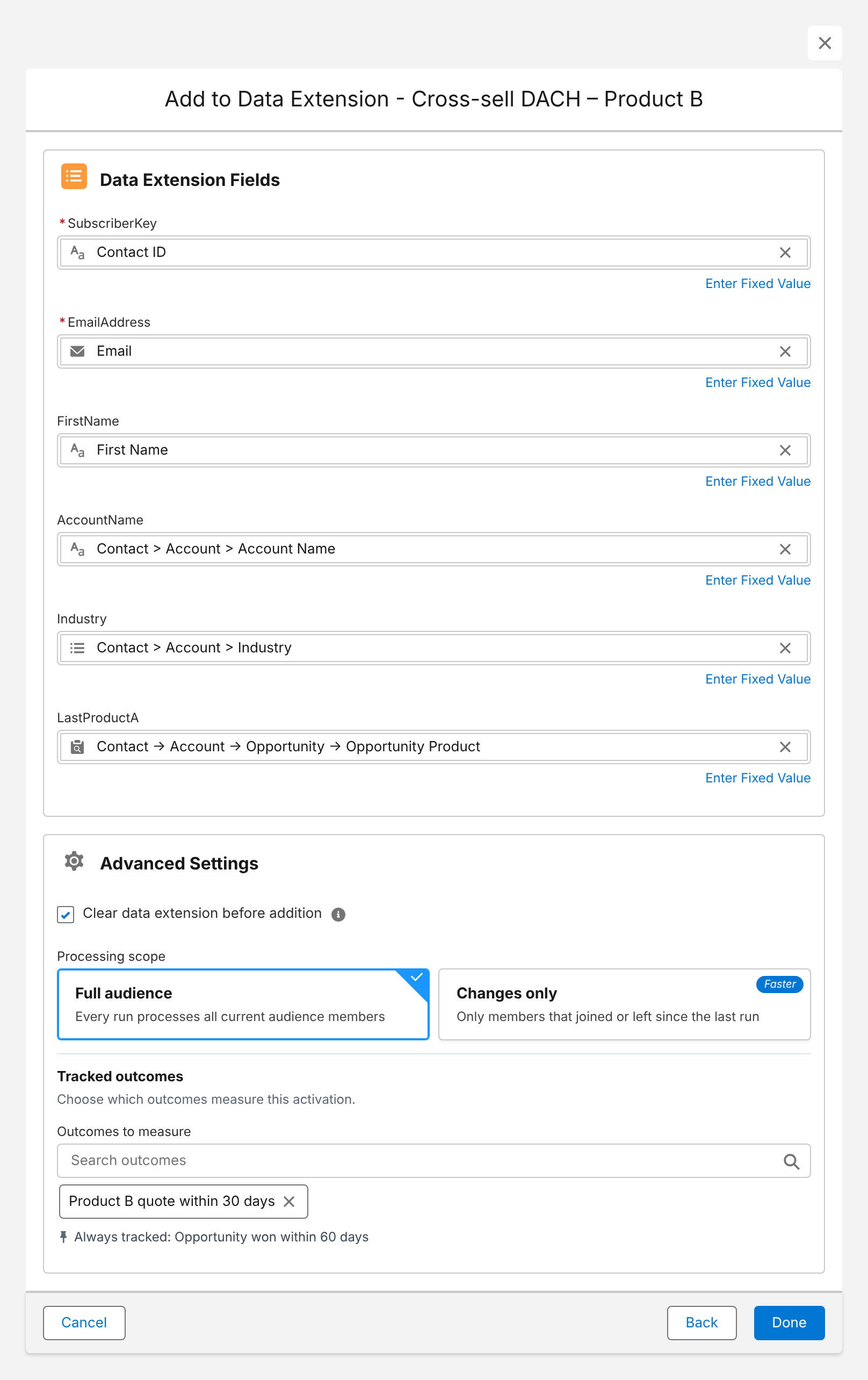
- Data extensions: the same audience can be written directly into a new or existing data extension, with contact fields, fields from related records, aggregate values and fixed values – and the data extension cleared before each run if needed.
Here is the data extension mapping for a cross-sell audience:
More on the setup on our Marketing Cloud integration page.
Conclusion
To get Salesforce campaign members into Marketing Cloud, use Salesforce sends for one-offs, synchronized data extensions when journeys need campaign membership alongside Marketing Cloud data, the Salesforce Data entry source for triggered messages, and direct data extension writes for recurring audiences built on CRM data. Keep subscriber keys consistent, decide between replace and append, and keep the campaign as the record in Salesforce.
How Campaign Audience Builder helps
Campaign Audience Builder builds audiences on your Salesforce CRM data and delivers them to Account Engagement, Marketing Cloud and third-party tools – without reports, CSV imports or SQL.
- Segment on any standard or custom object, including products, contracts and cases
- Sync audiences into Pardot lists or Marketing Cloud data extensions on a schedule
- Reach any other tool through Salesforce campaigns or a Flow or Apex API call
FAQ
Can Marketing Cloud send to a Salesforce campaign?
Yes. With Marketing Cloud Connect, you can send emails to Salesforce campaigns and reports from Email Studio, and Journey Builder can bring campaign members into a journey. For recurring, data-rich audiences, many teams use data extensions instead.
How do I sync campaign members to a data extension?
Add the CampaignMember object – and the Campaign object if needed – as synchronized data sources in Contact Builder. The synchronized data extension isn't sendable, so a query or filter activity copies the relevant members into a sendable data extension.
How often do synchronized data extensions update?
Synchronized data sources poll Salesforce on a schedule, for example every 15 minutes, 30 minutes or hourly, depending on your configuration. They aren't real time.
What's the best way to trigger a journey when someone is added to a campaign?
The Salesforce Data entry source in Journey Builder can start a journey when a campaign member is created and matches filter criteria. It's well suited for one-to-one, triggered messages like confirmations and reminders, not for large batch audiences.
Do I need Marketing Cloud Connect to get Salesforce segments into Marketing Cloud?
For Salesforce sends, synchronized data extensions and Salesforce Data entry sources, yes. Apps that write segments directly into data extensions through the Marketing Cloud API, like Campaign Audience Builder, work through their own integration.